
Get more from your Symbian OS Phone

Nokia E90 vs Nokia N810: Part 2 - GPS, Apps, Web and Multimedia

Published by krisse at 0:48 GMT, February 1st 2008

Continuing AAS's comparison of the Nokia E90 communicator and N810 internet tablet, Part Two takes a look at their GPS abilities, applications, web browsers and multimedia functionality.

Nokia E90 vs Nokia N810: Part 2 - GPS, Apps, Web and Multimedia 

The previous article in this series looked at the N810 and E90 hardware and their communications features. This time we look at GPS, applications, browsing the web and multimedia.

Just to recap, the E90 is of course a Symbian S60 3rd Edition smartphone, while the N810 is an internet tablet which runs Maemo, a Linux-based software platform. They're both made by Nokia and share some similar features like QWERTY keyboards, large screens and built-in GPS receivers, but there are also fundamental differences in the philosophies behind their design.
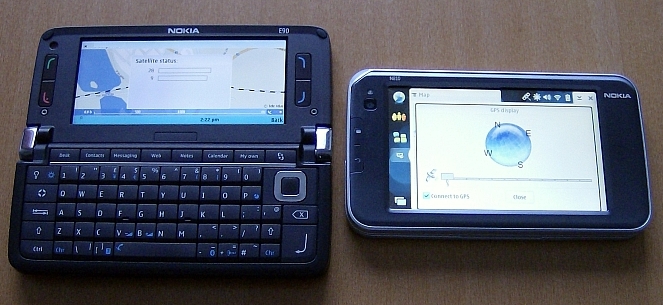
 

Nokia E90 and N810 GPS satellite navigation

The E90 and N810 running their satellite navigation apps.


GPS & Satellite Navigation

The E90's GPS receiver finds satellites much much more quickly than the N810's. The E90's assisted GPS (which uses the phone network) probably helps, but even without a network connection the E90 is significantly faster. It could be that the N810's performance will improve as new firmware updates are issued, and to be fair this is the first-ever Maemo device with GPS, but at the moment the E90 is a more practical device for navigation purposes.

One thing perhaps mitigating this is the N810's touch-based navigation interface that has on-screen buttons, which some may find easier to operate while on the move. There's a dashboard holder included in the N810 sales package, so Nokia is clearly hoping people will fit this device in their cars.

If you're unhappy with the built-in GPS receivers, both the N810 and E90 can use external Bluetooth GPS units instead, including unofficial units made by third party companies.

The E90 features free maps through the Nokia Maps/Smart2Go service, which can be downloaded on the fly directly onto the E90 itself, or onto your PC and transferred. The N810 uses a different map service, Wayfinder, which also has free maps but distributed as separate chunks for each part of the world. You have to download the entire relevant map pack for your current area (for example Scandinavia) while you have a network connection, but you don't need a network connection while actually using the map.

As for the maps themselves, they both worked in that they tracked movement and displayed roads without a problem, but they also both had significant gaps and mistakes in their Points Of Interest data. To give a couple of glaring examples:

 - The E90's Nokia Maps insists that there are no cash machines at all in Finland, and the ATM category only mentions those hundreds of kilometres away in Russia.

 - The N810's Wayfinder software insists that the only kind of shops in Finland are Off-Licences (Liquor Stores). Does this perhaps say something about the people who compiled the map data? :-)

Both Nokia Maps and Wayfinder have similar route-planning and navigation features, with options for 2D and 3D views etc. Route-planning is free with Nokia Maps but you have to pay extra for navigation guidance (the voice that tells you where to turn next), whereas Wayfinder charges extra for both route-planning and navigation guidance.

If you're unhappy with the built-in map services you can install third party ones instead. N810 owners are strongly advised to try Maemo Mapper, a free open source map and navigation application, while E90 owners can choose from a range of commercial navigation products for the S60 3rd Edition platform including Navicore, Route 66 and Wayfinder, plus the free Google Maps for Mobile.
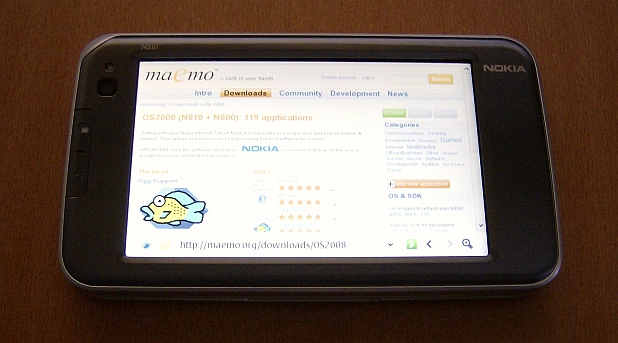
The official Maemo website downloads section

The maemo.org website's downloads page, where you can install free native apps and games on the N810.


Applications & Games

As far as bundled applications go, the E90 has far more PIM functionality, with a decent built-in calendar and appointments system which is integrated into the active standby screen. The N810 has no bundled calendar at all.

Moving on to apps you install yourself, the situation gets a bit more interesting as the two devices take completely different approaches to application development.

The E90 uses S60 3rd Edition applications, and S60 is generally based on the same model that all computing devices have traditionally used. The S60 platform has formed a commercial software ecosystem, where companies and individuals are encouraged to make and sell closed source software in the hope of profit. In short, people pay developers for S60 stuff, so the developers make more S60 stuff. There are some open source freeware S60 apps too, but the majority are closed source commercial releases.

The N810 uses Maemo OS 2008 applications, and generally follows the newer open source model for software development. Under open source, enthusiasts and companies develop software together and allow anyone free access to both the applications and their source code. The reason Maemo is so dominated by open source apps is largely because of Maemo's Linux-based nature, which means there are many existing open source software apps for desktop Linux which can very easily be ported to Maemo, and many Linux fans interested in supporting the tablets. However, Nokia is trying to encourage commercial Maemo development as well, and has opened a section on Forum Nokia for the platform, but at the moment open source dominates.

The practical upshot of all this is the following:

 - The E90 has a wider variety of software, it tends to be in a more finished state, but you generally have to pay for it.

 - The N810 has a narrower variety of software (no original games for example, and very few PIM applications), a lot of it is half-finished, but it tends to be free.

Installing applications on the N810 is very addictive because most applications are available for free, with one click, from a central site: you just go to maemo.org on the tablet's browser, click on "Downloads", click on the green install icon next to the app you want, and it installs.

The E90's "Download!" icon offers a similar service, with a mixture of free and commercial apps available as direct installations, but unfortunately the choice of software on Download! is extremely limited. A much better option for E90 owners is to use software retail sites such as the AAS Software Shop, which carries hundreds of S60 3rd Edition titles, and which can be accessed through your PC, your E90's browser, and possibly through the Catalogs section of Download.


The Nokia S60 Download application

The S60 Download! application which lets you install free and commercial apps and games on the E90.


Web Browsing

The E90 features the standard S60 web browser found on other S60 3rd Edition devices, which uses the same open source engine that Apple's Safari browser does. S60 renders most pages pretty much as they would appear on a PC, and this looks particularly brilliant on the E90 because of its large screen, which is much wider and with a far higher resolution than those found on other S60 devices.

Because there's no touchscreen or touchpad, you have to select links by steering the E90's pointer with the direction pad which is slightly awkward. The browser helps you though by making the pointer jump to nearby links, but it still takes time and concentration to navigate from one part of a page to another. The S60 browser sometimes gets automatically redirected to simplified mobile versions of web sites instead of PC versions, which is extremely annoying as the E90's huge screen and rendering ability is wasted on mobile sites. Some examples of sites that do this mobile redirect include Google (and all its services), the BBC and Amazon. It would be extremely helpful if Nokia provided S60 users with some way to opt out of these redirects.
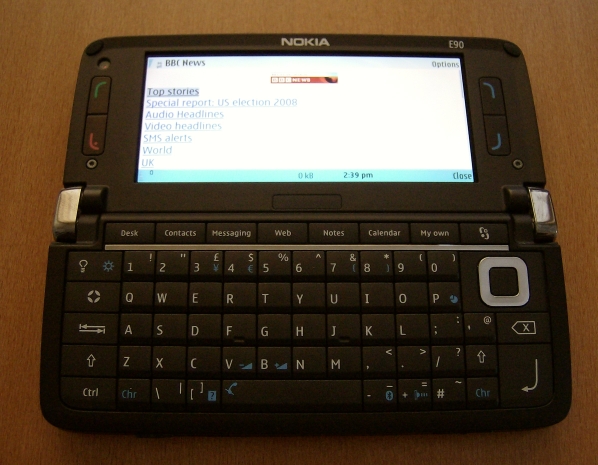
BBC News website on S60 browser
 
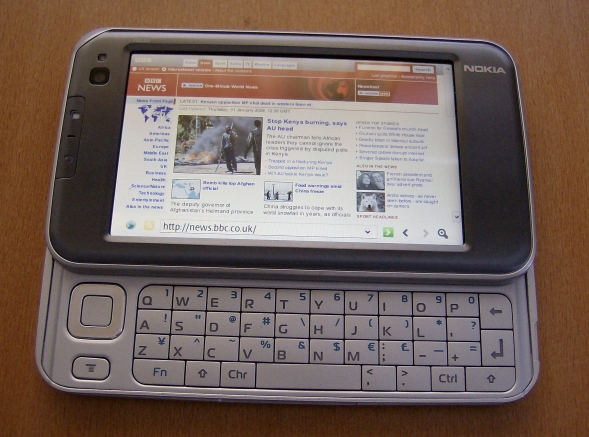
 Nokia N810 displaying BBC News website
 
Although the E90 is perfectly capable of displaying the full PC version of the BBC News web site, it is automatically redirected by the BBC to the cut-down mobile version. The N810 is not redirected, and can access the full version.


The web is definitely the N810's forte, it has possibly the best web browser of any pocket-sized device at the moment, and certainly better than any phone's. While previous tablet OS versions used Opera, OS 2008 uses a Mozilla-based browser called MicroB. Far more web sites are compatible with MicroB than Opera or S60, because sites treat MicroB as if it was Firefox (which it is, sort of). There are absolutely no redirects to mobile versions. The N810 includes Flash 9 so the browser will work with almost all Flash-based sites, and (if you get the latest firmware update) it can now display the full PC version of YouTube without stuttering or any need for external applications. Flash games will run too, though they may run slowly if they involve lots of fast-moving objects.

The N810 has dedicated hardware buttons for zooming in and out, and a dedicated full-screen button (which can all be used in non-browser apps too such as the photo gallery). In full-screen mode the N810's resolution is big enough to view sites such as BBC News without any sideways scrolling or zooming out, and the physical size and clarity of the screen means the text on full size sites is perfectly readable, at least to this writer. Those who do have trouble with the text though can zoom in and out with the dedicated buttons, and the browser remembers the zoom setting for each page so you don't have to repeat the process.

Perhaps the most significant thing about the N810 is what a browser of its quality means for portable devices in general. This review is being written on Google Documents through a desktop PC's browser, but it could equally well be written on Google Documents through the N810's browser, or a combination of both. Not only are the same documents on the same servers accessed by both devices, but they're also displayed and edited in exactly the same way too. In effect, the PC and the tablet are no longer individual devices but just two windows into a single internet world of applications and data. Though the PC and tablet differ greatly in physical size, they don't differ much in how you use their browsers or what you can access with them.
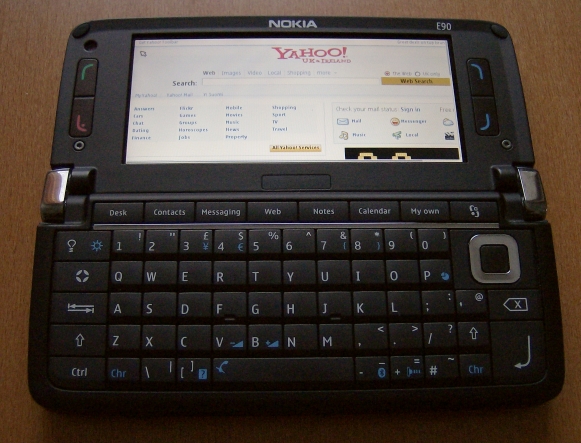
 

Nokia E90 displaying Yahoo UK website

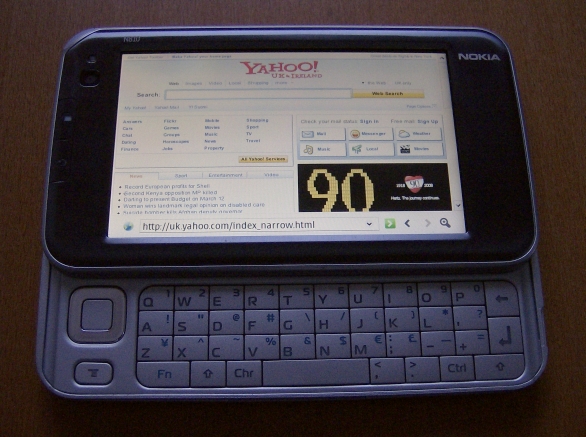
Nokia N810 displaying Yahoo UK website

The E90 and N810 actually have comparable page-rendering abilities, as shown by Yahoo UK which does not redirect to a mobile version.


Multimedia

The N810 has a slightly larger screen with stereo speakers mounted either side of it, and a standard 3.5mm audio jack so you can plug normal audio headphones straight into it. The E90 has a more phone-centric 2.5mm jack that requires an adaptor for use with normal headphones, and its stereo speakers are in slightly stranger positions, but it can use wireless A2DP Bluetooth stereo headphones, something the N810 cannot do on current firmware.

For those who are worried about listening to music on these devices in your pocket, the E90 has an auto-keylock which activates shortly after you close it, while the N810 has a screen-locking flick switch very similar to the one on the N81 smartphone. To unlock the E90 you simply open it, and to unlock the N810 you just flick the same switch again.

Video
The E90 and N810 both have excellent screens and can play good quality video, and they can also both be stood on a table at a variety of comfortable viewing angles thanks to the N810's built-in stand and the E90's low centre of gravity. Various third party PC applications are available to convert and optimise video files for viewing on the devices, and there are also two official apps from Nokia: Nokia Video Manager for putting video onto S60 devices, and Nokia Internet Tablet Video Converter for putting video onto Maemo devices. Both of Nokia's official offerings are aimed at ordinary people rather than tech enthusiasts, and are generally very easy to use, though their options are deliberately limited in order to keep them simple. They're also only available for Windows at the moment. The Tablet Video Converter is probably the more intuitive and elegant as it simply requires you to drag and drop a file into its window to convert it, then click on an icon next to the converted file to transfer it.
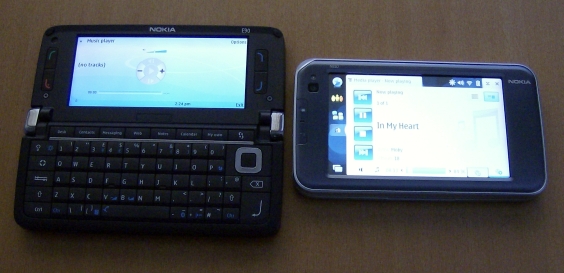
 

Nokia E90 and N810 music players

The E90 and N810 also have similar music-playing abilities, though their interfaces are very different.


Music
The N810 and E90 support a wide variety of audio formats including AAC, MP3, MP4, RealAudio and WMA. You can use most popular CD-ripping applications such as Winamp, iTunes and Windows Media Player, and tracks can be transferred from all kinds of computers including Windows, Macintosh and Linux. Nokia themselves also provide Nokia Music Manager for the E90 as part of the Nokia PC Suite, but this does not work on the N810 as the N810 does not have a PC Suite-compatible mode. The devices' players themselves are reasonably easy to control, but as always it's worth repeating that the biggest effect on sound quality seems to come from which headphones you use. It's a really good idea to buy a high quality pair from a third party manufacturer instead of the ones that come bundled with a device, as bundled headphones tend to be cheap and nasty.

Camera
The N810's built-in camera was only ever intended as a webcam for video conferencing, and it doesn't even come with a still photo application. You can find and install a very simple camera app through the N810's application manager, but you can only really take self-portraits as the camera is fixed facing forwards.

The E90's camera by comparison is very impressive, with 3.2 megapixel stills and VGA resolution 30FPS video. It basically wipes the floor with the N810, there's absolutely no contest. The E90 is a completely plausible main camera and camcorder, and should easily suit the photo and video needs of the casual user. Because it's a connected device the photos and videos can be emailed or uploaded to web sites directly from the phone, so for example you could shoot a video and immediately post it straight onto YouTube through the web browser. The E90 also has a lower resolution second camera next to its internal screen for videophone calls.

FM Radio
The E90 has an FM radio, the N810 doesn't. The E90 wins. (Incidentally, the N800 model does have an FM radio but you have to download a special application to activate it.)

Internet Radio
Both the N810 and E90 support playback of internet radio streams, and both let you access these streams either by clicking on compatible links on web sites, or by entering the stream's RTSP address manually. The web site option is very handy if your favourite station's web site uses a compatible stream, and can be used to browse things like the BBC's Listen Again sections, but not all sites have compatible streams. A manually entered address is very convenient to access on the E90's Gallery app or the N810's Media Player app, but it may stop working because many stations regularly change their stream URLs.

The N810 gets round this problem by including a built-in constantly updated internet radio station directory, which can be accessed through the tablet's Media Player. The directory is organised by country, language and genre, and contains hundreds of stations around the world. It's definitely not comprehensive, there are no BBC stations for example, but it is a vast improvement on the previous manual system as it lets you browse stations just like you would on a non-internet radio, and you know the stations will all work. If stations have streams at a variety of bitrates then you can choose the one that suits the speed of your current connection, and even a 2G Bluetooth phone connection is enough to listen to lower bitrate radio streams.

The E90 does not have an internet radio directory, though Nokia does seem to have a beta app currently available for selected S60 devices which apparently gives them access to the same station database that the N810 uses. It isn't available for the E90 at the moment, but it seems likely that the app will become available when it leaves beta testing. To get an idea of what it's like, read AAS's review of the beta app.

On a personal note, the internet radio directory is the N810 feature that this writer uses the most, as the tablet is the same size and weight as a normal radio and can be used in all the situations a normal radio might face. It's also a viable alternative to digital radios such as DAB as it provides generally better sound quality and a much wider choice of stations.

Krisse, All About Symbian 

Share This (Digg, del.icio.us, Facebook, etc.)

Categories: Comment, Hardware
Platforms: General, S60 3rd Edition

Feature Discussion

timsalmon
Nice ongoing review/comparison. Thanks.

I can't help thinking that on these two devices in particular, the user would be much better served if the D Pad did *not* have an execution button in its centre. On the E90, there is a perfectly accessible 'return' key below and with the N810, one's right thumb is going to hovering over the 'return' key as well. OK, so I do have fairly large hands, but I use the D Pad, as it is, very gingerly for fear of pressing the centre and on the E90 certainly 'downward' presses are in danger of getting the 'delete' and '@' keys. If there was a good indent in the centre of the silver ring I think one could use the D Pad more confidently 'resting' one's thumb in the middle and being firmer with directional presses. The D Pad on the outside of the E90 is bigger and so, although equally 'clustered' with other keys, for me at least, works significantly more effectively.

Tim
krisse
An idea which may be doable: an optional patch to deactivate the direction pad button and substitute it with Return as you suggested?


Quote:
I can't help thinking that on these two devices in particular, the user would be much better served if the D Pad did *not* have an execution button in its centre.
This is probably a matter of taste really so there's no "right" way of doing things. The original E61 used a joystick which many people liked, but personally I found it annoying as it was physically painful to use for an extended period of time. The E61i had a d-pad instead, but that's subject to the problems you mentioned about accidentally pressing other buttons.

Going back to the comparison, the E90's internal d-pad felt more awkward to get used to than the N810's d-pad, probably because the E90's is slightly smaller.

Totally agree that the E90's external d-pad is best of all, but it would be difficult to fit it in a fold or slide keyboard as it sticks out so much.
timsalmon
We just need some clever programmer now!

On E61, I preferred the joystick as when it became the E61i I found it *very* difficult to press the keys next to the D Pad at all - was it the Contacts and Mail? Can't remember now and it's gone! So I preferred the joystick.

I agree about the N810 D Pad being less awkward than E90. You're right. But the greater reason for me is that there is lots of space around it.

Getting back to the comparison again again (!) I think that the N810 is *almost* as quick as the E90 for 'locking on' to GPS Sats. and maybe not as different as you're finding. Perhaps it's where I live that makes a difference. Or the view across the South Downs from my office window :-)

Tim
krisse
Quote:
Getting back to the comparison again again (!) I think that the N810 is *almost* as quick as the E90 for 'locking on' to GPS Sats. and maybe not as different as you're finding.
I can only tell people what I saw, and my N810 took a lot longer to lock on than the E90, both indoors and outdoors.

Maybe the part of the world you're in has an effect, maybe the weather does too (it's been permanently cloudy and snowing here), but whatever it was the E90 clearly coped better with it.

There has been some talk that the N810 GPS seems to speed up if you use it a lot, as if it has some kind of learning process going on. Maybe that's the case with your N810?
Pythonista
The camera on the E90 is slow and sluggish. The N810 does have an FM radio application. It is now in version 1.5.7. So there is no tuner? Come to think of it the FM radio application is pretty quiet on the N810. The N800 has excellent built-in speakers. The FM radio on the Nokia N800 comes programmed with local stations by name for every city.

Webkit works beautifully. What the E90 needs:
Larger internal screen, reposition internal softkey buttons, find a better pointer solution than the internal D-pad - why not license IBM's Trackpoint pointer, larger external screen, Linux, tabbed browsing, ability to save web pages with pictures

What the N810 needs:
1) faster CPU - dual core
2) a Mozilla and wifi coprocessor - instead of 3D graphics, ARM should be working on specialized CPU features that will speed up Mozilla or Webkit web browsing
3) A clitoral trackpoint or similar pointing device to get rid of the space-wasting D-pad and make more room for bigger keys on the keyboard
4) Portrait mode vertical orientation instant flip
5) When the time is right: Google Gears, high-end camera, HD video camera, tabbed browsing, more offline browsing features, two SDHC slots
6) The RSS Reader erases headlines after you have scrolled through them. There is a Read Later checkbox but I would like the option to keep all feeds until I say to erase them. Full-text RSS articles are a good solution for offline browsing. Prepaid GPRS data rates are priced too high even for a Saudi prince so the telephony features of the E90 are useless. In Europe the cost is as much as 20 000 Euros per Gigabyte. And until the cost comes down to a low prepaid flat rate like 300 Euros per month for unlimited GPRS data there is no need to talk about anything faster than GPRS. The fact that you can buy a phone without a contract is Nokia's major advantage over Apple but this advantage is negated by the fact that there are no reasonable prepaid GPRS flat rate unlimited access plans. I am not asking for fantastic Teledesic at 720Mbps, although that would be useful. Perfectly good GPRS at 64+ kbps would be fine. Even at that speed the GPRS is still faster than the CPU of most phones.
7) Ability to update OS without a PC

The N810 is one of the greatest computers of all time but sluggish downloading of web sites makes it less than an executive tool. Any corporation can easily port the wealth of Linux and Unix applications to the N810 so business software is not a problem. The form-factor is very small but to suck down big web sites without getting stuck, it needs more horsepower. One option is to download the web sites on a Macbook Air and then use bluetooth to send them over but this requires some workarounds. The battery life on the N810 is too long and the form factor is nice although the keyboard could be bigger. The built-in maps are far more useful than having to download maps on the fly like the E90. Do you know how much it costs to spend a day downloading maps on the fly? One could buy a yacht and a private jet and still have enough money left over for a live sherpa navigator.

One of the annoying features of laptop computers is the built-in fan. With 10 Nokia N810s and a couple of N800s, one should be able to replace the laptop with a quieter solution.

The iPod Touch does not allow offline browsing of more than one or two pages. Nokia offers saving web pages and bigger screens and a physical keyboard. But Apple isn't wasting time piddling around with Symbian. Apple is catching up quickly and their developer's kit will be out soon. The purchase of Trolltech is a clever move but Nokia needs to get their Linux devices into gear and into the fast lane. Surfing the web on a handheld internet tablet should be as fast and efficient as surfing the web on a Macbook Air.
krisse
Quote:
The camera on the E90 is slow and sluggish.
Compared to what?

This is a comparison of the N810 and E90, and the E90's camera is far better than the N810's in every way.


Quote:
The N810 does have an FM radio application. It is now in version 1.5.7. So there is no tuner?
You can install the application but nothing happens when you use it because there is no FM hardware for it to access.


Quote:
The N800 has excellent built-in speakers. The FM radio on the Nokia N800 comes programmed with local stations by name for every city.
Yes, I agree, the FM radio on the N800 is great, as are its speakers.


Quote:
1) faster CPU - dual core
If you put a faster CPU the battery life will be severely eroded, which ruins the point of having a pocket-sized device.

They only removed the speed cap on the N800 when OS 2008 came out because OS 2008 is much better at conserving power in other ways.


Quote:
3) A clitoral trackpoint or similar pointing device
Have to say, I've never heard the word "clitoral" used in quite that context.

If you mean a mini-joystick, I would be completely against it because the one on my E61 is literally painful to use.


Quote:
In Europe the cost is as much as 20 000 Euros per Gigabyte.
Are you the same person who claimed it was 10,000 euros per megabyte?

Even 20 euros per megabyte is pushing it, here in Finland the most you'd pay is 1 euro per megabyte, and 10 euros a month gets you unlimited access.

Quote:
And until the cost comes down to a low prepaid flat rate like 300 Euros per month for unlimited GPRS data
Erm... the cost is already way, way below that. Are you sure you mean Euros, or are you confusing it with another currency?


Quote:
7) Ability to update OS without a PC
I'd definitely appreciate this one, and in a way you can do this already as you can boot from a memory card.


Quote:
The built-in maps are far more useful than having to download maps on the fly like the E90.
You can actually download the maps to a PC and transfer them to the E90.


Quote:
Surfing the web on a handheld internet tablet should be as fast and efficient as surfing the web on a Macbook Air.
You're making the mistake of thinking that pocket-sized gadgets should do as much as laptops or desktop PCs.

Pocket-sized devices will never, EVER catch up with laptops or desktops because technology will always allow larger devices to do more.

The point of a tablet is not to compete with current laptops, the point is to compete with other pocket-sized devices, and to have a good battery life and a reasonable price tag.
Unregistered
Concerning the GPRS prices.
AFAIK, flatrate in Germany costs from 25 to 50 Euros/month depending on the operator.
T-com offers unlimited HSDPA/HSUPA option for 50 euros/month.
O2 does not have any HSDPA, but GPRS/UMTS is availible for 25 Euros/month only. 5Gb limitation per month. 0.5 Euro each additional Mb.
Where did you get your numbers?
tomsky
It's an interesting comparison - especially as it brings the whole 1 box/2 boxes debate back up again. With the E90, I sometimes wish I could break the phone away from the rest of the stuff, and have 2 boxes temporarily. This is especially important when you are on the phone and someone asks whether day x is free - you try to remember, but your phone is also your diary, and in use!

On the other hand, the N810 is no smartphone replacement when it comes to the PDA functions. Nokia really need to start looking at the device-to-device syncing problems they're creating when they start diverging devices - content copier doesn't cut it.

What would be really nice is if all of their phones etc. could network themselves locally and exchange calendar data or free time, and thus make appointment setting a pain free process. Or maybe I should just go back to a filofax and a dumb phone...

Tom
Unregistered
Why dont you consider a smartphone in addition to your E90?
Just E51 for example.
bills2north
next year.. Tablets like this will drop off the market quickly when next commies aquire touch screen input.

It's gonna happen soon..
krisse
Quote:
next year.. Tablets like this will drop off the market quickly when next commies aquire touch screen input. It's gonna happen soon..
Even if you added touchscreens, the S60 interface and application ecosystem are completely different to Maemo. They are aimed at totally different audiences, with the tablets oriented around internet use while the communicators are oriented around business use. There's also the difference in price: the E90 launched for 900 euros while the N810 launched for 400 euros.

If there is internal competition for the tablets it's going to come from ordinary S60 phones getting larger screens and touchscreens, but even then they'd look and feel very different.


Quote:
On the other hand, the N810 is no smartphone replacement when it comes to the PDA functions.
I agree on the native applications there isn't much PDA/PIM stuff for the tablet (at least not yet), and mentioned this as one of the drawbacks of the tablet.

However, the tablet's very good browser and touchscreen means you can use web-based calendars etc much more easily than on a smartphone, and the beauty of these is that they are the same calendar whether you access them on a mobile device or a PC. They don't require any syncing at all because they're the same data on the same server.

I'm not saying that's necessarily a viable replacement for PDA/PIM stuff right now, but it might well be in the future as more and more places get cheap fast internet access. That's possibly why Nokia is developing both app-centric smartphones and web-centric tablets, so it has both options covered whatever the future brings.


Quote:
Why dont you consider a smartphone in addition to your E90?
Just E51 for example.
Yes, really good point. This is the point that many people miss.

Smartphones such as the 6120 or E51 are so small and cheap (about 200 to 300 euros sim-free) that it's perfectly plausible to buy the N810 and a 6120/E51 instead of an E90, because the total cost would be the same in either case.

At least one phone network operator here in Finland does actually offer a phone and internet tablet package for precisely the above reason.
tomsky
Quote:
Why dont you consider a smartphone in addition to your E90?
Just E51 for example.
But my E90 is so big and shiny!

Quote:
Smartphones such as the 6120 or E51 are so small and cheap (about 200 to 300 euros sim-free) that it's perfectly plausible to buy the N810 and a 6120/E51 instead of an E90, because the total cost would be the same in either case.
No, I use an N73 as my "pub phone", so I'm already in a weird kind of 1.5 box situation.

The syncing issue is really the clincher for me at the moment. Always connected devices, although the data is always up-to-date, have very short lives. Google want us to all be connected like this, and you can see this in their Gmail app (it gets its data from the server, and never stores anything locally), but sometimes we're going to be out of contact, and need some data stored locally. On the other hand, we need to keep our data backed up in case we lose a device, and this is where I really get wound up. Things never sync perfectly, and I'm forever deleting duplicate entries or re-defining my speed dials because something isn't quite right.

Don't get me wrong, I like google's idea of keeping everything stored on the internet and easily sharable (although they could use a lesson in privacy) but at the same time, we don't all have flat-rate data plans and ubiquitous 3.5G connections. I really like the idea of the sidekick and it's online storage idea, and I just wonder why Nokia never got in on this. It's a unique selling point, it's genuinely useful and it just works (now *there's* and idea!). Carphone warehouse even sell themselves on backing up your address book, because real, non-techy people often lose their phones and don't keep any other list of numbers. "Never lose your data" used to be a mantra, yet it's now completely possible, and would free smartphones from desktop computers.

I shall stop ranting about pet peeves now, and watch QI. :D
krisse
Quote:
The syncing issue is really the clincher for me at the moment. Always connected devices, although the data is always up-to-date, have very short lives. Google want us to all be connected like this, and you can see this in their Gmail app (it gets its data from the server, and never stores anything locally), but sometimes we're going to be out of contact, and need some data stored locally.
Quote:
Don't get me wrong, I like google's idea of keeping everything stored on the internet and easily sharable (although they could use a lesson in privacy) but at the same time, we don't all have flat-rate data plans and ubiquitous 3.5G connections.
I totally agree it's impractical for many people at the moment, you can't always get a signal and if you do it may be very expensive to access, but in the future things may be different. All wireless networks now provide much wider, faster and cheaper coverage than they used to, and that trend will probably continue.

When mobile phones first began people complained about the huge gaps in the networks which seemed to be based around cities and towns, but it's now becoming increasingly difficult to find gaps even in the countryside.

Here in Finland you can row out into the middle of a lake in the middle of nowhere, and you can surf the internet through a mobile phone connection that costs less per month than home broadband. That kind of connectivity was unimaginable 10 or 20 years ago, and in another 10 or 20 years the world may be unbelievably connected. (Even uninhabited deserts already have some kind of connection through satellite phones.)

It's not just Google talking this way either, the idea of online apps pre-dates their existence and first came up when Java appeared. People thought that they'd be able to do all their apps through Java on websites, and Microsoft started getting terrified that the operating systems of computers would become irrelevant. That never happened because Java in the 1990s was cumbersome and slow, it was never a serious rival to native applications.

Now though, web apps are a lot more slick and reliable. I'm not saying they are better than PC software, just that for many people they may be good enough.
tomsky
Quote:
When mobile phones first began people complained about the huge gaps in the networks which seemed to be based around cities and towns, but it's now becoming increasingly difficult to find gaps even in the countryside.
I think it's interesting that you make that point, because that was really the limiting factor in the uptake of mobile phones for casual use (and still is the barrier for uptake in the USA!). The similar problem - lack of mobile internet - is what is holding devices like the N810 back. Microsoft and Amazon both back a similar form factor with UMPCs and the Kindle, respectively.

I think (and hope!) that we'll see these sorts of "internet appliance" start to break into the mainstream. Big screens, responsive interfaces and long battery life have only really become possible in such small devices recently, and I think that it is a new form factor that deserves success, if only because it could be really useful to so many people.
bills2north
Once again I must push for E90.
Youīre absolutely right about E90īs target group being business (but donīt forget phone geeks too ;-)

However, major upgrades are needed in N8xx series eg. camera & video recording before it can be called a true portable multimedia device. The other attributes are already on the market in other devices.

Like you pointed out. E90 is a multimedia player, qwerty pda, gps, camcorder, camera, and smartphone(!) with a superb screen (4"), one of the biggest and best compared to iphone 3.5" & N95 8Gb 2.8". And all in one.
I believe the cost of the devices it replaces makes up for the price.

And as you and someone also said, buying 2 devices or E90 on contract makes both alternatives cheaper. Although having said that.. N800īs under 200€ price tag here at the Northpole is a great deal. When N810īs price comes down itīll be worth dragging around with my brick... maybe. Well actually that would be wasteful.

If you donīt have an E90 then N810īs worth exploring. Or if youīre very well off and have pockets to spare ;-)

Btw. The story is very informative. And the comparisions well done.
Thanks!
krisse
Quote:
However, major upgrades are needed in N8xx series eg. camera & video recording before it can be called a true portable multimedia device.
If you do use a tablet on the move then you have to have a phone with it for the internet connection, so the phone can also handle all the camerawork. Even lower-end phones nowadays come with a surprisingly good camera, for example the 5300 has a 1.3mp and costs about 140 euros sim-free.

If you set the phone and tablet as trusted Bluetooth devices, you can access all of the phone's files (including photos and videos) just as if they were present on the tablet. The phone actually appears as a drive in the tablet's file manager. As soon as you take a picture on your phone's camera, you can access that picture on your tablet.

In effect, a paired tablet and phone are the same device, they just happen to be in two physical pieces.

I totally agree the N810's camera is no competition at all for a phone's camera, and said so in the article with pretty strong language.

But if you use the N810 in combination with a phone or smartphone, the tablet is actually darn good at handling multimedia, partly because photos and videos look extremely good on the N810's huge sharp screen (the E90 is almost as huge but most will use smaller phones). Also, the N810's excellent browser makes it very easy to get those photos and videos onto the web without having to use any unfamiliar apps or interfaces. The process is exactly the same as uploading from your PC.


Quote:
Like you pointed out. E90 is a multimedia player, qwerty pda, gps, camcorder, camera, and smartphone(!) with a superb screen (4"), one of the biggest and best compared to iphone 3.5" & N95 8Gb 2.8". And all in one.
I believe the cost of the devices it replaces makes up for the price.
If you want all or most of those in one package, then yes the E90 is definitely the one to go for, and the large screen means you get a lot more value out of features like videos, photos and the web than you do with normal-sized smartphones. I also rate the E90's GPS much more highly than the N810's, it's far far quicker to lock on and Nokia Maps provides more free services including route-planning.

Another great thing about the the E90 is that it does an excellent job of combining a one-handed smartphone on the outside with a large-screen smartphone on the inside. No one could possibly complain it's cumbersome to do texts on an E90 as they often do for other large-screen devices.

However, if your main priority is access to internet services, the N810 does do this much better than any phone or PDA. If you are okay with carrying two devices and you want the best pocket-sized web browser, then you'd probably be best off with a tablet and phone.

Neither device is better than the other because their usefulness depends entirely on what your particular priorities are. I know many people who would reject both because their priority is having as small a device as possible, so they'd probably prefer an E51 or 6120.


Quote:
Btw. The story is very informative. And the comparisions well done.
Thanks! :-)

I just want to emphasise these articles aren't really about E90 vs N810. Devices are meant to be useful, and the wrong device is the one that doesn't fit your own needs.

These articles are meant to be a comparison of how one company can produce two very different devices with very different strengths and weaknesses.
Gary Parker
I was wondering if the N810 provides a command line (bash or something else)?
Basically how much direct access will one have to the host OS itself? users, services, shells,files,utilities, scripting??

I am a tech guy operating in a primarily Linux based environment.
Right now I have got everything I need to connect and work with my servers from anywhere, installed on my E90 (Putty, Midpssh, SIC!FTP, Mocha Telnet, Vnc Viewer....).
But carrying around a personal copy of Linux in a pocket sized device would be a truly novel and satisfying experience.

To be honest, I haven't done any reading up on Maemo yet (where these questions would probably answered), but if anyone could confirm these, I would really appreciate it.
Richard Ross
Gary - yes you can get a command line. I'm not a techie at all so won't go into detail but there's a website called internettablettalk.com that does and PenguinBaiter has hack to port KDE (+KOffice) to the device. There are some hidden/protected/secure bits of Maemo, I understand.


Krisse - thanks for these articles, really interesting and helpful if (like me) you are thinking of buying one of these. I'm going to go for the n810 because I just can't live with the size of the E90 for a day-to-day phone.

It strikes me that buyers might be better off thinking of the n810 as a mini-computer rather than a personal media player or extension of their phone. There are easier to use and smaller dedicated PMPs and phones that do the integration already on Symbian, OSX and WinMob platforms - although integration brings compromise and it's a personal choice how much of that you can live with.

It seems to me that the real value of the n810 lies in its flexibility but that that flexibility requires a commitment from the user to get the most out of it (i.e. a desire to find your way around the Linux communities).
Unregistered
@Gary,

I'm a linux sysadmin, and I use my N810 for exactly that. It has xterm built in, and from that you can apt-get install ssh for example. The slide out keyboard even has a ctrl key.

There aren't as many standard linux apps ported over yet as I'd like, but many are in the process. Finding out what is available is a little bit of a slog, as you have to search a number of repositories, and some are N800 compatible only (again, so far). But I love my Linux-in-a pocket.

I also second the bluetooth-to-smartphone use as being one fully featured device in two parts.

S
ahmedstp
thanku for your concern

20 Comments / Post New Comment

Close
  • Social Web
  • About

You can use this widget to send bookmarks or notes for this page to your favourite sharing / bookmarking service. You will need an account at mnay of these services and may need to log in to use them.

Copyright Notes || Contact Us || Privacy Policy