
Nokia Music PC Client has been available for some time. Previously, however, only the music library and transfer functions were available. The integration with the Music Store has now been activated.
In the Nokia Music PC Client there are two tabs: My Music and Store. My Music handles the management of local music (library, transfer to mobile device, importing, burning to CD) and the Store tab shows the Nokia Music Store. The Music Store looks very similar to the web version (music.nokia.com), although there are a number of UI tweaks.
You can play and queue previews of music in the store using the embedded player and play list queue functionality. Purchase take two clicks (one to select, and one to confirm) after which they are automatically downloaded and added to your local music library.
The recommendation feature of the application has also been activated. This will generate a recommendation, with a link to the store, based on the currently playing tack. The music streaming option (£8 per month for unlimited streaming the the PC) also becomes, arguably, a more attractive now that it is integrated into the client application.
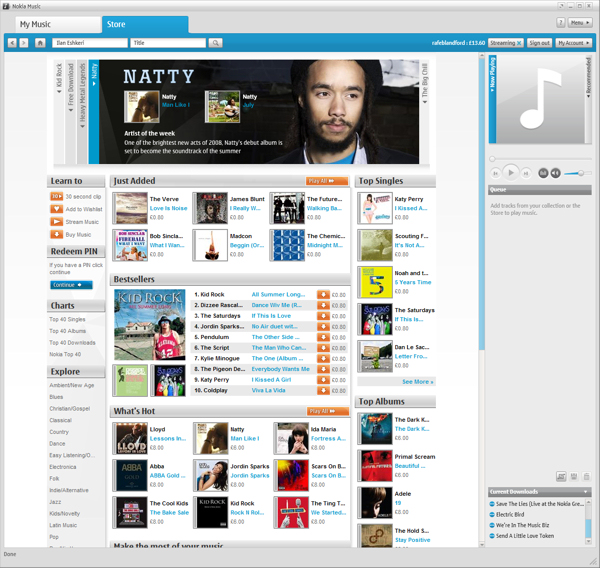
Here's a quick screencast demonstrating the integration and the purchase of a track:
As with the web version of the Nokia Music Store tracks are protected by Windows Media DRM. The exact rights (e.g. number of times you can burn to a CD) vary from label to label. You can view the DRM rights before downloading by following the appropriate link in the Music Store. For music in your library you can see the DRM by viewing the file's properties. Typical minimum rights are unlimited playback, 25 mobile device transfers and 10 CD burns (many are more generous that this). We'll cover the DRM issue in more detail in a future article.
Note that the integration is only available for countries that already have a Nokia Music Store (United Kingdom, Finland, Germany, Ireland, Italy, Netherlands, Singapore, Australia, France, Sweden and Spain). Nokia Music PC Client is a Windows only application.
Incidentally Nokia Music PC Client should be compatible with any device that supports MTP (Microsoft's Multimedia Transfer Protocol) as the transfer protocol. To play music from the store the device must also support Windows Media DRM.
It is worth stressing that this application is still in beta. Users looking for a completely stable application may want to wait for the final release.
Significance and Comes with Music
The real significance here is that Nokia now have a much more polished music platform (experience) that reaches across 3 platforms: the web, the PC and the mobile device. It puts Nokia in a much better position to compete with Apple's iTunes. The PC component is especially important because side-loading is, by far, the most popular way to get music onto a mobile device. Nokia still have a long way to go to match Apple's content catalog (no video for example) and mind share, but the crucial components are now effectively in place.
With the music platform in place Nokia's Music business suddenly looks a lot more compelling. Nokia is the biggest manufacturer of MP3 players in the world (though whether they are all used is open to debate). However more significant is Nokia's forthcoming Comes with Music service / phones. Comes with Music will give users the perception of being able to download as much music as they like for free (in reality the music cost is included in the price of the device). In this light it is possible to see Nokia having a very major impact in the digital music space.