
Nokia E90 - adapting the applications

Published by Rafe Blandford at 21:21 UTC, May 6th 2007
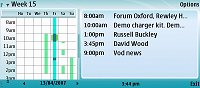
E90 screenshotIn Steve's continuing review of the Nokia E90 Communicator, he looks specifically at some of the core S60 3rd Edition applications and how they've been adapted for the wide screen. Steve looks in detail at some of the PIM functionality and considers how good a job has Nokia done. He also discusses the comparative experience upgraders from devices such other S60 phones or the Series 80 range (9300 and 9500) will find.


Filed: Home > News > Nokia E90 - adapting the applications

Platforms: Series 80, S60 3rd Edition

Categories: Hardware, Editorial Thoughts

News Discussion

Desperado
Enjoyed the article.

Any news on the release date for the E90? Also, any news on price?
jah
When Projekt gets ported for the E90 you can use this for serious business To Dos and Notes management. Also let hope Acqua Calendar gets ported...
Guess Who
The Calendar is a joke. Especially the Week view.
Chris Handley
I assume there is no way to zoom (i.e. change the size of the shown text) ? Many of the apps show very little text - and the 9500 was bad enough when zoomed to the smallest size. I think this may be as much of a killer as the E90's PIM apps, although there you can hopefully replace them with a 3rd-party solution eventually...
slitchfield
No, there's no way to zoom in on 99% of the apps. The fonts used aren't terrible, to be fair, but every now and then I do think 'Hmmm..... they could have fitted a lot more in....'

Quite why there can't be a zoom setting is beyond me. These are proper display-agnostic, object-oriented apps and even the distant ancestor, the Psion Series 3 had display zooming, in 1991, 16 YEARS ago. Maybe Nokia should ask Symbian for a few coding tips.....!
krisse
"Also let hope Acqua Calendar gets ported..."

Aqua Calendar is already available for S60 3rd isn't it?
jah
@krisse, just thought developers may wish to tweak apps for the E90 screen.
JimH
Heh, and I was wondering what time the M610/P700 press gig was.

Ta Steve :-)
Duncan J Murray
Thanks Steve for the review of the PIM apps. Still trying to decide if the E90's for me. Just got a few questions, if that's ok!

1. If you've got a really busy day, does it become difficult to see all the entries?
2. Is it easy to jump to 'today' in the calendar program?
3. How quickly can you scan through a week by right-clicking through the days - instantaneous or a bit of a pause?
4. How easy is it (ergonomically) to type in a quick appointment - e.g. 'swimming' at '5:00pm' - is the interface clunky or well designed?

Thanks again!

Duncan.
slitchfield
>>1. If you've got a really busy day, does it become difficult to see all the entries?

I guess so, if you have more than about 6 or 7 entries. Might be a problem.

>>2. Is it easy to jump to 'today' in the calendar program?

'#', same as in other S60 devices

>>3. How quickly can you scan through a week by right-clicking through the days - instantaneous or a bit of a pause?

Near instantaneous.

>>4. How easy is it (ergonomically) to type in a quick appointment -

Same as usual S60 Calendar. Start typing and then double-click down to adjust time etc.

Steve
Duncan J Murray
awesome - thanks Steve, relieved to hear it has 'today' button! sounds like it'll do just fine for what I need it for. now just have to wait for it to come out...

cheers, duncan.
iantaylor27
Hi steve
I have a N95 and would love a E90 for its big screen and keyboard, not a business user.

1. Is the device really heavy or just ok, like HTC Tytn?
2. Does the battery last longer than 2 days

Thanks buddy:cool:
slitchfield
I'd rate battery life (though it's hard to tell for certain - this isn't final h/w and s/w!) as pretty good. I'd guess at halfway between an E61 and an N95 8-)))

Weight is 210g. Solid but not a huge problem.

Steve

Full thread: 13 Comments / Post New Comment

Search

Navigation

Social

Advert

Translate

Also All About