Defining the Smartphone - part 2 (testing the definition, head to head)

Published by Steve Litchfield at 11:41 UTC, July 21st 2010

Summary:

As mentioned in part one of my Defining the Smartphone feature from earlier in the week, the very word now encompasses a surprising range of hardware, with some claiming that the older phone-like devices are outdated when compared to the modern capacitive touch slabs and that the former shouldn't even be called smartphones. In this, part two, I attempt to quantify the various attributes of two of the extremes from the smartphone world, I take the latest evolution of Nokia's classic S60 slider form factor, the N86, and pitch it head to head with the current highest rated Android smartphone in the UK, the HTC Desire. Will my own smartphone definition hold water?

From part one:

However, having played with many low end phones over the last few months (from LG Cookies to Nokia Series 40 to Sony Ericsson Wseries devices), I've come to the conclusion that there's a still a wide gulf in terms of ability between these units and true 'smartphones'. The apps, the multitasking, the better browsers, the high specs, the larger screens - ALL of these factors make a smartphone smart. And so the term is still relevant, it's just singling out a definition that's the hard bit. Here goes anyway, my tuppence worth from 2010:

 A smartphone runs an open (to new apps) operating system and is permanently connected to the Internet.

What I'd like to do is then, to take a variety of functions, related to the above definition as much as possible, and then see how the Nokia N86 and the HTC Desire fare. It was tempting to take the Nokia N8 as the 2010 tablet form factor example, especially as this is All About Symbian, but this would be misleading, since the N8's primary goals are much the same as the N86's, perhaps not surprising since they're from the same design team. A more accurate comparison would be to take the N86 against the capacitive screened Nokia X6, again Symbian but with a closer spec to the popular conception of a 2010 smartphone. However, several aspects of the X6 (screen size, battery life, use of S60 5th Edition) compromise its claim to be close to being a top end touch-based smartphone, which is why I looked to the HTC Desire and Android - a device which has been almost universally praised. 

It should be noted at this point that this isn't going to be a hatchet job against anything that's 'not Symbian' - I've had extensive experience of Android over the last year and, among other involvements, even write the Android Helpdesk pages in Smartphone Essentials magazine. I've also owned the Google Nexus One, on which the HTC Desire was based and have also played with the Desire as part of Phones Show coverage. In a nutshell, I'm well placed to spot the pros and cons of each device and OS in answering the smartphone definition.

(As usual, I've tinted the cells in each row that indicate an obvious 'winner' for that attribute, for interest sake. This was a system I believe I started and which has since been copied by many others in the mobile world - ahem!)

  Nokia N86 8MP HTC Desire
  N86 8MP Desire
Open OS
Smartphone OS, and latest firmware Symbian OS 9.3, S60 3rd Edition FP2, v30 Android OS 2.1 with HTC Sense UI homescreen
Form factor, materials Dual slider, with both numeric keypad and media control keys. Tempered glass front, metal chassis, 149g  Tablet, metal and plastics, tempered glass capacitive touchscreen, 135g
Physical properties
Input mechanisms One-handed, d-pad interface, T9 or multi-tap using numeric keypad, physical buttons On-screen virtual, multi-touch qwerty keyboard, writing aids 
Display  QVGA resolution, 2.6", AMOLED, gorgeous indoors, but almost impossible to read in direct sunlight 3.7" (480 x 800 pixels) AMOLED, gorgeous indoors, but almost impossible to read in direct sunlight
Speed, multitasking, processor Quickish, full multitasking, adequate RAM (60MB free after booting) Quick, full multitasking, adequate RAM, very fast 1GHz Snapdragon processor
Memory capacity (storage) 78MB user accessible flash memory on disk C:, 8GB mass memory, microSD expansion  Up to 512MB of internal flash memory, plus microSD expansion by another 32GB. Apps installed on internal only (at present) 
Battery 1200mAh, typical use between charges 2 days, microUSB charging, user swappable battery 1400mAh, typical use between charges 1 day, microUSB charging, user swappable battery
Connectivity to local hardware UPnP, microUSB data and charging, Wi-Fi (802.11b/g) microUSB data and charging, Wi-Fi (802.11b/g)
Internet connectivity and functions
Connectivity to the Internet  Tri-band 3G, HSDPA, 3.6Mbps, quad-band GSM Dual-band 3G, HSDPA, 7.2Mbps, HSUPA, quad-band GSM
YouTube and video playback YouTube client a free download, uses low resolution streams.   General video playback good for MP4 video, helped by integrated kick-stand. Built-in YouTube client with HQ stream support, plus average MP4 playback. Large screen helps for pleasant viewing.
Email facilities Email wizard sets up built-in Messaging for popular IMAP4 email retrieval, plus Nokia Messaging offers free push email if preferred. Limited to a degree by screen real estate and limited text input, of course. Android's Gmail client is the best Gmail experience available, as you'd expect, plus there's a generic email support and Microsoft Exchange syncing if needed.
Social network integration Very limited out of the box - third party applications such as Gravity fill the gap superbly, but do require purchasing.  A Twitter client is included and works fine for basic use, plus there's a degree of Facebook integration into Android's Contacts store. 
Web browsing Adequate browser and Flash (lite) support Responsive browser with kinetics and reflow, Flash (lite) support
At a glance information display Limited to Calendar appointments and a summary of Share online and Email inboxes. Android and HTC widgets are available for everything from news to weather to social network summaries to sports headlines. Very flexible. 
Open to new applications
Application store and ecosystem  Ovi Store built-in. Slow and quirky, but still plenty of choice for new users. Android Market built-in. Well stocked, lots of free apps, automatic notification of app updates. 
Multimedia and miscellany
Camera (stills) 8 megapixel, Carl Zeiss lens, dual LED flash, variable aperture, Mechanical camera glass protection Average 5 megapixel sensor, LED flash, exposed camera glass 
Camera (video) VGA video recording at 30fps, excellent results for both. Video capture is pre-focussed at a couple of metres. Initial focus WVGA recording at jerky 15fps, poor audio capture 
GPS and navigation  GPS, A-GPS and digital compass, Ovi Maps navigation available for almost all countries, plus maps can be preloaded from a desktop to save data worries. GPS, A-GPS and digital compass. Google Maps Navigation now in many Euro countries.
Audio out 3.5mm jack, A2DP (Bluetooth stereo), (tinny but loud) stereo speakers, FM transmitter, Podcasting client built-in and fully automated/integrated Average mono speaker, 3.5mm jack, A2DP 
Ongoing firmware support and updates Over the air or via Ovi Suite or Nokia Software Updater, full user data preservation. Some (minor) over the air updates, plus PC-driven major updates. Android 2.2 expected at some point.
Price (SIM-free, including local taxes in the UK, as at July 2010) Around £265 Around £400

As I usually do, it's interesting (if not definitive) to count up the shaded blue 'winner' panels - the HTC Desire scores 8, while the Nokia N86 scores 7. So a win for the large-screened Android tablet, but only by a 'nose'. Even a hardened Symbian sceptic would have to acknowledge that there are some functionality wins for the otherwise Internet-outgunned Nokia here. And by the definition given above, the N86 is most definitely a smartphone, though the block of wins for the Desire in the critical Intenet-integration section is telling. Partly due to the larger screen and touch dynamic and partly due to the newer Android OS, I'll cheerfully admit that the Desire presents, out of the box, far better Internet interactivity.

In truth however, both devices/form factors have very typical pros and cons and are optimised for different purposes, the N86 excels at media capture, audio playback through a multitude of methods and of course it's smaller, cheaper, more rugged, more pocketable, easier to operate one-handed and without the same degree of attention that a touchscreen interface requires. It's also more phone-centric.

In contrast, the Desire is borne of the Social Internet age and excels at working online and at media consumption, but at the expense of needing a larger form factor that requires close attention and two hands for anything serious. Horse for courses, etc.

I loved the comment to my part one, to the effect that a 'smartphone' is 'only as smart as its user'. You can see how this might play out - not necessarily for the top-end N86 but certainly for lesser S60 phones like the N79 and 5230. The buyer sees a phone they like rather than seeking out a phone that runs a particular smartphone OS - and as a result they tend not to use it for such 'smart' activities. In some cases, not even installing third party applications. In contrast, anyone buying the HTC Desire is likely to know enough about the design (and you'd hope so considering the purchase price) that they're after 'something that runs Android' and are fully intending to play with the widgets and Android Market after buying.

This syndrome is partly why many Nokia/S60 smartphones are not considered as such - but it's rarely the fault of the device and usually limited by the imagination and ambitions of the new user, especially in the mid-tier market. In the N86's case, with its high end camera, this is perhaps less so. 

In summary, we've defined the smartphone in these features and explored two of the extreme examples of the breed. But we've also recognised that the definition itself is wider than many analysts would like to acknowledge - and that a lot depends on the person using the device!

Steve Litchfield, AAS, 26 July 2010

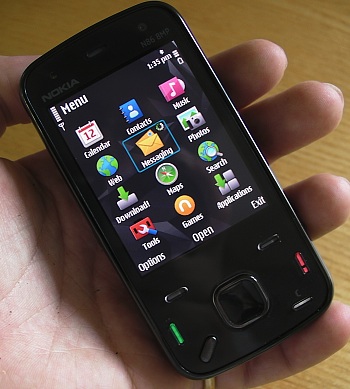
White N86 smartphone


Filed: Home > Features > Defining the Smartphone - part 2 (testing the definition, head to head)

Platforms: General, S60 3rd Edition, Symbian^3

Categories: Comment, Hardware

Discussion

Unregistered
The Younger Generation thinks it good buying mobiles nowdays with Larger Screens an Interent Prawn,thats the Way the N86 loses out,the Only problem using the Interenet on Mobiles is that you are paying to use it,but loads do not realise that an throw loads of money away showing off using the interenet,this is another reason Nokia are under pressure because of the Smartphone Boom an hope the Future N8 really does Succede an get them back on Track Again
ClockworkZombie
I think more should be made of the dual slider design, the media keys are excellent. I am finding them very useful for music whilst in the car.

I would be happy to see new phones with these. I use an N95 which is set up with joikuspot and other apps in case I need to use it for business functions when I am not near a computer or with my laptop and need an emergency internet connection.

If there was an N97 type device with dual slider goodness it would be pretty sweet, it may be something only I want but I would buy a decent Nokia phone with it over an iPhone for example as I already have an iPad for other non music multimedia & books.

The call quality and signal reception is far more important to me than a whole lot of other features, if it is not too subjective could they be added to your list.
Tenkom
Nokia podcasting is not fully integrated. A fully integrated podcasting client would pick up on a link pressed in the browser and not have to rely on a clumsy copy and paste trick.
Like for example the free download from android market called Google Listen. It fully integrates with the browser. Syncs your subscriptions with google. Supports resuming playback within the app itself so you don't have use another app for playing the podcasts(like in s60 where you have to download them in the podcast app and then use the music player to play them since it supports resuming playback). Of course it also supports scheduled downloads for new podcasts and has a much nicer interface.
And the n86 gets a point for Upnp? Upnp is useless in almost every way.

I have an n86 and a galaxy s(pretty close to the desire). And there are 2 or 3 reasons to get the n86 over the android. Camera, form factor and navigation if you live in a country where google navigation is not yet available.
Android has better games, better browser, better music player, better video playback, better podcasting app, better PIM functions, a much wider range of usefull apps(like google goggles, layar,tv-guides and such things).

Nokia better get the camera right on the n8 or that thing will be as redundant as a pair of manboobs.

Edit: and why didn't the desire get a point for its much faster snapdragon processor? If you call it a tie on the connectivity(upnp? Really?) and give the desire proper credit in the processor/speed(it is alot faster. Especially in apps like gallery, games and the browser) then we're looking at 5 points for the n86 and 9 for the desire.
_fakefur
the exact 2 phone i have so i read with interest and have to agree for the most part

the one area i don't agree with is maps ... the search on google maps is in a completely different league to ovi and for me, without a very good and flexible search engine the maps aren't so useful

yes yes i know ... preload rules etc etc but it actually doesn't ... i have unlocked phones so whatever country i'm in i just buy a prepaid sim and use local rates for data and i have to say that google maps uses very little data ... also the "places" directory on the htc desire (basically a POI app from google) is absolutely better than anything nokia has right now

my final point with google maps over ovi is integration with other apps ... google maps on android are simple to integrate into your own apps ... ovi doesn't even have a public API last time i looked and even janole was using google maps in gravity afaik

of course the camera and speakers on my N86 leave the htc desire in the dust so i would agree 100% with you there steve

all in all i found that my htc desire cannot really replace my N86 completely
gadget freak
Don't laugh, but in my opinion the p910i was and probably still is the perfect form factor for a smartphone, open the keypad, close the keypad, remove it completly if only UIQ wasn't so darn complicated.
SWR
Couldn't agree more about the P910 and UIQ. The PIM functions were much closer to the EPOC originals in allowing copy/paste in calendar and the combination of scroll wheel, qwerty, and touch was unbeatable.
What about the question of sync'ing? As a Mac user, I look to see whether a phone has an iSync plug-in before I buy - with one exception. Just bought a Samsung i8910 and am now living with the frustration of trying to get my agenda set up without sync facilities. Can Android phones sync with Mac's? Shouldn't sync'ing be a criterion?
gadget freak
Get Android, open Google account, sync outlook with google, sync google with phone. sync with the cloud....well thats what they want anyway market won't work unless you have a gtalk account.
user47alpha
Quote:
permanently connected to the Internet.
Who says that? Thats a stupid definition. What if I don't want my smartphone to be permanently connected to the Internet? Will it stop to be a smartphone?

1Ghz Snapdragon should give a point.

GoogleMaps has a very good version for Symbian as well, so this is no plus for Android.

Quote:
Get Android, open Google account, sync outlook with google, sync google with phone. sync with the cloud....well thats what they want anyway market won't work unless you have a gtalk account.
Yeah, thats easy... By the way: Ovi has a pretty good Online-Calendar and Contact-Synchronisation, along with Tasks AND Notes (Something that even Exchange does not offer [at least for the Pre and Nokia]).
gadget freak
it is a plus because on android you get layers and free navigation which you don't on symbian
slitchfield
@SWR, but you CAN get iSync plug-ins for the i8910 HD! I sync fine to my Mac.... see the Nova Media web site - it's a commercial plug-in but well worth it.
user47alpha
Is GoogleMaps Navigation available outside of the US?
UKJeeper
Quote:
Originally Posted by user47alpha View Post
Is GoogleMaps Navigation available outside of the US?
A quick Google search got me this (From Mashable.com)


Quote:
In October 2009, Google released Google Maps Navigation for Android devices, a free turn-by-turn navigation system based on Google Maps. At first, the service was limited to the U.S. Recently it was extended to the U.K. and Ireland, and now it’s also available in Canada and most of mainland Europe.

According to Mobiflip.de the list of newly supported countries is as follows: Canada, France, Italy, Germany, Spain, Netherlands, Denmark, Austria, Switzerland and Belgium.
gadget freak
navigation works on my desire and works well.
On my E71 I open ovi maps and it tells me i'm a mile away, open google maps bang! it knows where i am, go back to Ovi maps look i've moved to where i'm supposed to be, see little things like that can give the end user (ie me) the right hump, that and having to change the access point in every goddam application.
shadamehr
Quote:
Originally Posted by user47alpha View Post
Is GoogleMaps Navigation available outside of the US?
Yes.

Initially it was the UK and Ireland, but about a month ago a whole raft of additional European Countries were added.
-


May I say a couple of thinks about it however, as someone who owned a white N86, now owns a HTC Desire, and additionally has owned several high end TomToms, and currently own a high end TomTom Go 940 Live...

There are good and bad points to them ALL!

Ovi Maps is completely free (for all new devices, and some older ones). This means on the Value front, it cant be knocked, and moreover, on the "getting it out there" front, millions will use or have access to it. Score two to Ovi.

MAJOR fail for Ovi though (though it's getting slowly better supposedly), is 'Search'. And sadly this does not just extend to POI type destinations or Commercial locations, entering ANY destination can be a fraught affair on Ovi Maps... Postcodes or Residential Full Addresses are not user friendly to add, are often not found, and ultimately rely on a data connection based back-end search, and even then often do not find what you are looking for. More on this Data aspect later...


Onto "Google Maps with Navigation"...

Again, for those devices that support it, as it needs certain versions of Androids and upwards, this too is entirely free, but with the caveat, only certain countries are covered. Again though, this is expanding all the time.

In terms of those countries that do support it though, again as it's Free, it scores on the "Value" box. Additionally, as Android 2.1 is now allegedly on 56% of all Android devices, and it also runs on 1.6 up if I recall, then this again means a huge amount of devices that have free access to it, and it is ever expanding.

And let me just say I am using it more and more instead of my high end TomTom Go 940 LIVE - though, like Ovi Maps, this is in a small part due to the fact that it is "on a device I already happen to have with me", which is one of the biggest plus points about mapping on mobile phone of course.

Notwithstanding this however, I do also favour it for many other reasons too, when I choose to use this rather than TomTom...

The display, graphics, and presentation is amazing... On my Desire, with 1Ghz Snapdragon, and 3D Support, it looks amazing... anti-aliased streets, smoother curved roads than either Ovi Maps or TomTom, and of course, with the option to enable true Satellite Imagery Mapping if you wish, or even more incredible, full Google Street View routing using actual photos of your route, junctions, and roundabouts. For now, this is something that NO other Navigation or Mapping Provider can offer, and is another major plus tick for Google Navigation.

Another one where Google wins, is "Search"... with Google Navigation, you can basically go ANYWHERE you want to go, and simply and easily at that... Streets - search finds them, even if recently opened or added. Companies? It's what Google Maps Search was INVENTED for... Postcodes - no problem. Grid References...? Did I mention it uses Google Maps/Search for it's location services? Natural Search - no problem, just press the Speak Button, and tell it "Dominos" and it will find the nearest Domino's Pizzas (other Pizza Services exist, and we do not endorse any particular brand *lol*) to where you are (it's clever like that), and let you choose the one you want...

So actual search/destination, is one aspect where Google Navigation leaves everyone else standing - albeit subject to the next point I will make...

Data Connection!

It is of course, well documented that Google Navigation requires a working Data Connection.

BUT - as Google Maps Navigation currently only comes on Android devices, then for the MAJORITY of (but indeed not all), users, they will likely already have a working data plan with their carrier, with inclusive Data allowance. And believe it or not, despite the rich detail offered, Google Nav uses a lot less data than you would think.

No - to me the issue with requiring a Data Connection, is not so much cost, but COVERAGE... In the Highlands of Scotland, for example, there may not be coverage in many places.

Now obviously, Google gets around this, by caching the map tile data for the whole of the journey planned, and alternative routes to it etc, in case of wrong turns or directions. But this is still something that should not be overlooked, as when you get to Granny MacDougall's Farmhouse B&B in the middle of nowhere, then planning an ongoing route to somewhere in the area, might be an issue for you, if there is no mobile signal where you are staying.

I'd like to say to this though, as everything Google, they like to develop. And I have a hope that the next major milestone version of Google Nav will be a very different beast, and add a lot more functionality again, in terms of data displayed on the routing screen, even greater POI like functionality, map error reporting, map correcting on the fly maybe, like TomTom MapShare, user/third party POI's such as Speed Camera Warnings, possible inbuilt Speed Camera warnings (currently there is no support for this in any form), and another biggy: LOCAL MAP STORAGE.

Now let me just say, these are in effect, my wish-list, not things I have some sort of insider knowledge about.

But with Froyo (Android 2.2) and inbuilt SD Card support without Root being required, I think this offers Google the opportunity for making available the opportunity for local storage of Map Data.

The issue here though, is that Google's Map data is not like OVI's or TomTom's... it also includes massive "Search" database info, complete Satellite Imagery, and even high-res photo coverage of most of the UK, in terms of Street View. Clearly, it would be impossible to move all of this to local storage, as the size would be staggering, and far too much for even the biggest SD cards perhaps.

So of course, Google could elect to just move the basic mapping data, namely the roads and routing only, to an optional local storage mode. BUT, this then runs the risk of a two-tier quality, whereby those who use local storage get only basic mapping, routing, and inaccurate historic data, compared to those that have a data connection.

And whilst this is not unique to Google, in that this very same issue applies to Ovi Maps already, both for mapping, AND for POI/Search (with MASSIVE difference in quality for OVi Maps, as well known and documented), then the issue is MUCH MUCH larger for Google however, who are in effect, a Cloud/Data Company - everything they have and do, is Cloud, or Back-end Database based. So for Google to offer a Local Storage option, as well as the normal Data pull method, I see MASSIVE differences and disparity between the quality of each, far far more so than is clear for Ovi, and perhaps so much so, that it means it's not something Google can be comfortable to do.

I still think that Google will, as the future develops, look for more and better ways to cover offline/local storage and routing too, so watch this space.

And lets not forget, that into the future, and in an ideal world, a Data Connected model and device, means that we can have real time superior quality traffic alerts (and even traffic shaping/monitoring in real time using the mobile data from the devices themselves, as TomTom do with HD Traffic)... real time weather... real time speed camera and mobile camera data interchange, reporting, and recording... most up to date routing, mapping, and new roads data... real time search... location sharing (such as CoPilot offer)... remote routing/destination changes or suggestions from "Head Office" etc, again such as Copilot already offer)... GPS Almanac updates, to allow faster fixes (akin/linked in with Assisted GPS as we already see on mobile devices)... real time fuel prices, and so very much more. So Data has a cost and a Coverage issue, but overall, makes for a far more 'complete' service, with a much better end user experience.

------------

This Sat Nav comparison however, has of course taken me largely off-topic from the thread as it stood.

So just to close by saying, that whilst I might agree with the "on paper" inclusion of the N86 Steve, my very reason from moving away from my N86, and then its replacement E72, to my current HTC Desire, were all reliability issues...

My N86 froze, crashed, hung, failed to respond, etc etc, on an almost regular basis, with the latest firmware, being kept as clean as possible, etc etc... and was a well documented story at that time, whilst working with D.D. to get to the bottom of it. Alas all the replacements were just the same.... the issue was the OS itself... it just couldn't cut the mustard any more, and even the E72 after it, was only a bit better.

So another thing about SmartPhones, when defining what that means...

Ticking paper boxes is no good - how they cope in real terms, is the only key. And my N86 didn't come close, and even my E72 which was better, still gave me so much frustration in the end, that I elected to try the HTC Desire.

And my Desire has been a dream, in this particular aspect.

But I have to agree - media wise, the N86 was better for gathering this (it's camera/video recording etc), by leaps and bounds. (The Desire is a dream for SHARING/Distributing media content though, far more so even than my N86 with Pixelpipe even).

And the Battery life is a nightmare, given it's screen etc.

So the N86 wins by miles, for Media CAPTURE.

The E72 wins just about anything by miles, for BATTERY LIFE.

But for overall SYSTEM RELIABILITY, APPLICATION INSTALLATION, and Media Sharing and Social Networking, as well as Internet etc, the Desire wins by miles.

That would be my fair assessment of each device's strengths and weaknesses...
gadget freak
Here's a win for nokia PIMS, seriously folks the Desire is a great gadget but the calender is shocking, so shocking in fact my e71 calender wins hands down and thats without handy calender.
Unregistered
The N86 is an excellent smartphone but under appreciated by many. If only Nokia hasd released an N86 with slide up QWERTY .... a minor change but " the most important" factor for many while picking a smartphone.
Jimmy1
To sort of answer Steve's question: today's high end smart phone, is tomorrow's feature phone. As devices get more advanced capabilities, previous gen devices are pretty much given away on contract.

(On a side note, that's a reason that I think the Finns in Espoo are in trouble: they still sell a ton of feature phones to emerging markets, but get this: last year's Motorola Milestone, will likely pretty much be given away on contract in emerging markets by this time next year, and its capabilities found on lower end handsets. Ditto the HTC Desire in two years' time and even the iPhone, though Apple doesn't like to play outside the luxury, high end. Nokia better hope that Symbian 3 and 4 can compete against lower end and mid range Android phones in their bastions of strength, because that's what they'll be facing.)
Dragos
Quote:
Originally Posted by gadget freak View Post
Here's a win for nokia PIMS, seriously folks the Desire is a great gadget but the calender is shocking, so shocking in fact my e71 calender wins hands down and thats without handy calender.
I can search the Android Market and find some very good, free 3rd party calendars which integrate seamlessly in the OS. I agree that Desire's included calendar (which is not the stock Android one, btw, but part of HTC's Sense framework) is not exactly great, but for me solutions like CalendarPad or Jorte are better than what I could have on my E71. And add to that a wide option of homescreen widgets for displaying your agenda / schedule.
And also the option to sync multiple calendars with Google Calendar is a big plus (for me at least).
Quote:
Originally Posted by Tenkom View Post
And the n86 gets a point for Upnp? Upnp is useless in almost every way.If you call it a tie on the connectivity(upnp? Really?)
I still find it amazingly surprising (in a bad way) that you can't specify a WiFi proxy on Andorid. I also find it amazingly surprising (in a bad way) that there is no sound equalizer on Android, either at the system level or in the music player.
Still, overall, I have to agree that Android (on the HTC Desire) feels much better and powerful overall than my E71 or E72. And we have to take into consideration that is actually a young and immature OS, so there's a lot of improvement coming.
shadamehr
Quote:
Originally Posted by gadget freak View Post
Here's a win for nokia PIMS, seriously folks the Desire is a great gadget but the calender is shocking, so shocking in fact my e71 calender wins hands down and thats without handy calender.
Hello Sir,

I don't suppose you'd care to support or highlight that statement with any explanations or examples as to WHY you feel this is the case?

As I've used Nokias (all 67 different ones at last count), for years, and found the PIM/Calendar side of things to be the worst single factor about Nokia phones.

Admittedly we are talking Symbian only here, but for example, on S40 Nokias, unless things have only very recently changed, you couldn't even create REPEATING ENTRIES on the device itself.

Symbian might be a bit better and allow this, but not a lot.

For example, feel free to tell me how I create a repeating entry for a Boad meeting that occurs on the last Thurdsay of the month (not a numbered day of the month), and take place every two months, on a Nokia device...?


On my Android device, I can easily create "last Thursday of the Month, last Tuesday of the month etc" type entries. Until very recently, on Symbian devices you could only add standard numbered day repeats, not logical repeats, and even now the scope for advanced or logical repeating entries, is slim.

Additionally, on my Android Device, my Calendars are readily synced with my Google Apps Account (and therefore, using software mentioned further below, onwards to the rest of my family, albeit if they were ALL on Android, this chargeable Service/Software on the Nokias wouldn't even be needed).

On my Nokia, for multiple Calendars, this means a very convoluted process to set up...

First you have to PURCHASE the PREMIUM version of a certain Third party app/Online Service, in order to support multiple calendars.

Then you have to MANUALLY configure the sync settings on the Nokia Device.

And then after all of that, you have to use a third party tool to get the phone to automatically trigger these manually configured syncs, as to this day Symbian STILL doesn't have automatic Sync built in, one if it's long known and complained about key ommissions. (And until a FP2 version of this tool eventually got written long long after FP2 devices actually came out, it meant you could not automatically sync at all using a Nokia phone, as I know this myself from the near YEAR I had a new FP2 device, but no means of making it auto sync).

Now it gets worse... As the rest of my Family still have Nokias for now, it means I still need to PAY FOR, and manually configure and set up, the premium Calendar Sync Service I mentioned earlier.

If they instead had Android devices, I would need no ongoing MONEY cost, no time consuming manual set up, and simply a case of enter your Google Apps Account credentials once only, and there you go, fully interchangeable shared calendars across devices.

How anyone can claim that the Android Calendar is inferior is quite staggering to me.

Unless of course they neglect to consider that Android devices are meant as a natural extension to a desktop and even Cloud based account, and that you can do all of the "heavy lifting work" with the simplicity and convenience of a desktop PC (anywhere in the world of course, with it all being cloud based), and seconds later it's all in your Device Calendar.

How does that even remotely compare with Symbian/Nokia PIMs?

Oh, of course notwithstanding the fact that Google Calendar lets you set up multiple "Reminder" events for each Calendar entry, so you can receive a Pop Up on your screen on the PC (and thus the notification bar, on the device itself), or an automatic email message (so to both PC and device), as well as set it up to receive FREE (yes Google pays) SMS notifications, direct to your device. Or all three together if you want. AND totally control WHEN to receive these, based on exactly when YOU want them, or even set up MULTIPLE reminders, of multiple TYPES, for exactly when you want - so an advanced two week warning of a big meeting, by an auto-Email alert and SMS, followed up by an SMS reminder three days before, and again the night before!

I am quiet frankly staggered by the claim you made, again unless you failed to realise that the "Calendar App" on an Android Device, is more a "presentation" tool, to present you with the information FROM your Google Calendar you manage on a real device (anywhere around the world you happen to be), than the actual data entry tool itself. But even then, I still find the Android device, as per the example I listed at the start, to have MORE functionalities itself, than the Symbian PIM does.

I don't say this in an argumentative sense though - I really WOULD love to hear why you think the Symbian PIM/Calender Tools are better than Android and it's direct link to Google Calendar, and the truly massive amount of features, functionality, and controls and useful extras, this includes.

Cheers mate.
gadget freak
ok lets be clear i am not saying the e71 calender is good, hell no way i am just saying in terms of view it is better than android. i just don't find the calender app user friendly.
shadamehr
Quote:
Originally Posted by gadget freak View Post
ok lets be clear i am not saying the e71 calender is good, hell no way i am just saying in terms of view it is better than android. i just don't find the calender app user friendly.
In terms of viewing it, it's light-years better... I'm just comparing the two now...

On my Desire, I am looking at a spacious, bright screen. I'm in Agenda View currently, and see a clear list of events, with a colour coding bar at the left side, so I can see if they are mine, the kids, my partners, or public holidays, anniversaries etc at a simple glance.

I can see a nice big Alarm symbol on the right for those that have reminders set. And a drag up, will show the next day's events. clearly separated to avoid confusion, by the solod dated border divder.

Contrast that with the Symbian display.

One day View on Android is similar to the Agenda view, but shows only one day's entries.

Month view is easier to see on Android, given the bigger, better screen. But the "Busy" bars in green, in case you weren't aware, Google are aware the current format is not popular, so they are different again in Froy, Android 2.2, to be even more user friendly.

If you meant actually ADDING a new event, not viewing, then I'm really staggered here...

Adding a new event on Symbian, in the PIM/Calendar, is probably the most counter-intuitive, error ridden process you can ever think of...

I mentioned earlier about the "Shared Calendars2 functionality our family utilisies...

Well I've lost track of the MASSIVE amount of entries I have had to correct, when my own Devie receives them, as my partner has once again mis-read what the Entry Fields on Symbian were meaning, or my eldest son has done the same... It' is so entirely counter-intuitive, it's diabolical.

Contrast adding a new item on my Android Calendar...

Click new item.

Change the Calendar you wish it to belong to, from the drop down field at the top (only applicable for those using multiple Calendars this bit).

In the "What" Field, enter the event 'name' (it even prompts you for this, by having "Event name" in shaded, in the box already. Contrast this with Symbian, where the principle is meant to be the same, but the layout arrangement of it always causes issues, or a pause to question what you are meant to be doing...

Then, change the "From" buttons, which are separate for both day, and time, by clicking on the button, and then the "Fruit machine" spin reels approach to choosing a date and time, will pop up for you to just 'dial' in to the time and date you want.

Do the same for the "To" option.

Alternatively, tick the "All Day" tick box, for an all day event.

Enter the "Where" and "Description" fields as you wish, or just leave blank if you prefer.

Choose a Reminder period if you want one...

Invite any guests via their email address, if applicable

And then choose the "repition" from the drop down list.

Then just click Save.

Much more straight-forward, and intuitive, than Symbian, and I know this, becuase after all the many mistaken entires from my parnter or son, I handed them my Android device, and asked them to create an entry, and they instantly said it was much more straight-forward than on their phone, even though neither had even seen Android until I handed them it.

So each to there own, but I see them as remote as chalk and cheese, the Android PIM, compared to the Symbian one, and the Desire one bing light-years ahead at least for me (and my family who I handed the device to, to try and enter one).

Thanks for the clarification though, for sure...
Jimmy1
I agree with shadamehr.

One of the things I hate on my i8910 is the PIM management.

I'm not confident that Symbian 3 (or 4) will resolve this, which is why I asked Steve, Rafe and the crew for the day to day stuff on S^3: PIM, Contacts, Destinations, Email , etc.

This is the type of stuff, the day to day user experience issues where other platforms are sprinting ahead on.

So anyway, yeah, that post....

But then, some Nokia fanboy is going to chime in about: "What's with all these whipper-snappers and their need to check their mail, and their Facebook, and their calendars and contacts. Why, in my day, our phones where mono-chrome, had retractable antennas ( the Zack Morris phone)---and we were grateful! Now get off my lawn!"
manual_
I find shadamehr's posts to be of great value.
Shadamehr gives Symbian owners or potential buyers a different perspective. And he goes deep into the details. He shows how different smartphones and user experience are.
Thanks to his posts it becomes clear that what Steve considers to be one point win is actually a huge difference. And that Nokia will have to get a lot more things right in future Symbian / Meego devies than giving them proper specs to have real winners.
Unregistered
I find the N86 slower in speed than my N95 ie it sometimes pauses when you open it up after long periods, and it sometimes slow to transition when you turn it sideways. Internet runs out of memory. This is straight out of the box (no new apps installed). So I think it needs to be marked down on speed/memory.

However I bought it due to the fact it had OVI maps turn by turn, and an fm transmitter, plus its physical keys and sliding form factor. It excels there.
KPOM
Quote:
Originally Posted by manual_ View Post
I find shadamehr's posts to be of great value.
Shadamehr gives Symbian owners or potential buyers a different perspective. And he goes deep into the details. He shows how different smartphones and user experience are.
Thanks to his posts it becomes clear that what Steve considers to be one point win is actually a huge difference. And that Nokia will have to get a lot more things right in future Symbian / Meego devies than giving them proper specs to have real winners.
That's what those of us who switched from Symbian to Android (or iPhone) have been shouting for a long time now. Steve can keep on putting these "comparisons" that always end up with the Nokia device on top or close, but those are simple "box ticking" exercises (to use a UK phrase) that have little meaning to the average user.

Sure, the N86 has a calendar, but it doesn't sync up with the GPS or phone apps very well. I always had to buy Papyrus to automatically dial out a phone number that was in a calendar entry, and that never came out for the n97. On Android and iPhone, it's built in. Android also neatly links addresses in calendar entries to the Maps app.

Of course, if you need uPNP on your phone, then the N86 is for you, but that probably isn't as useful to as many people as a calendar app that is integrated with the other built-in apps.

Full thread: 31 Comments / Post New Comment

Search

Navigation

Social

Advert

Translate