
How to: Optimise RAM on the Nokia N97 (and N97 mini)
Published by Steve Litchfield at 12:14 GMT, February 4th 2010
Steve Litchfield explores the world of RAM on the Nokia N97 and N97 mini, discussing what Nokia got wrong and what you can do to keep things on the rails...
The problem with RAM (Random Access Memory, along with the processor, the physical engine that runs a smartphone operating system) on S60 5th Edition devices like the Nokia N97, N97 mini, X6 and even the 5800, is that when Nokia's design teams specified the hardware, a 128MB RAM chip was though to be enough. Yes, the N95 had had problems with a 64MB chip, but the ceiling had now been raised to 128MB for the N95 8GB and, after all, wasn't S60 5th Edition largely the same OS? Surely the same chip would be enough?
Unfortunately, S60 5th Edition turned out to need more RAM when running (because it's larger, doing more things at once, managing a larger display area, etc.) Whereas the typical Nokia E90 or N95 8GB booted up with about 80MB RAM free, the N97 and its sister devices boot up with 'only' 50MB or so. This figure would still have been fine for yesterday's devices, but applications that run under S60 5th Edition also need more RAM. We've now got applications that run a larger, more varied interface and which, quite often have to deal with large media files or complex Internet resources. The end result is that, with some heavyweight web pages loaded, and with Music and Photos and everything else all trying to hang around in RAM, you're likely to start seeing applications closed down in the background by the operating system - which can get irritating for a power user, used to flitting between apps.
But being hamstrung by RAM isn't inevitable. Let's see what the Nokia N97, with its 128MB RAM chip is capable of...
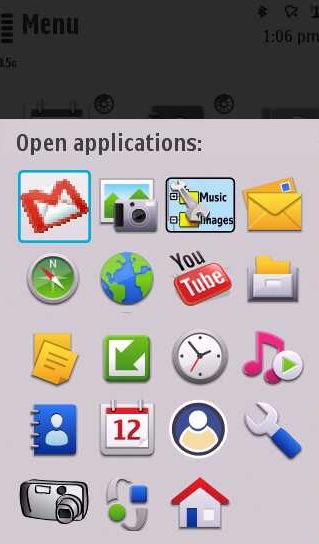
19 apps at the same time, plus the OS, in 128MB of RAM
You may remember Dotsisx's demo of RAM on the Samsung i8910 HD last week - 50 major S60 applications all running in RAM (of which the i8910 HD has 256MB) at the same time. This was a direct response to a demo of the RAM on the Palm Pre Plus (which, incidentally needs twice the physical RAM - 512MB - to achieve the same feat, a tribute to the efficiency of Symbian OS) and both, if we're honest, were rather artificial - noone in their right mind would have 50 apps all loaded in RAM and running at the same time in real life. Even with the best multitasking OS in the world, there would be a hit on battery life, for one thing - never mind confusion over how to actually get to each of the 50 apps via a multitasking menu.
The screenshot on the right shows (with a long press on the main menu key, showing what's currently running) how far I got when trying to replicate the feat on the Nokia N97. Note that, like Dotsisx, I was mostly steering clear of the tiny trivial apps and utilities which S60 has in abundance - I was looking at major applications that users might actually use. The cropped screenshot on the right shows 19 applications/user processes all running at once - on an N97! No, really. In case you don't recognise all the icons, we have:
- Google Mail (java app), Photos (showing a gallery of images), X-plore (a file manager), Messaging
- Ovi Maps 3.3 (free nav etc), Web, Google's YouTube client, File manager
- Notes, Software update, Clock, Music player
- Contacts, Calendar, Gravity, Settings
- Screensnap (needed to take the screenshot!), Menu, Home (the last two are always running under S60 5th Edition)
Now, this was me simply seeing how far I could push the N97 - trying to launch a further application caused the OS to shut down a few of the candidates show here. As did trying to do more with the apps that were open - for example, trying to open a bigger web page or changing the zoom level in Ovi Maps or adding an extra Twitter account to Gravity.
But my 'pushing the limits' test does at least prove that, limited though the RAM on the N97 is, there's potential for some useful multitasking, even if you have to be rather more careful than you would on, say, a Samsung i8910 HD.
Yes, some of the above concurrently running apps are a little trivial, but many aren't. Being able to leave the Twitter client Gravity logged in and music playing in the background while you look up something on the web and check your email, is real-world-useful.
Strategies and tips
- Stick to a lightweight theme. Shown here is the built-in 'Nseries 3', but I also like the third party Just Black, which is equally frugal and uses a similar amount of RAM. A typical (fancy) third party theme, with its own icon set and complicated backgrounds, will often look prettier but in my tests takes another precious Megabyte of RAM (or more) away from the operating system.
- Stay bang up to date with firmware. Updating to latest firmware is a doddle these days, with Over The Air updating much of the time and User Data Replacement all of the time. So, if you really don't want any hassle, you can update in minutes, without having to restore a thing (though for fiddlers and geeks - you know who you are - I usually recommend a rebuild anyway!). The thing is that firmware updates often come with tweaks for better performance and this usually means more free RAM - the recent v21 for the N97 and v11 for the N97 mini both released an extra 5MB or so of free RAM - so pay attention to firmware news stories, look for changelogs and check your own device regularly on Nokia Software Update - just in case!
- Don't go overboard with homescreen widgets. Out of the box, the N97 and N97 mini come with Facebook and AccuWeather widgets. Both of which are perfectly fine, but they do eat up RAM - expect the pair to use quite a bit more than 10MB on their own. Which is a pain if you plan to do a lot with your phone since these two are on the homescreen and hard for the OS to terminate when free RAM drops too low. My advice is to stick to 'static'/simple homescreen plugins. Shortcuts, contacts, calendar, and so on. And don't be afraid to leave some homescreen slots empty - the less widgets you have here, the more free RAM you'll have.
- Be wary of anything which insists on running all the time. And yes, this includes Nokia Messaging. Of course, if you need an app, if its existence is crucial to your use of the smartphone, then by all means leave it running. But anything not absolutely critical is best left on a 'fire it up if you need it' basis. A good example of this might be Gravity or even Web - heavyweight applications which are essential when you need them but rather a waste of RAM when you're relaxing listening to music or driving or at the shops with your family. Be wary, very wary, of anything which wants to 'auto-start' or take over from a built-in function in the S60 system.
- Consider a dedicated helper utility. RAMblow, for example, actively trawls your running OS for inactive applications and zaps them - potentially making a mockery of having multitasking in the first place, but if all else fails then RAMblow should clear you the RAM you need for something really heavyweight.
Can you add to this list of strategies to make the most of the Nokia N97's limited RAM?
Steve Litchfield, All About Symbian 4th Feb 2010
Categories: How To, Comment, Hardware
Platforms: S60 5th Edition
Feature Discussion
mbrett
One other thing, not mentioned here, is that in my experience the N97 does seem to have somewhat of a RAM leak and does need a reboot to reclaim lost RAM every so often. I have found this issue to be more extreme in the v20 FW.
Unregistered
Cleaning up the cache of google maps can give you a lot of free space back as wel(25 mb's in my case) click on options>options>restore google maps
slitchfield
No, no, no, I'm talking about RAM!! Why do people KEEP getting RAM mixed up with internal flash memory? Gah.
mdanuz
Ya I agree with mbrett , roobt does clear atleast 10 to 15 mb of ram even with the new firmware 21.0.045
Unregistered
The AccuWeather widget is a disaster. I tested an N97, and it ruined battery life by forcing the data connection to stay on continuously, and reverted to GPS even though I set a fixed location. I couldn't find any settings to adjust the update interval either. Nokia should have told them to shove it and quickly ported the Foreca widget from Maemo. I think many new owners don't realize this and blame the phone instead.
My N900 is set to keep data active all the time, but it's designed for it, and I can live with the resulting battery life.
j d
My tip for ram is "know your enemy"
And by that i mean, fork out for handy taskman. Brilliant for many reasons, but a big one is that every time you open it up to switch tasks it tells you how much ram you are using. That way, you can kill a few apps if and when you need to
malerocks
Quote:
Originally Posted by j d
My tip for ram is "know your enemy"
And by that i mean, fork out for handy taskman. Brilliant for many reasons, but a big one is that every time you open it up to switch tasks it tells you how much ram you are using. That way, you can kill a few apps if and when you need to
|
My experience with Handy Taskman has not been good. It seemed to slow my phone down a bit.
ajeet
Quote:
Originally Posted by mbrett
One other thing, not mentioned here, is that in my experience the N97 does seem to have somewhat of a RAM leak and does need a reboot to reclaim lost
|
Upon boot up my N97 has about 59MB of RAM available. Looking further clock, messaging, contacts & log is running. If I close these using Handy Taskman (which was bundled with my phone), I gain 2MB RAM. But after doing some browsing, e-mails, SMS, calls etc, the available RAM does decrease even with no application runnning. I use Taskman to check. The available RAM can go as low as 48MB at times. So what has happened to the RAM. The only way to gain it back is to re-boot and start the cycle again.
Nokia should look at this and resolve. Perhaps 128MB RAM could be sufficient if managed well.
slitchfield
@ajeet You're being naive about the way a complex operating system works, I'm afraid. All OS have dozens of background threads and processes and there's no practical way to manage these as a user. You just have to trust the OS to sort its own resources out. If, to the user, this then seems as if there's a loss of RAM then so be it.
Provided there really ISN'T a memory leak, of course. Bugs have been known in Web, though actual memory leaks are usually down to third party apps, in my experience.
Unregistered
What about Swiss Manager Pro? Do you think RAMblow woeks better then Swiss Manager Pro?
slitchfield
Same app, essentially. Same developer. SMP is RAMblow plus extra Task manager code and functions.
raffmonster
I politely disagree with your article.Keeping apps opened in the background is one thing and switching and using each of them is different.
To make my point clear 'opening' Nokia maps,Youtube,Music player and running them in the background is different from actually mapping a route, using GPS(and data connection),Playing Youtube video and simultaneously playing Music through Music player.Not that you would use youtube and music player at once,but even running maps(with GPS) with Music OR video running slows up the phone quite a bit,with quite obvious lags in the browser interface and, I can't play, say Worms World party because one of these apps will hang/will be shut down.
So, I can't, say, play my fav mp3 in the background,use Satnav(obviously with muted voice)and switch to a youtube video I had left to buffer fully in the browser.note that I have full 3G connectivity and not EDGE.
"RAMblow, for example, actively trawls your running OS for inactive applications and zaps them - potentially making a mockery of having multitasking in the first place"
Almost all RAM freeing utils do that,they are just a quick buck for the company.No RAM utility will ever work even 1% as good as extra MBs of physical RAM.
Having more 'Circles' on top of app icons does not mean a better device.
The N97 had much much more on its plate than what it could actually crunch.If S60v5 requires more amount of RAM for reasons mentioned in your article,why didn't Nokia sense this common logic (which even you & I know) while making N97s and made the same mistake with the mini.All of which is proof that Nokia are going much against the flow of customer aspirations, somewhere, there is a blockage between customer feedback & implementation of the needful.
They advertised it as a social net,'Live online' device with multiple homescreens and widgets and other whims & fancies while it takes more than my PC to boot up into a running state and it is out of juice in no time.I wonder if I can hack and stop the widget homescreens from loading and keep it simple like the 5800s screen and fire up the widget as & when I want.
froschy
Please stop making excuses for Nokia, for such an expensive phone that was sold as an always connected device owners shouldn't have to resort to these workarounds as they could have just purchased a much cheaper device or one of the competition phones.
I can only assume that it was just stubbornness on Nokia part with the attitude that Symbian is the most efficient mobile OS and that they could make it run on outdated hardware. I'm sure it wouldn't have cost much more to have at least 256 MB RAM, 512 MB NAND, and a faster processor given that when companies purchase things like memory in significant volume the cost difference between an amount like 128 MB & 256 MB is negligible and the Nexus One is a good example where the hardware has been approximated to cost roughly US $170.
Unless bloggers and analysts in the tech industry start telling it like it is, Nokia will keep on making these type of short sighted mistakes.
slitchfield
I'm not 'making excuses for Nokia', I quite agree that there should be more RAM under the hood. I'm just trying to explain WHY they got it wrong and HOW users who have already bought the N97 can make the most of their current hardware. Is that not a good thing to do?
RogerPodacter
i dont think this is a memory leak that we are talking about. i think the OS just keeps a "footprint" of certain apps in order to make them run faster the next time you open them. for example after a day using my n97 mini, yes the RAM goes down, but also opening any app such as google maps, ovi maps, web browser, all opens much faster than the first time opening them. and i find that the OS is just holding onto that RAM, but the RAM is still available for any app to use. its just a way for the OS to speed up the phone operation. but the lower RAM doesnt seem to actually stop me from multitasking...
froschy
Yes, I agree that it's a useful thing to do but as for the N97 being able to do useful multi-tasking I think we'll have to agree to disagree.
Unregistered
I struggle to understand these memory problems. I use my phone intensely, multi-tasking etc and I've never seen a memory problem.
stuclark
No one I know, in the REAL WORLD, actually tries to keep more than 2 or 3 apps open at any one time anyway!
Is it really too much to ask to have to wait a couple of seconds for Messaging to start up when you want to use it? (as opposed to waiting up to 10 seconds for the phone to switch tasks if many apps. are open simultaneously)
And infact ajeet was right - there are multiple memory leaks in "base" S60 v5 applications - Messaging being the worst contender. Free RAM does drop on a device during use, and closing ALL background tasks and threads (not the same as applications, please note) does not necessarily reclaim that RAM.
Unregistered
Is it that difficult for Nokia to give the phone a decent processor and large amount of RAM? If Nokia's next generation of phones with Symbian^3 don't start including something like a Snapdragon processor, 512MB of RAM, and 512MB+ of available phone memory, then I'm moving to a different brand.
They obviously saw they put too little phone memory on the N97, and gave the N97 Mini more, but that's still not enough. We want 2GB like the N900 has or just map everything to the mass memory storage, and forget about this C drive for the phone memory.
I really don't think the suits at Nokia are dumb, but after seeing the X6, N97, and N97 Mini, where only the mini was slightly improved from the others, I have to wonder if they really are dumb.
Unregistered
Quote:
Originally Posted by Unregistered
I really don't think the suits at Nokia are dumb, but after seeing the X6, N97, and N97 Mini, where only the mini was slightly improved from the others, I have to wonder if they really are dumb.
|
Do any of us actually know what constraints the suits at Nokia are facing? Some contractual commitment to a hardware supply where the hardware has an architectural limitation perhaps? If so then once that is fulfilled then those constraints could be removed.
Unregistered
if the suits find contractual supply agreements as constraints for their flagships, then that is a sign of extremely poor planning, and that is unforgivable. All this after so much efforts were spent on advertising.
Unregistered
Quote:
Originally Posted by Unregistered
if the suits find contractual supply agreements as constraints for their flagships, then that is a sign of extremely poor planning, and that is unforgivable. All this after so much efforts were spent on advertising.
|
Unforgivable by who? The shareholders? If Nokia were (just speculation) in such a contract then they are likely to be sourcing extremely cheap hardware. This would enable them to sell millions of extremely competitive phones with maximum function into non-western markets with massive potential.
The odd geek who wants to use their phone a certain way might not forgive, but the millions for who full-featured phones have become accessible would be happier.
Those suits will be considering a global strategy, not just the odd few.
Speaking personally, because of the way I naturally operate my phone, the memory problem NEVER occurs.
illusionado
gonna try this on mini...but last time I cant run opera + nimbuzz + gravity + music player.....nimbuzz closes first....then gravity..
froschy
"...Those suits will be considering a global strategy, not just the odd few..."
My understanding is that Nokia have sold several million N97s, so I hardly think we're talking about just an odd few and given these volumes (plus the N97 mini, X6, etc...) I would assume that the cost to Nokia for contracting the production of 256 MB SDRAM modules as opposed to 128 MB modules would be negligible. As for the low end device they are hardly going to have the same sort of hardware as Nokia's high-end/flagship devices so it would be foolish of Nokia to have just one contract for the production of a single component, like the RAM, for their entire range.
I still believe that it was either arrogant stubbornness (trying to prove the point that symbian can do more on less) on Nokia's part or a strategic decision to design an interim device that wouldn't allow consumers to upgrade to Symbian^3 or ^4 without purchasing another handset.
Either way it was a fail on Nokia's part as they have not only got really bad press but also flamed many of their loyal high-end, early adopters.
P.S. If you are not using all of the features on your N97, like the internet based widgets, and this helps your phone to be more stable and responsive that's good for you but when using it like this you might as well have just purchased a much cheaper device, you would have been just as happy and had several hundred dollars/quid in your pocket.
Unregistered
Quote:
Originally Posted by froschy
I would assume that the cost to Nokia for contracting the production of 256 MB SDRAM modules as opposed to 128 MB modules would be negligible.
|
Unless that RAM was integral to the components. You don't slot a SODIMM into a phone. An SDHC card is not of the same type as the C: drive.
Quote:
Originally Posted by froschy
As for the low end device they are hardly going to have the same sort of hardware as Nokia's high-end/flagship devices
|
But that's exactly what they are. Same processor, same speed. Same limited RAM.
Only the packaging changes significantly.
Quote:
Originally Posted by froschy
Either way it was a fail on Nokia's part as they have not only got really bad press but also flamed many of their loyal high-end, early adopters.
|
But they continue to make money, because they are a business, not a service to please phone geeks.
Quote:
Originally Posted by froschy
P.S. If you are not using all of the features on your N97, like the internet based widgets, and this helps your phone to be more stable and responsive that's good for you but when using it like this you might as well have just purchased a much cheaper device, you would have been just as happy and had several hundred dollars/quid in your pocket.
|
OK, so I have to give up my physical keyboard because I don't use phone widgets? No dice.
34 Comments / Post New Comment