
All About Symbian - News from the Symbian Ecosystem...

Making more of RAM: it never rains, then it pours - RAMblow

Published by Steve Litchfield at 15:17 GMT, February 2nd 2010

After months of struggling with low RAM (in which CellPhoneSoft came up with RAMblow) on the Nokia N97 and N97 mini, we now have firmware for most N97 product codes that has more free RAM and handles memory much better. Still, the appearance of RAMblow, screenshotted, linked and detailed below, may help anyone trying to clear extra RAM for a big game, for those whom the new firmware has not yet been released and for those with other devices with RAM problems.

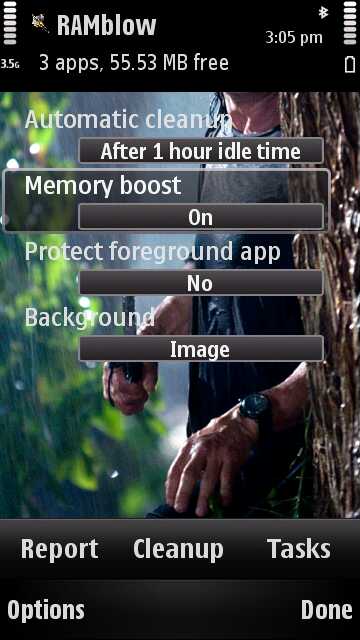
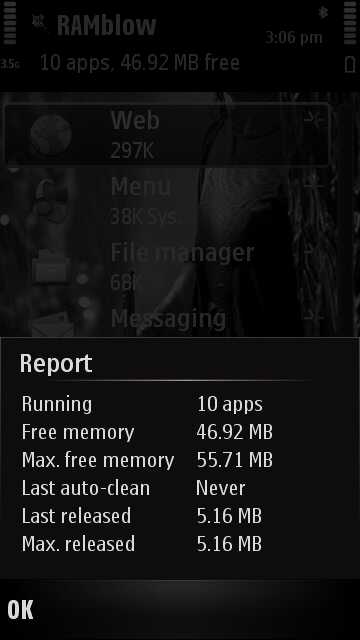
RAMblow dialog RAMblow reporting back

Here's the RAMblow Download link... It's apparently compatible with all Symbian OS 9 and above smartphones from all manufacturers.

From the CellPhoneSoft web site:

"RAMblow aims to maintain a healthy amount of available memory, or RAM, to help running the phone smooth for a long time. The application provides automated memory management, as well as manual termination of running programs. The memory boost feature can blow RAM up to amounts never before seen. RAMblow is very simple to use, just let it run in the background, and you will never again find your phone lacking memory. By its advanced memory management functions RAMblow can serve up to 50 MB free memory after prolonged use on phones like the Nokia N97."
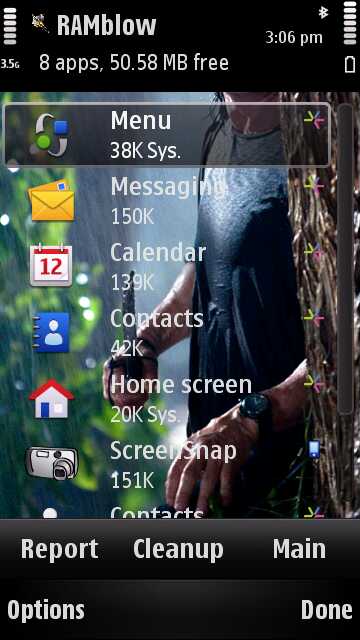
RAMblow's task managerThe utility essentially automates the manual killing of old applications which are hanging around in RAM. Of course, by killing these apps, you eliminate the benefit of multitasking and having these apps available instantly the next time they're needed, but this is a tradeoff that anyone thirsty for more RAM will be likely to accept.

Major claimed features:

  • Unattended and manual management of running applications. The idea is that you can 'set it and forget' the utility.
     
  • Maintaining a healthy amount of free available memory for smooth operation of the phone.
      
  • Memory optimization for executing large programs. This includes 'Memory boost', which as far as I can gather cleans up orphaned memory from the OS and claims to often give you back up to 5MB extra RAM.
     
  • Automatic memory cleanup after set idle time. Again, set and forget operation.
     
  • Examination and manual closing of unwanted programs.
     

The trial version is fully working and your comments are welcomed with regard to how effective RAMblow is? An essential utility or something that gets into the way of Symbian OS trying to do its job? Your call! Either way, it seems like a useful tool in your Symbian armoury.

Here's the main RAMblow product page

Steve Litchfield

PS. In case the image and name weren't clear, to you, it's of Rambo (the movie character) and the utility name is an obvious pun. But of course you got that far faster than I did!

Categories: Software, Links of Interest
Platforms: S60 3rd Edition, S60 5th Edition

News Discussion

yade
I am glad to say I will never need this app for my i8910 :)
timsalmon
Beware this page https://store3.esellerate.net/store/...alDownload.htm takes an age to download on the N97c - froze the unit up first time and needed a reboot (N97c with new firmware) - eventually it loaded and got going - hope it's more eeficient with RAM management once onboard!! BTW it's £3.31
slitchfield
I imagine that page is designed for desktop browsers... But yes, clumsy page encoding for it to be that un-portable....
Unregistered
I am so pleased that I chose not to go for the 8910 now that Nokia seem to be issuing forth a stream of gifts, none of which are any use on the 8910.
brrip
actually most of nokia's so-called 'gifts' seem to work out quite nicely on the i8910, thanks for asking. (with ram to spare, if i might add)
Unregistered
LOL Samsung owners are easy to bait. If they keep repeating themselves enough, it is possible that they may eventually convince themselves. Insecure.

"Quite nicely" AKA "a bit ropey".
yade
I am running several apps including reply to this using opera and downloading ovi racing from ovi store on my i8910. i currently have 78mb of free RAM. In 2010 this app shouldn't need to exist
brrip
If you say so "Unregistered". Quite nicely means I can run 50 tasks on my phone, including some juicy goodies from the Ovi store, which also runs fine on my i8910. Get back to me when Nokia can give you enough optimisation of poor hardware to do that.

And "poor hardware" aka N97. That was completely unnecessary but I'm throwing it in, just for you.
Jejoma
Quote:
Originally Posted by yade View Post
I am running several apps including reply to this using opera and downloading ovi racing from ovi store on my i8910. i currently have 78mb of free RAM. In 2010 this app shouldn't need to exist
Does Ovi Racing work? All I get on my i8910 (Italian firmware) are interference patterns.

What firmware are you using to get 78mb free RAM? Mine starts nowhere near that and currently I am playing a balancing act with 18mb :con?
Unregistered
to get that much free ram on the i8910 you'd probably have to run a cooked firmware
Unregistered
Nokia should probably bundle this in the firmwares itself with all its RAM crippled phones like the E72 in the name of cost cutting ... The iPhone may have ten thousand fart apps, but it will never have an app like this..
slitchfield
What the heck are you i8910 HD owners doing to your phones? Mine boots up with almost 150MB free RAM! Or am I misunderstanding something here?
Nick17
Really happy with this.

Cellphonesofts Swiss Manager Pro was also quite good, but kept closing apps on me (even when set to system app).

This keeps RAM really high, even after taking pictures (after which RAM useally drops 5-8MB (why is that??)).
RAMblow gets a lot of this back, which is needed for fun- but memory-hog-apps (like Coreplayer).
malerocks
Steve, somehow you always seem to have more free RAM on boot on your phones than others. For instance, after the recent firmware on the n97 mini, you mentioned that it boots up with around 55MB if you dont have the homescreen widgets. Mine boots with 48 MB.

I guess you dont install apps of your phone? Probably minuscule...
Support@CPS
Quote:
I am glad to say I will never need this app for my i8910 ... i currently have 78mb of free RAM. In 2010 this app shouldn't need to exist
Quote:
currently I am playing a balancing act with 18mb
Quote:
Nokia should probably bundle this in the firmwares itself with all its RAM crippled phones
These are quite contradictory remarks. RAMblow is here to improve the memory situation on any S60 phone that may need it.
John C
My i8910 also starts with around 155mb of ram on boot up. Been running for around 6 days without switching off and running around 6 apps and still it sits at 118mb.
Think maybe some are talking about the 'C' drive?
Unregistered
I have only 3 applications on C, but the memory is full. Ramblow says 59.41 MB free and the native File Manager says C:Phone Memory free: 6.8 MB!
I had to delete Quickoffice because the message Memory Full poped up constantly. I cannot see how this application can help. It closes running applications, but that's it. Or perhaps I am not using it in the right way, in this case let me know if there is something different to do than Clean up.

I am fed up with the memory problems. Every time I reboot my 5800 because of this, I have to spend to much time to set up correctly the phone, re enter the podcasts, and so on. I there is nothing new from Symbian quickly, I will get a Nexus
Jejoma
Quote:
Originally Posted by John C View Post
My i8910 also starts with around 155mb of ram on boot up. Been running for around 6 days without switching off and running around 6 apps and still it sits at 118mb.
Think maybe some are talking about the 'C' drive?
You're right, I'm on the wrong tack. My problem is the C drive. It starts with only 40.48Mb (That's from DeviceInfo) and unfortunately programs such as Ovi Maps insist on loading onto it rather than mass memory or memory card. Hence I'm currently down to 18Mb.

RAM starts with 254 I've had no problems there (i8910).
Support@CPS
Quote:
perhaps I am not using it in the right way
Yes, you are mixing two different things:

(1) RAM, also called runtime memory: space in which active programs are running. This is what RAMblow cleans up, to make sure you can start up other programs.

(2) Drive C, also called phone memory: space where data are permanently stored, including installed programs. RAMblow has nothing to do with this item, file managers serve for that purpose.

If your problem is surely the little space on Drive C, then you need to uninstall applications, or delete some other data (like messages, images, video, etc.).
Jejoma
Quote:
Originally Posted by Support@CPS View Post
Yes, you are mixing two different things:

(1) RAM, also called runtime memory: space in which active programs are running. This is what RAMblow cleans up, to make sure you can start up other programs.

(2) Drive C, also called phone memory: space where data are permanently stored, including installed programs. RAMblow has nothing to do with this item, file managers serve for that purpose.

If your problem is surely the little space on Drive C, then you need to uninstall applications, or delete some other data (like messages, images, video, etc.).
The Samsung i8910 seems to differ slightly from the standard Symbian way of handling memory. Ignoring the memory card there are three separate areas of memory:

(1) RAM - As above but having 250Mb or so there is no problem here.

(2) Drive C - As above, the phone memory. This is where the Samsung has problems because this memory starts at only about 40Mb and rapidly fills (I'm currently operating on 15Mb). Only certain data and programs are installed here, generally those such as Ovi Maps or Messaging that do not give an option as to where to store them. Another memory hog is the Quick Office upgrade. Certainly using file managers can help but a lot of this memory seems taken up by various System files that I would not risk deleting.

(3) Drive E - Also known as Mass Memory. This is where most programs can be installed and data stored. Starting with 16GB I'm not expecting any problems here!

So in summary it looks like Ramblow does not solve the i8910 memory problem. Rather judicious use of the small Drive C memory is the only way.
Support@CPS
Quote:
The Samsung i8910 seems to differ slightly from the standard Symbian way of handling memory.
No, the 8910 is the same as other computers, from smartphones to desktop PCs. Just two kinds of storage need to be sharply distinguished: RAM and disk. RAM is for running programs. Disk is for permanent storage (can be either removable or not).

Quote:
Ignoring the memory card there are three separate areas of memory:
Quote:
(3) Drive E - Also known as Mass Memory.
Drive E: is the memory card itself on most S60 devices!

Quote:
(1) RAM - As above but having 250Mb or so there is no problem here.
RAM is the single kind of storage where RAMblow comes to play. You are right that the 8910 does not suffer from lack of RAM (like the N97 and other ones do).

Quote:
So in summary it looks like Ramblow does not solve the i8910 memory problem. Rather judicious use of the small Drive C memory is the only way.
This is agreed, provided you call Drive C as memory, not disk (taking the terminology from desktop computer world).

However, clearing apps from RAM can provide another benefit, which applies to the 8910 as well: preventing active but unused apps from doing something in the background that takes battery power.
Jejoma
Quote:
Originally Posted by Support@CPS View Post
Drive E: is the memory card itself on most S60 devices!
Ah, that's where the i8910 really wins out since as well as the onboard Drive E: 16Mb Mass Memory it also takes a memory card in drive F:. Currently that adds another 16Mb so I can carry all sorts of rubbish about with me in a pretty unlimited sort of way :)

Full thread: 22 Comments / Post New Comment

Copyright Notes || Contact Us || Privacy Policy (Ellie)