
Click here for a complete list of All About Symbian's Nokia 5800 XpressMusic tutorials
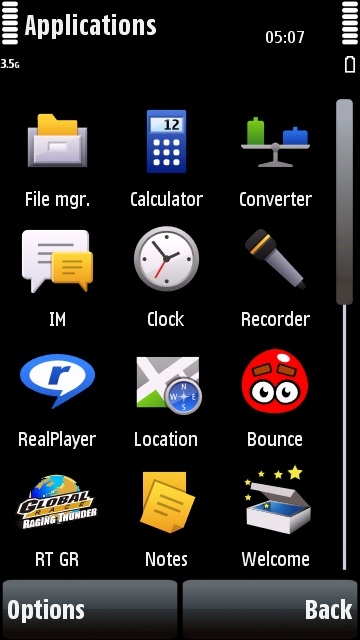
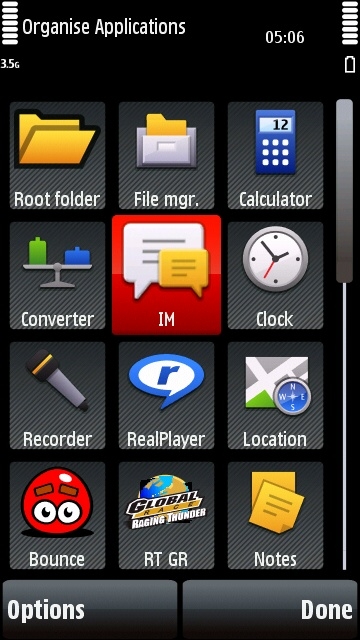
The Nokia 5800's Applications folder in normal mode on the left, and "Organise" mode on the right.
How to customise the main menu on the Nokia 5800 XpressMusic, including folders and sub-folders
You can customise the menu system on the 5800 by changing the menu type, by moving icons from one place to another, and by creating folders and sub-folders.
How to change the menu type
1. Go to the menu system by pressing the white menu button.
2. Select "Options".
3. Select "Change Menu View".
4. Double-click on the menu type you want.
How to move icons around the 5800 menu system
1. Go to the part of the menu system where the icons are that you want to move.
2. Select "Options".
3. Select "Organise".
4. Drag the icon you want to move to the place you want to move it.
5. When you've finished moving icons, select "Done".
How to move icons to another folder
1. Go to the icon you want to move.
2. Select "Options".
3. Select "Organise".
4. Select the icon you want to move.
5. Select "Options".
6. Select "Move To Folder", then choose the folder you want to move the icon to.
7. Select "Move".
8. When you've finished moving icons, select "Done".
Useful Tip: You can move icons to the front page of the menu system by selecting "Root Folder" as their destination.
How to create folders and sub-folders
You can create as many folders and sub-folders (folders within folders) as you want. These are useful if you want to organise icons by particular themes, and can bevery useful if you've installed lots of new applications.
1. Go to the part of the menu system you want to create a folder or sub-folder.
2. Select "Options".
3. Select "Organise".
4. Select "Options".
5. Select "New Folder".
6. Give the folder a memorable name, then select "OK".
7. When you've finished creating folders, select "Done".
How to delete folders and sub-folders
1. Go to the part of the menu system that contains the folder you want to delete.
2. Select "Options".
3. Select "Organise".
4. Select the folder you want to delete.
5. Select "Options".
6. Select "Delete", and then "Yes".
7. When you've finished deleting folders, select "Done".
Click here for a complete list of All About Symbian's Nokia 5800 XpressMusic tutorials