Ovi Maps 3.0 Beta for mobile updated
Published by Rafe Blandford at 15:30 UTC, June 11th 2009
A new beta version of Ovi Maps 3.0 has been released via Nokia's Beta Labs website. Ovi Maps is the new name for the application previously known as Nokia Maps. The new beta adds a number of new features including weather information, premium POIs and, in selected countries, safety camera information.
Additionally the number of countries covered by traffic data has been increased, the underlying map data set has been updated, zooming and panning performance improved, numerous bugs have been fixed and overall stability improved. The new beta includes support for S60 5th Edition (Nokia N97 and 5800) in addition to the existing compatibility with S60 3.1 and 3.2. Read on for more details and screenshots.

Key changes in this beta
- Ovi Maps 3.0 now supports S60 5th Edition (Nokia N97 and Nokia 5800 XpressMusic).
- Underlying map data has been updated.
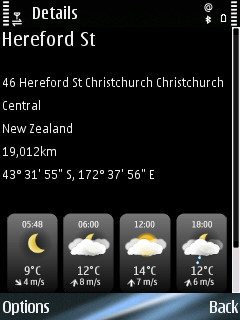
- Details view now includes weather forecast information.
- Application performance has been improved (e.g. map zooming and panning), bug fixed and stability improved. There are improvements in search (division between addresses and place), general UI prompting (less warning messages). This is the final beta before release and feels very much like a release candidate.
- The built in shop has been streamlined. Purchase options have been simplified and the on-device purchase process (credit card and pSMS) is much improved. There is also a clearer option for manually entering a license key. The navigation services costs £52.99 for a year, £6.00 for 30 days, or £1.50 for a day for a European wide service. Existing country specific licenses will be automatically upgraded to European wide licenses. Pricing for other regions do vary (e.g. North America is £43.99 a year), but follow a broadly similar pattern. Travel guides have been removed from the shop; they are now available via Ovi Store.
- Traffic information functionality has expanded and is available in more markets. It includes both real time traffic information and speed camera warnings. The service costs £15 per year, £1.50 for a month, or £0.80 for a day for a European wide service.
Mapping and application performance
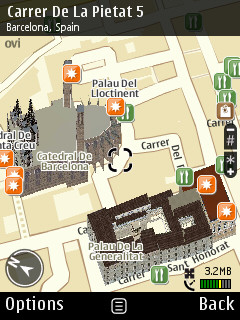
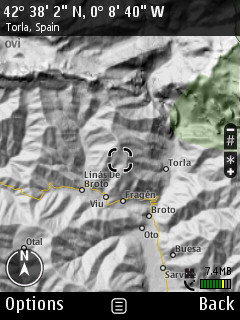
The new beta updates the map data set to the latest set issued by Navteq. Maps 3 includes 2D and 3D maps modes, satellite imagery and terrain mapping. There's also support for 3D buildings and full map rotation.
One of the most welcome improvements in the new beta is the improved application performance. The application is much snappier, with map zooming and panning particularly impressive given the level of detail being displayed.
Favourites (landmarks) and Sync
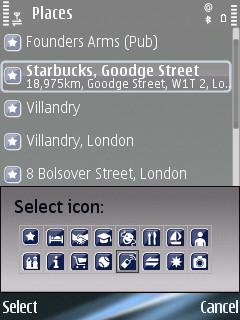
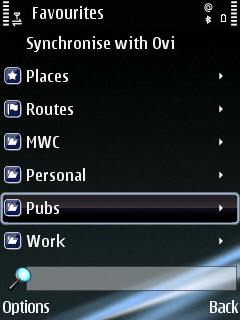
Places and routes can be stored as favourites. This allows them to be more quickly accessed and used in the future. Maps 3 adds the ability to organise places and routes into categories (folders) and customise their name and appearance.
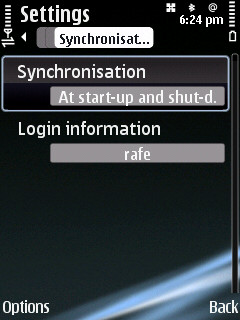
A key feature of Ovi Maps is its ability to sync with Ovi Maps for the web. This allows you to sync places (landmarks) and routes between a mobile device and the web. This means you can find a new place or plan a route on a desktop PC (where input and screen size are less restricted) and have it automatically synchronised to your phone when you start Ovi Maps.
Routing / Navigation
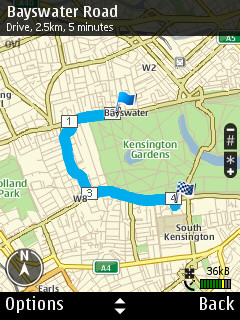
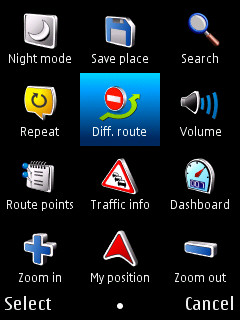
The routing functionality remains much the same as previous beta, although a number of UI tweaks have been made. The example screenshots below show route overview, the options menu (which allows you to access key functions when driving) and an example of navigation mode.
Maps 3.0 also supports pedestrian navigation. Where applicable the software will route pedestrians on non-car routes (e.g. a pathway through a park, or the wrong way up a one way street).
Details view and weather forecasts
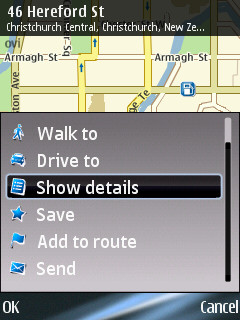
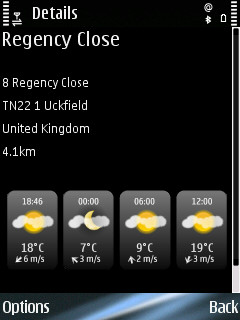
Weather forecasts are now included in the details view (accessed via the central context menu). This allows you to see a weather forecast for any places you may be visiting.
Search and PoI access via explore
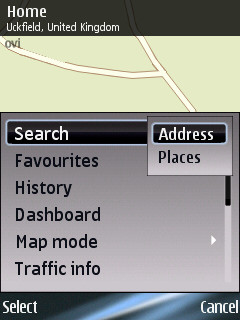
The search function has been divided into an address search (i.e. postcode or street) and places. A places search looks through the PoI database for matches and is therefore better an finding particular services. The address search includes support for full postcodes and the ability to select an address from the Contacts application (annoyingly it does not filter out Contacts which do not have an address). Alternatively you can directly input a lat/long co-ordinate set.
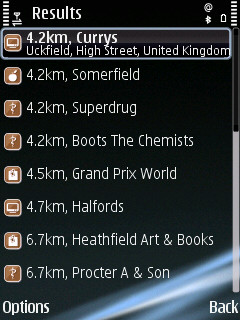
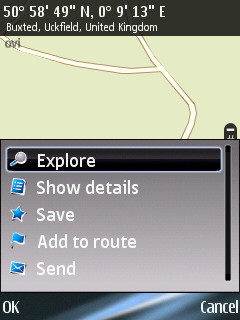
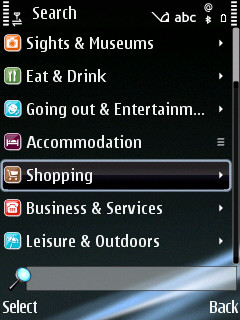
As with previous beta versions of Nokia Maps 3.0 one of the easiest ways to discovers local points of interest is to use the Explore entry from the central contextual menu. Shown below is an example for local shops.
Traffic information and speed cameras
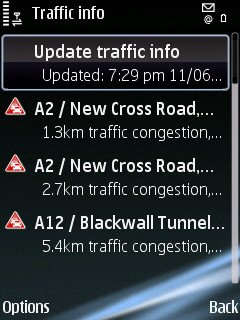
The traffic information service, which is available as an add-on service, has been improved and expanded in the latest beta. It is also available in more countries.
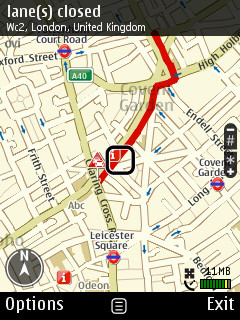
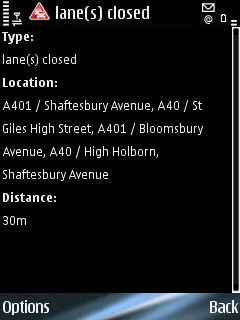
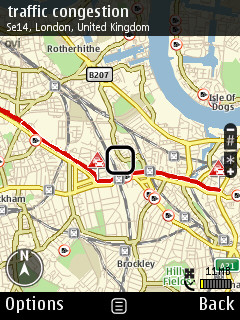
The service consists of two elements: traffic information and safety spot (speed camera) PoIs / warnings. Traffic information is overlaid on the maps as a red line. Alternatively a list of problems can be viewed, sorted by distance from the currently selected location, can be view via the Options menu. In both cases selecting the incident and choosing 'More details' from the central contextual menu displays more detailed information about the problem. Traffic information can be set to update automatically, at specified intervals, or can be updated manually.
When in navigation mode Ovi Maps can re-route you to avoid traffic problems. This can be set to happen automatically or to be manually prompted.
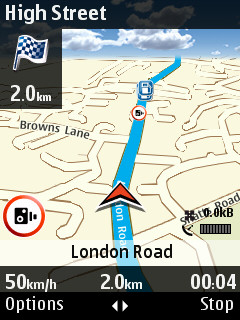
Safety spots (cameras) are indicated on the map by a small camera icon. In navigation mode the voice directions will give an audible and that you are approaching a safety spot and indicate the speed limit. A visual warning is displayed on the screen, the graphic alternates between the safety spot icon and the maximum speed limit. This is in addition to the optional speed limit warnings which are available as part of the basic navigation mode.
The traffic / safety camera service costs £15.99 / 18 Euro for European wide coverage; this compares favourably to competing products, for example TomTom charges £35 a year for a similar level of service.
In Europe the following countries support traffic information: Belgium, Denmark, Finland, France, Germany, Italy, Luxembourg, Netherlands, Northern Ireland, Norway, Spain, Switzerland and United Kingdom. The following countries support safety spot (cameras): Andorra, Austria, Belgium, France, Italy, Netherlands, Northern Ireland, Norway, Romania, Poland, Spain, Sweden and United Kingdom.
Installation and compatibility
As with previous updates there is a multi-step install process to follow.
Here's the full list of compatible devices:
- S60 3rd Edition Feature Pack 1 (E63, E66, E71, E90 Communicator, N81, N81 8GB, N82, N95, and N95 8GB)
- S60 3rd Edition Feature Pack 2 (E55, E75, N78, N79, N85, N86 8MP, N96, 5320 XpressMusic, 5630 XpressMusic, 5730 XpressMusic, 6210 Navigator, 6220 Classic, 6650, 6710 Navigator, and 6720 Classic)
- S60 5th Edition (5800 XpressMusic and N97)
Further details can be found on the Nokia Beta Labs website.
We will take a more detailed looks at Maps 3.0 in due course.
Categories: Software
Platforms: S60 3rd Edition, S60 5th Edition
News Discussion
Ian Ian
After so many months (half a year?) of no progress there is another beta and I even cannot install it on N82 (same as previous beta) - "Component is build in - cannot install". This is ridiculous!!! Now that iPhone is going to have navigation (real navigation from TomTom and Navigon) I think I will finally switch and be done with this...
Rafe
This is the final beta before release. I suspect this is a catch any last minute bugs (a preview release), where as the others really were Beta.
From my first look (updating post at the moment) I'm impressed. Generally much smoother and better performance. A lot of UI issues have been improved. Of course will have to do some real world testing, but thus far things are looking good.
fernando20
Looking great on my 5800, and it scrolls real smooth. One thing I wonder though is why it can't run on landscape mode. Perhaps software differentiation from future navigation oriented S60v5 devices? Anyway, dumb decision.
Unregistered
Ovi map? Is everything nokia going to be ovi-fied? I'm sorry but this just seems wrong when it's so often snickered as 'euro-centric.'
(what does ovi mean anyway?)
splus
Wow, I am really impressed by this release!
The Maps Updater program downloaded and installed the new Ovi Maps on my Nokia N95 8GB, deleted the old maps data, and then even downloaded the new version of maps data for countries which were in the phone before the installation.
No glitches.
I expected a little upgrade, but this is completely new application. Huge difference comparing to previous version 2 which was practically unusable due to unresponsiveness and slowness.
Scrolling and zooming is super smooth, really easy, and the whole feeling of using the program is MUCH better.
Maps have been improved quite a bit as well, I see the file size of some countries have increased considerably.
I have to say that I haven't tried any advanced features.
It looks like Nokia have finally nailed it!
I am starting to think again about N97 (gave up on it due to weak processor and memory and started to think about iPhone or something else) after seeing this new version, it gives me hope Nokia is finally going in the right direction, realizing the importance of good software.
Rafe
All of Nokia's service are being branded Ovi.
Ovi means door in Finnish. I understand it also means kindergarten (nursery school) in Hungarian and the genitive singular of ovum (egg) in Latin.
BTW - I've now updated the story with extra details and screenshots.
rvirga
Although a HUGE improvement over 2.0, there are still a few areas where it lags behind competition:
1. Zip code information should be stored locally instead of on Nokia's servers.
2. You shouldn't need Map Loader to download map packs, and instead be able to download them directly from your phone. Ditto for voices.
3. Map handling should be reworked so that map packs are handled modularly. For example, after you return from your trip to Spain, you should be able to remove just the Spain map pack. Currently, you have to remove everything, and then re-download all the packs you had(do you remember what they were? I hope so, because you have no way to find out) minus the Spain one.
4. You should be able to edit your Favourites from inside Maps.
5. All your contacts with an address should automatically appear in your Favourites
6. There should be a simplified way to say "drive/walk me home", either by adding a new menu entry, or (preferably) using a special favourite "Home" which always sits on top of the list for easy access.
One final note: the "Maps Improvements" preference is a violation of my privacy, and it shouldn't come enabled by default without my explicit consent. Those of you who don't like Nokia knowing where you are (and where you're going) each time you use Maps may want to go to Preferences/Navigation and uncheck this option.
seki
sadly the low quality of the Japan maps is an issue to me.
I'm sticking to Google until they sort some real resolution.
sigh..
Unregistered
I used TomTom on N95 for years before I finally decided that I really needed a dedicated Satnav because the phone was just too much of a compromise. I still believe that, the phone is OK for getting around a city on foot but for driving, it's dedicated device all the way.
Before I look at Maps 3.0 is there anything that was free gratis on 2.0 that is lost to premium cost service on 3.0?
Unregistered
New to this version 3 which looks like a clear improvement in speed & usability versus 2. What's not obvious to me is how one enables the phone app to show 3D landmarks (e.g. Tower Bridge, Eiffel tower). Looked in tools>settings>categories, went online with the app, etc. Still no buildings shown. Can anyone please enlighten me (& tell Nokia to make this a bit more obvious)?
tonyreilly
I can't find how to enable the 3D landmarks either!
what's going on?
Also, is Landscape mode STILL not supported on the 5800 or am I missing something?
tonyreilly
Anyone?
Rafe
Quote:
Originally Posted by rvirga
Although a HUGE improvement over 2.0, there are still a few areas where it lags behind competition:
1. Zip code information should be stored locally instead of on Nokia's servers.
2. You shouldn't need Map Loader to download map packs, and instead be able to download them directly from your phone. Ditto for voices.
3. Map handling should be reworked so that map packs are handled modularly. For example, after you return from your trip to Spain, you should be able to remove just the Spain map pack. Currently, you have to remove everything, and then re-download all the packs you had(do you remember what they were? I hope so, because you have no way to find out) minus the Spain one.
4. You should be able to edit your Favourites from inside Maps.
5. All your contacts with an address should automatically appear in your Favourites
6. There should be a simplified way to say "drive/walk me home", either by adding a new menu entry, or (preferably) using a special favourite "Home" which always sits on top of the list for easy access.
|
1. Yes agree it would be nice.
2. On the plus side if you download OTA it will cache them. Probably better this way given people's data limitations. Voices can be downloaded OTA - if you change the voice it will auto-prompt you to download it.
3. Yes - I've mentioned this as annoyance. Though in the end I just got a bigger memory card.
4. You can.
5. Yes, the current Contacts access is messy.
6. Yes. It would be nice to have favourites favourites.
Quote:
Originally Posted by Unregistered
New to this version 3 which looks like a clear improvement in speed & usability versus 2. What's not obvious to me is how one enables the phone app to show 3D landmarks (e.g. Tower Bridge, Eiffel tower). Looked in tools>settings>categories, went online with the app, etc. Still no buildings shown. Can anyone please enlighten me (& tell Nokia to make this a bit more obvious)?
|
Quote:
Originally Posted by tonyreilly
I can't find how to enable the 3D landmarks either!
what's going on?
Also, is Landscape mode STILL not supported on the 5800 or am I missing something?
|
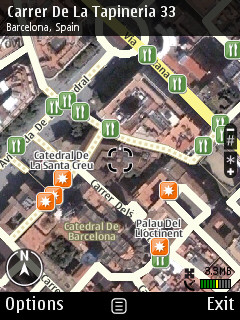
I saw 3D landmarks in Barcelona, but not in London (where I know there are some). I wonder if there is something wrong with the map data. Might be a good idea to report this as a bug to beta labs?
Unregistered
They are out of their minds to ask for that kind of money. For 60€, you can get a regional Route 66, or the whole Europe for 120€, and then you can get the speed camera lists from the Internet. Or you can get a dedicated navigator for not much more.
The free part of Ovi Maps looks very good, though. It is very surprising that you have to pay so much to get so little more. At half the price it might be a good deal, but not a penny or euro cent more.
Unregistered
Ovi means door. It's finnish. Nokia is finnish ;)
rvirga
Quote:
Originally Posted by Rafe
1. Yes agree it would be nice.
2. On the plus side if you download OTA it will cache them. Probably better this way given people's data limitations. Voices can be downloaded OTA - if you change the voice it will auto-prompt you to download it.
3. Yes - I've mentioned this as annoyance. Though in the end I just got a bigger memory card.
4. You can.
5. Yes, the current Contacts access is messy.
6. Yes. It would be nice to have favourites favourites
|
1. This was not intented to be a wish list, but rather a report on how all other navigation programs I've used work. I apologize for the confusion.
2. Nokia Maps cannot download OtA an entire country's map pack. It can only download maps of smaller areas, in a on-demand fashion. Given my data plan's extreme limitations (most of the time, I don't have a data plan :)), I prefer to download the entire map pack for my country when I'm connected to my house's or office's wifi, rather than having Nokia Maps download maps whenever it feels like.
3. If only the problem could be solved by a bigger card. What happens when a map pack gets an update? On Route66, which handles map packs modularly, it downloads and install the new one after erasing the old one. How does Nokia Maps handle updates? Well, first of all, unless you use Map Loader frequently, you may never know there's an update available, since Maps always use the cached version. When you launch Map Loader, you get a "there's an update for your maps" message. It doesn't tell you what was updated. If you have stored the maps for the entire Europe on your phone, and if you somehow know that only Vatican City maps have changed, you might decide it's not worth updating. But Map Loader doesn't tell you, so you cannot make that judgement call. And how is the update itself handled? By making a clean slate, and downloading everything again from scratch.
4. I can rename them and/or change the icon. To edit all other information (e.g. phone #), I have to use a separate application.
6. Again, it was not meant to be a wish list entry, but something other navigation programs (Route66, Garmin) offer.
Albie999
Have installed Maps 3.0 and it seems pretty good. There seems to be a 7 day trial licence available, on the Nokia site, although I have put my number in, and supposed to send a 7 day licence code .. but still nothing.
Has anyone tried this and got the trial licence code.
I have sent an email to Nokia, am just waiting for reply ... if I actually get one
Unregistered
hello frns ....
i was able to install th map3 application without any problem but i am unable to load my country map to 5800 with nokia map loader ........ it say some error statement
did any1 face the same prob ..............
Jejoma
When I first installed the new Maps Loader it came up in very garish colours offering three tabs, the third being licences. When I next used it the third tab had gone as had the garish colours. Despite reloading I cannot get the third tab back.
Any ideas anyone?
As another query, does Ovi Maps work with the Samsung Omnia HD or is it locked to Nokia mobiles only?
rvirga
Ovi Maps is made by Nokia exclusively for its phones.
The Omnia HD, at least the sim-free unlocked version, comes with the latest Route 66, which is much better than Ovi Maps. Careful, however, that is not installed by default: it's on the internal flash drive, under Samsung/Apps.
Jejoma
Thanks for the info Rvirga. I'm thinking of going for the Omnia HD so it's reassuring to know there's a decent GPS program for it.
Unregistered
Works fine on my N82!
The new features are great.
By the way, Ovi means "door".
rvirga
@Jejoma:
Actually, there are several. Apart from Route 66, which comes with the phone, the following three programs work well on the HD:
Garmin Mobile XT (version 5.00.30 or later)
Sygic McGuider (version 7.71 or later)
NDrive Symbian
They all have a touch-based interface and can use the i8910's internal GPS. Having been designed in collaboration with Samsung, however, Route 66 is the only one currently capable of using the internal digital compass.
tigertezza
I lost my maps licence after upgrading to maps 3 on the E90. Reinstalled to be sure and tried to enter my licence code again. Can't transfer drive and walk licence to maps 3. I see others have been having this trouble on the nokia beta site (bug reports). With nearly a year to run on the licence its too expensive to buy a new licence. Back to maps 2 for me.
capitaine
ermm.. I installed Maps 3, started it, it said checking licences, then it says 90 day UK/ireland drive+walk licence activated
eh? I havent bought any licence.. so what is this?
Full thread: 33 Comments / Post New Comment