

Maps on Ovi now for Mac and Safari
Published by Steve Litchfield at 16:11 UTC, April 30th 2009
Maps on Ovi, a comprehensive mapping service running on Nokia's web servers and which syncs down to Maps 3.0 running on S60 3rd Edition FP1 and FP2 phones, was initially released for Windows-based browsers but has just gone live for Safari on the Mac (see maps.ovi.com). As with Windows, there's a browser plug-in involved. See below for screenshots and brief comments.

Great to see Ovi Maps not just being tied to Windows. This screenshot is from Safari on Mac OS Leopard.
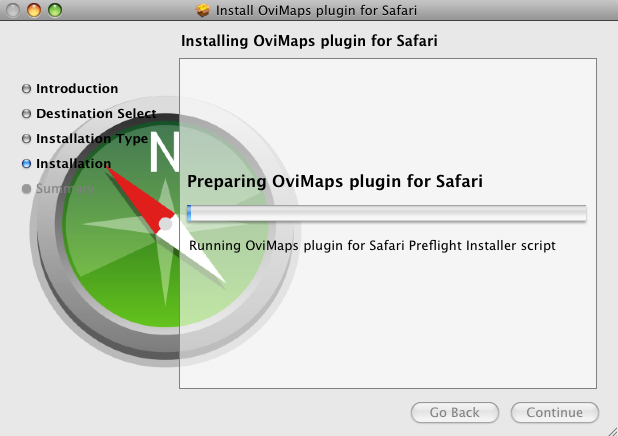
The installation is a 6MB download and goes without a hitch, apart from the need to quit Safari (and lose any open tabs) at one point, plus you have to manually 'eject' the package installer...
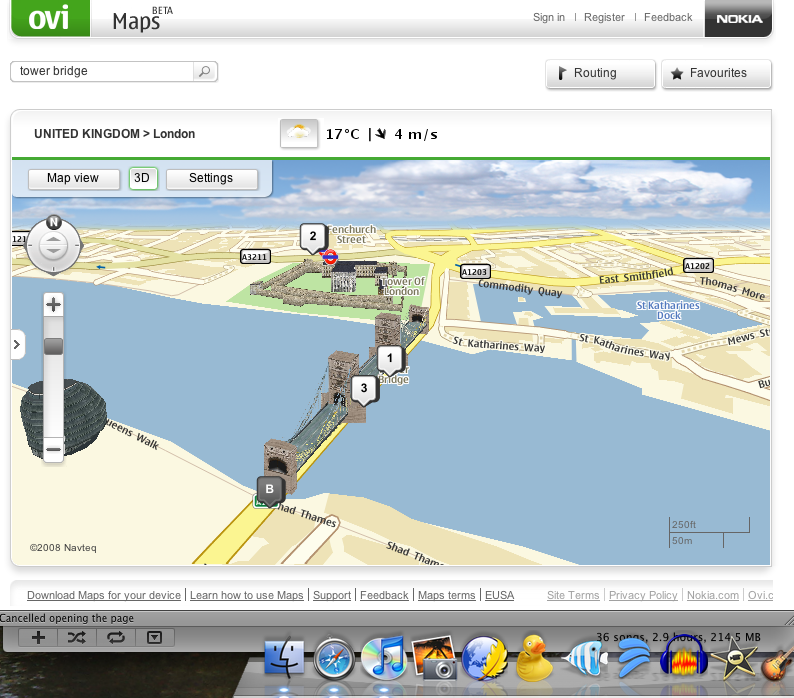
And here's the proof that it's all working. The speed of map-dragging is quite impressive, even on my humble Mac Mini. Note the weather conditions in the title bar for the current map. And, of course, I've got those oh-so-sexy 3D models in view 8-)
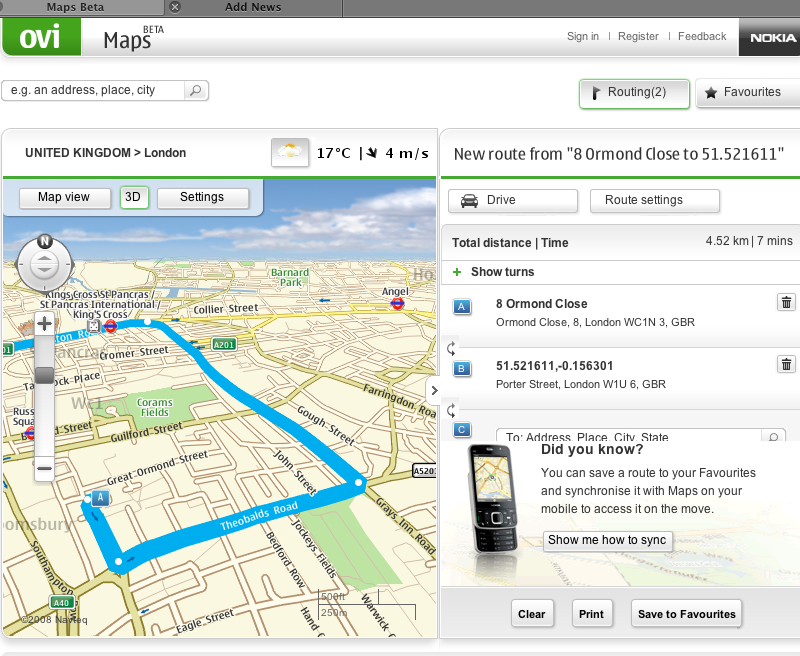
With a route planned - waypoints are added by right clicking on spots on the map, and you can have as many as you like. Planning is near instantaneous for a simple A-B route, I was sitting there waiting to see a 'Calc' button and realised that the route had appeared before I'd even started scanning the screen properly...
Steve Litchfield
News Discussion
In81
Steve, just go to "History\Reopen All Windows form last session" and you won't loose open tabs in Safari.
sapporobaby
I think a link to download/install would have been handy but oh well.....
slitchfield
sapporobaby
I knew you would not leave us hanging. :)
sapporobaby
Maybe I am misunderstanding but to install the maps on my phone (E71) it appears that I need to do this via Windows. Is this true Steve?
JayTay
Quote:
Originally Posted by sapporobaby
Maybe I am misunderstanding but to install the maps on my phone (E71) it appears that I need to do this via Windows. Is this true Steve?
|
Yup. Rubbish isn't it?
slitchfield
Yes and no. The current early beta of Maps 3.0 for S60 only has a Windows installer. The release version (imminent) will be available as an SIS file etc, via Ovi Store, I'm 99% confident.
You're not missing much though, the beta of 3.0 for S60 was rather buggy... let's be patient.
Unregistered
seems that you need to login with admin priviledges to install the plugin and still it won't work for other users in the OS X
rvirga
As a linux user and a 5800 XM owner, I feel slighted.
dion
I'm running the Safari 4 beta so I'm not sure if that's causing a problem but you appear to login and the map zooms in and then it zooms back out and logs you out !
Anyone else seeing this ....
fernando20
Logging in and out is definitely weird, Safari 3 here.
But yay, besides that, it's quite good. You can find the Maps 3.0 beta .sis around if you search, too, so you don't need the windows installer.
sapporobaby
Quote:
Originally Posted by fernando20
Logging in and out is definitely weird, Safari 3 here.
But yay, besides that, it's quite good. You can find the Maps 3.0 beta .sis around if you search, too, so you don't need the windows installer.
|
If it is so easy, why didn't you bother to post a link? It is not top secret or forbidden so to say an .sis file is there without supplying a link is a waste or statement or are you saying it to prove that you have something no one else has? Either way: Lame...
Unregistered
Same problem - once I log in, any action immediately logs me back out. (BTW, I was never prompted to quit Safari when I installed). Too bad, seems like it will be a nice app once the bugs are fixed.
Running Safari 3.2.1
Unregistered
Safari 4 Beta. It logs me in for a split second, then a little pink bar comes up that says, "Sorry you have to login first".
tym79m
Quote:
Originally Posted by sapporobaby
If it is so easy, why didn't you bother to post a link? It is not top secret or forbidden so to say an .sis file is there without supplying a link is a waste or statement or are you saying it to prove that you have something no one else has? Either way: Lame...
|
http://www.e71blog.com/2009/02/nokia...lable-for-e71/
Edit: Oh, and yes, it was easy to find.
Full thread: 15 Comments / Post New Comment