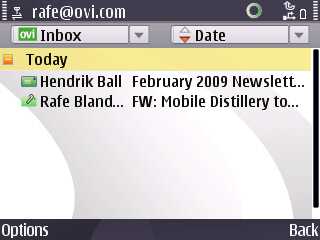
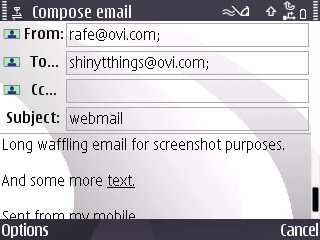
The webmail component of Mail on Ovi, which was previewed at Nokia World last year, is now live (in beta status, naturally). Along with the webmail component, you can now also use Mail on Ovi on S60 devices by adding the email address to either the built in Messaging application or the Nokia Messaging service. Mail on Ovi had previously only been available via Beta Labs on Nokia's Series 40 handsets. Mail on Ovi gives you a username@ovi.com e-mail account, based on your Ovi username, with a space quota of 1GB. Read on for more details and a short video demo...
Key features of the webmail component of Mail of Ovi
Web application for managing your @ovi.com email. Nokia's aim is to create a simple and elegant web mail experience. It uses AJAX and Javascript web technologies (like GMail and other modern equivalents) to cut down on page loads and improved usability. For example, you can organise your email into folders via a simple drag and drop mechanism, and, when composing email, contacts are auto-completed based on the contents of your address book.
Address book for storing contacts. Currently there is no connection between Mail on Ovi and Sync on Ovi (i.e. between your live contacts and the address book of Mail on Ovi). However this is a limitation of the current beta and the two will be connected together in a later beta or for the final release.
Built in spam (optional) and anti-virus filters and settings for auto-reply (e.g. for when you go on holiday) and email signatures.
There's a low bandwidth version of the Mail on Ovi webmail system for use when a broadband connection is not available.
It is a mistake to see Mail on Ovi as purely a competitor to other webmail systems, although clearly there is a strong element of this. Realistically, relatively few people are going to change their email accounts because of the switching costs involved. Nokia recognise this, which why it is looking to make other email services, such as GMail, Hotmail and Yahoo Mail, available to users of its phones through email configuration wizards and the Nokia Messaging service.
However, Nokia believes there is a gap in the market for those who do not already have an email address. In this light, Mail on Ovi can be seen as part of Nokia's strategy to broaden the use of email in general. Many such users will set up, and experience, email for the first time on their mobile phone. The webmail version is intended to provide these users with PC access to their Ovi email account.
Currently the on-device sign up and configuration is only being tested with Series 40 devices. However, if you do want to use your @ovi.com email address on your S60 device then it is very straightforward. You can use either the built in Messaging application or Nokia Messaging service (also in beta). In both cases you should only need to enter the email address and password - the respective email configuration wizards should take care of the rest of the settings for you.
Here's Mail on Ovi as an email account in Nokia Messaging:
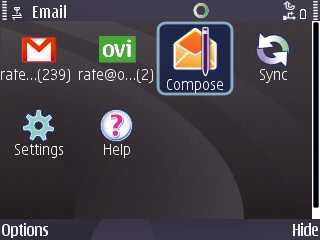
Nokia Messaging, which offers a consumer-focussed push mail service for existing email accounts, generally offers a better email experience than the built in Messaging application. Currently it is available as a free beta, but a charge may be made for the service once it has its first full release.
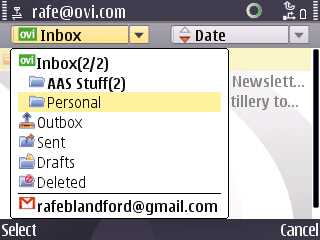
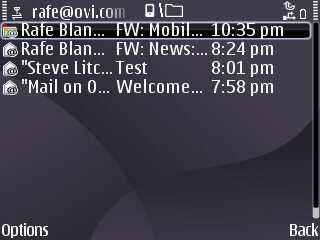
Here is an Ovi.com email account, set up in S60's standard messaging application. Ovi.com email accounts are made available via IMAP and, as such, could be used with any email client.
IMAP folders in Messaging application
Steve's comments
"Nokia's Ajax implementation of a webmail system seems pretty slick, even if it doesn't have all the bells and whistles of GMail as yet. We liked the way messages can be dragged and dropped into folders (you can create as many as you like) and we loved the way the Help system is fully stocked from day one.
Much remains to be seen, of course. Speed, the effectiveness of its 'Spam' filter, and so on. So far, Mail on Ovi has followed the GMail style in almost every regard, with similar spam settings and mail text quoting rules, but the key thing about this system is going to be the integration with your phone's email client and with Ovi Contacts, presenting a seamless and always backed up, always up to date contacts and email system.
So get to it. If you've already registered an Ovi username then you can now be reached at username@ovi.com . Comments welcome if you start to use it for real."
Rafe Blandford and Steve Litchfield, All About Symbian, 10 Feb 2009
I'm considering changing my gmail to this, even if it has less features. My username is so awesome! firstname@ovi.com! plus it would reaffirm my position as a nokia fanatic. lol, I'm such a geek.
tenoce
I need a firefox add-on for mail checking of my Ovi mail account.
neilhoskins
?
How do you mean? Firefox is working fine for me; no plugins being asked-for, even drag & drop working.
tenoce
Some comfort stuff.
By having an add-on on your Firefox, it alerts you when new email arrives to your Ovi mail address. You might not always have your ovi account open in your browser.
Rafe, you say I can use the @ovi.com account in the built-in messaging app: can I also use it in, say, profimail? If so, where are the settings such as server names and security settings? The beta Nokia email client looks OK but I'm concious of the fact that I now have three different email clients on my handset. This looks more like divergence than convergence just at the moment.
Rafe
Neil,
Yes you can use it with any mail client - sorry I should have made this clearer.
These are the settings (based on S60 Messaging):
Incoming email:
User name: you@ovi.com
Password: *****
Incoming mail server: imap.mail.ovi.com
Mailbox type: IMAP 4
Security (ports) SSL/TLS
Port: Default
Outgoing email:
My email address: username@ovi.com
User name: username@ovi.com
Password: *****
Outgoing mail server: smtp.mail.ovi.com
Security (ports): SSL/TLS
Port: Default
You should be able to use these in any mail client including Profimail.
neilhoskins
Thanks, but in Profimail, with smtp and imap ports at 25 and 143 respectively, it will only work with ssl unchecked. No big deal as I've got nothing to hide.
There are a couple of things spring to mind here.
- Personally I'd be surprised if they start charging, because the (apparently compulsory) ads at the foot of each email must be worth a fortune in raising awareness of Ovi.
- I would prefer to use the native messaging client because of its integration with other apps (eg, "send" from Gallery). However, the native app is pants so I use Profimail for several different mailboxes. The new 'Nokia Email' looks to me like a Series 40 app, with no integration with other apps, and I agree with the appraisal that this whole thing is aimed at new email users in the developing world; it therefore isn't of much interest to me, except insofar as I wish Nokia every success with it.
Does anybody know of a third-party email client, with as much functionality as Profimail, that integrates with other apps, so that I can, for example, just select "send" from Gallery?
Rafe
Neil - I don't think they will charge for Mail on Ovi. What they will charge for (well maybe) is the Nokia Messaging service - this service takes any email and effectively turns it into a basic push email account. The number of email services Nokia has get a bit confusing... but as I see it:
1) Mail on Ovi - for those who don't have an email address - has a webmail component and easy sign up on the phone into standard Messaging application. This will be free.
2) Messaging with current email - for thsoe who have an emai, but want to use it on their phone. The configuration wizard helps set this up in the standard Messaging application (i.e. using POP or IMAP). This will be free.
3) Nokia Messaging with current email - for those with a current email address (e.g. GMail, Yahoo, ISP etc.) but who want a premium service on their phone. Gives basic consumer push email. This service will be charged for.
4) Mail for Exchanage and Messaging - for those using corporate email (also appplies to things like Lotus Notes Blackberry, Visto etc etc).
The slight complication is that you can add an Ovi.com account to Nokia Messaging if you so wish (its just another email account after all). It may be that Nokia will offer a specific version of the Nokia Messaging client for Ovi.com users...
---
Yes agree the built in messaging application needs an overhaul right now. The integration is very important and the current situation is a mess. I can't be the only one who has configured an email account in messaging for sending stuff, but doesn't use it for receiving / reading.
neilhoskins
Quote:
Originally Posted by Rafe
3) Nokia Messaging with current email - for those with a current email address (e.g. GMail, Yahoo, ISP etc.) but who want a premium service on their phone. Gives basic consumer push email. This service will be charged for.
May I just modify this one to include "... and who lack the basic knowledge or inclination to set these up on an existing mail client, or who have only a Series40 handset", since Gmail at least is already "push" if you don't mind fiddling around with settings. I'm not taking the piss here: they need to address the less-technically-adept in order to compete with Apple, but I do see a lot of this as more of a Series40 thing. And we seem to be agreed that in an effort to simplify things they've ended-up with yet another Great Finnish Muddle™.
Williamoni
Neil's plans for a career in the Diplomatic Service are put on hold for a while.
Rafe
Quote:
Originally Posted by neilhoskins
May I just modify this one to include "... and who lack the basic knowledge or inclination to set these up on an existing mail client, or who have only a Series40 handset", since Gmail at least is already "push" if you don't mind fiddling around with settings. I'm not taking the piss here: they need to address the less-technically-adept in order to compete with Apple, but I do see a lot of this as more of a Series40 thing. And we seem to be agreed that in an effort to simplify things they've ended-up with yet another Great Finnish Muddle™.
Heh, you wont get much argument from me.
Things are getting better - the current email wizard on the recent devices works quite well (from the point of view that many people will only need to enter email address and password):
But screenshots like this also help illustrate the problem. And of course this will blur further when there are Ovi.com and Mail for Exchnage options also included.