
Nokia Maps 3.0 beta updated

Published by Rafe Blandford at 18:47 UTC, February 9th 2009

Nokia Maps 3.0, currently in beta, has received its second major release. The new beta extends compatibility to popular S60 3.1 (3rd Edition Feature Pack 1) devices such as the Nokia N95 and Nokia E71. The new version adds support for map rotation, more shortcut keys, better 3D support, a 'point me' function for saved landmarks and fixes a larger number of bugs. Based on my initial experience, I would add that the performance is improved and the application is much more stable. You are now also able to synchronise routes (in addition to favourites/landmarks) between Nokia Maps and Maps on Ovi. Read on for screens and more detail.

UI tweak   terrain   building

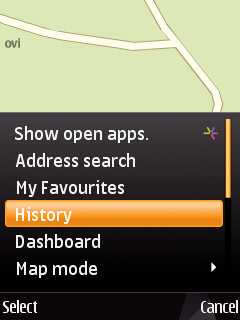
The application's UI has been reworked in several places. For example the 'History' entry, which offers quick access to recent locations, has been moved up the menu list. Terrain and satellite map mode both now work in 3D mode. Most usefully, the map can now be rotated, making it easier to orientate yourself and, incidentally, allowing you to fully view the 3D building rendering built into Nokia Maps 3.0.
Maps on Ovi

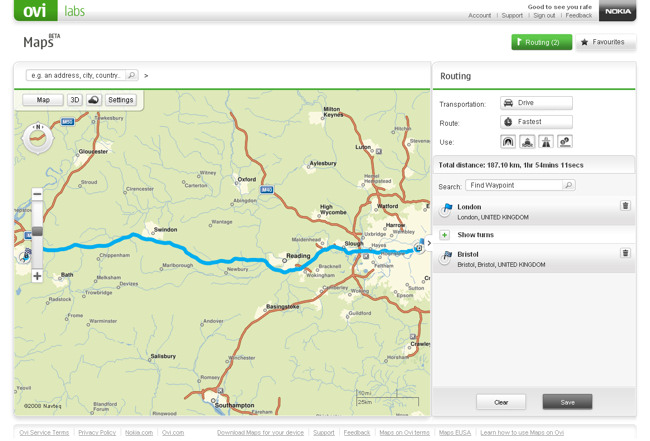
The new version brings improved integration with the browser-based Maps on Ovi. You can now plan a route using Maps on Ovi in your PC's web browser and, once you have saved the route, it can be synchronised to your phone. This is in addition to the existing landmark/favourite synchronisation.

sync with maps on ovi      sync

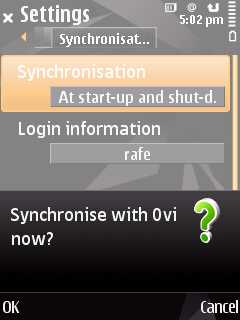
Nokia Maps uses the Ovi single-sign-on username and password. Synchronisation can be set to take place automatically every time you start and close Nokia Maps or you can choose to manually sync.
 

route   pointmeto

It is generally much easier to plan routes (especially complex ones) on the PC, before viewing and using them on the phone. Another useful addition is the  'Point me to' function, which shows you in which direction a selected landmark is on the maps, based on your current position.


Full details on the new version and detailed download and installation instructions are available from the Nokia Beta Labs web site. It is worth stressing that Maps 3.0 remains in beta and if you are looking for stability then you will be better served by staying on Nokia Maps 2.0. However, the new release does seem to be more stable than the initial release from early December 2008.

Nokia Maps 3.0 beta is now compatible with the following devices:
S60 3rd Edition Feature Pack 1 (E71, E66, 6110 Navigator, N95, N95 8GB, N82)
S60 3rd Edition Feature Pack 2 (N96, N85, N79, 6650, 6210 Navigator, 6220 Classic, N78)

Rafe Blandford, All About Symbian 9 Feb 2009


Filed: Home > News > Nokia Maps 3.0 beta updated

Platforms: S60 3rd Edition

Categories: Software

News Discussion

Unregistered
I wonder if the maps coverage of Japan is now better than before. Can anybody look that up? Is it still the crappy 3MB Map for whole Japan where Tokyo consists just of a couple of streets or is there improvement?
Unregistered
It crashes at startup after checking for updates for my N95 (RM-159, 31.0.017). The window appears that "Install Maps 3.0 to get the most advanced mobile navigation features and update your...etc." but the two buttons Cancel and Download are inactive. The app, however, doesn't freeze since I can close it properly. :) Any suggestion?
dougalzene
N82 install errors...

Error (on phone): "Unable to install: component is built-in", then
Error (on Nokia Maps Updater): "Cannot uodate the maps application. The installation failed or was cancelled on the phone (18)"

Nokia N82
v30.0.019

[which is being experienced by others - http://betalabs.nokia.com/forum/topic/648]
Rafe
Sounds like beta-itis is alive on the install process. If you get past that things seems quite smooth to me (the performance is very impressive).
chilko
after re-install works fine on my n82. i even synced some barcelona poi to prepare for mwc :)
Liquid_Li0n
My E90 simply reboots when the loading bar of nokia maps is 100%

But after reboot I tried again and it opened like it should, at first view, it really looks like the 2.0
Unregistered
Can I have both versions Maps 2 and 3 beta installed at the same time? I would like to try the 3, but don't want to get rid of the working version 2.
N/A
Not on the same phone. So, if you want to try v3 without risking v2, you need to get a second phone where to play with v2. Of course, you can always reformat the phone to get back to the original version with the phone firmware.
snoyt
Anyone comments on the stability. Is it reliable/stable enough for non-commercial usage. Is it safe? No turn here left, where there are no roads?

Cheers,

snoyt
snoyt
Quote:
Originally Posted by dougalzene View Post
N82 install errors...

Nokia N82
v30.0.019
Time to install the lastest firmware. We are already at v31!

Cheers
buglawton
I'd also like to hear about a decent map of Japan, I have a trip planned and with their unfamiliar language it would be an ideal navigation tool as a tourist.

Plus, what about the N78 - does this mapping work for any S60 or all 'n' series?

(I am finding the Yahoo! Go mapping for UK a great stopgap but it relies on a packet data connection, no hope of that in Japan).

Full thread: 11 Comments / Post New Comment

Search

Navigation

Social

Advert

Translate

Also All About