BBC iPlayer for S60 goes live... with caveats

Published by Steve Litchfield at 14:02 UTC, October 1st 2008

It seems that the BBC's version of iPlayer for S60 has gone live, download it here. It has been implemented as a web runtime widget that kicks off streaming in RealPlayer. And it's also, naturally, a bit fussy about which devices it installs on. It seems happy with the N78, N95 and N96, obviously, other success stories welcome. Screenshots and more comments below... [updated with photo of iPlayer running side by side on N96 and E90]

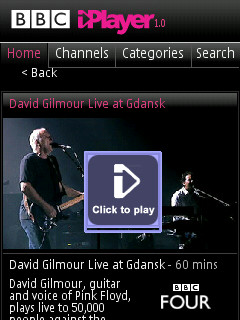
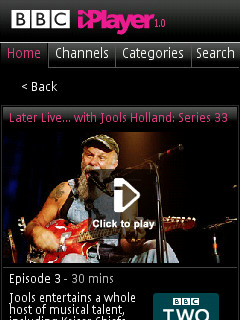
The iPlayer application / widget opens a mobile version of the main iPlayer site. A number of shows are featured on the front page or you can browse for shows via channel or category. There's also a search function for tracking down shows by name.
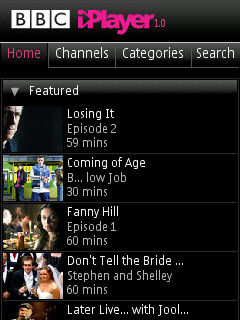
iPlayer    screenshot

sc  iPlayer  iPlayer

Shows are streamed to Real Player (you may need to set the access point for the Real player application). Shows are shown in a letter box format as the aspect ratio of the phone's screen is different to that of the the video stream.

You can stream shows over WiFi or over a strong 3G connection.

The other caveat is that the use of RealPlayer streaming means that it won't work for some over Wi-Fi, depending on firewall and router settings.

Please also note that iPlayer will only work in the UK.

Steve Litchfield and Rafe Blandford, All About Symbian, 1 Oct 2008

PS. Thanks to Andrew H for the heads-up

Thanks to Nick Anstee for the following photo:

N96 and E90


Filed: Home > News > BBC iPlayer for S60 goes live... with caveats

Platforms: S60 3rd Edition

Categories: Software

News Discussion

Jaggz
Works a treat! No, it's not as good as the iPhone version - 132,000 pixels verses 56,000 pixels. But hey, it's still the best mobile TV service in the UK, besides Slingplayer of course.

James @ Nokia Creative
entwisi
Installs on e90 but when running it I get a script alert about user agent not recognised. doesn't do anything beyond that
Nexus1974
I tried this on my N95 8GB using the Contract Internet profile via Vodafone, Realplayer complains there is not enough bandwidth over the 3G connection.

It works however if I set the Realplayer connection to use a local Wi-Fi connection.

Hopefully this will be resolved soon.

Does anyone know if the is a Vodafone firmware issue and if unbranding would help or really due the bandwidth provided by 3G and that used by the iPlayer.
JonWill
Doesn't seem to work on the E71 - get:

Sript alert:

device: user agent not recognisedmozilla/5.0

and then some more stuff ....
Unregistered
According to your first screen shot some of the content looks a bit dodgy. Especially the "Coming of age" episode!
Unregistered
Getting a "Sorry, television programmes can only be watched over a wifi connection" message when I try to stream a show ...
E Van Patrick
Won't work on my N82 with firmware 30+. Script alert: device: user agent not recognized? So much for Web Run Time...
Unregistered
Just open the Widget as a ZIP and look for the JavaScript files...

Search for the User Agent of a supported device or the error messages in the *.js files... Then just edit the Javascript to include the UserAgent of the device you want to use it with!!

Works a dream on my e71 :)
Tzer2
The "wi-fi only" message is apparently a deliberate action by the BBC to try and avoid overwhelming the mobile phone networks. Macwhu's N96 blog mentioned it I believe ( http://hellon96.tumblr.com/ ).

The story goes that the PC version of iPlayer takes up a huge proportion of UK internet traffic because the familiar brand name of the BBC has encouraged so many new people to try watching TV online. If the same thing is repeated on mobiles (so they say) it could cause havoc with mobile bandwidth availability.

BTW as far as everyone knows this is a UK-only service, with no subscription possible? Or can people overseas pay to access it too?
ajck
NOTE: It's not an S60 app, it's a Nokia Web Runtime (Nokia widgets) file, so your firmware needs to have WRT installed for it to work.

I'm currently hacking the code to work on more than just the n95, n96, n78 - the reason it only works on these is because these are the only user agent matches coded into the script. I hope to post a quick and easy fix shortly. Not sure what handsets can have WRT tho - N82, 6220, e71, e90, any others?

Alex
phonething.com
Robg79
Got an n958gb.

Iplayer launches. Access point defines. Clicks on a programme from the list. Then same list appears but with a white background and nothing happens when programme is clicked on.

Anyone else with similar problems? Any solutions?
Twm Davies
Web runtimes makes it easy to reverse engineer any protocol. Should be pretty straightforward to create a S60 native app if needed.
Unregistered
work's perfect on my n95 with old firmware v21(this is fab).
Berty
Can't get it to install on my E71. Anyone of you tech blokes are welcome to be my new best friend if someone can fix it to work.
Tzer2
Berty, if you look further up in this thread you'll see someone giving pointers about getting it working on an E71 (or any other S60 phone), it's the post about editing the javascript file.
Berty
Seen that yes, but don't really follow what it means, I've opened the wdiget with winzip, found the JS files, not sure what to do from there!!
Unregistered
Can you share you modified version that works on the E71??
Tzer2
Berty, ah, well, the problem is I don't understand it either! :-)

Hopefully they will open the official version up to more models before "unofficial" versions of the iPlayer flood the internet.
ajck
To work on other handsets than n95, n96, n78:

Download the iplayer.wgz file. Rename it so it's called iplayer.zip (you might have to get Windows to show you filename extensions). Or, just open the .wgz file in WinZip or another archiver.

Extract all the files, in their folders, so you have a top level folder called iplayer, with a subfolder called iplayer, then in that, folders called css, img, js and some other files.

Open the file in the js folder that's called app-min.js - you can open in NotePad, don't use a word processor, and make sure word wrap is off in notepad.

Search for the text "n95" until you find the text: (n95|n96|n78)
After the "n78" add another vertical bar (above the \ key on a keyboard, next to the left shift key), then the user agent for your phone, which is usually just the model number, in capitals, so N82 or E70 or E71 etc, so the text now looks something like (n95|n96|n78|N82)

Save the file. Re-zip the top "iplayer" folder so you have iplayer.zip again (prob delete old archive 1st). Don't use Windows built in zipper (right click folder, send to zip archive) - unsurprisingly it doesn't zip properly and the file won't install. Use winzip, or I used jzip from http://www.jzip.com

rename the archive to iplayer.wgz and install via PC suite app installer as normal.

Note, there's stuff in the script so it only works on phones over a wifi connection (i.e. phone has to have wifi, and you have to select that connection when you run the app). So, you can install on a 6220 Classic for example with user agent "Nokia6220c" but watching progs displays a wifi only message.

Alex
phonething.com
slitchfield
It's OK to give instructions for others to customise the install file on their own setups, but please don't post re-compiled versions of the widget here. I think that strays too far down the warez road, even though this isn't a commercial app.
Unregistered
OK, I have it working over a 3G data connection on a 6220 Classic - no wifi needed!
Rather cool!

One prog was very stuttery, rebuffering every 10 secs or so for a few secs, another however played just fine.

It was a very small edit to the app-min.js file (as mentioned in ajck's instructions above)

Not terribly sure if I should post instructions as it will hammer the 3G networks ....

Hmmm.....
cirrus
While I am very thankful that the Beeb has made an iPlayer app for S60 (even if it is only a widget), I'm a bit disappointed that they limit it to particular models based on the user-agent string. Especially given how easy it is to circumvent (see previous posts). Seems like an utterly pointless restriction to me.

I can totally understand if they don't want to officially support models they haven't tested or which, for one reason or another (lack of WiFi, varying video playback performance etc.), can't be guaranteed to deliver the best experience. However, all it takes is a disclaimer to say something like "Has only been tested on models X, Y & Z. May work on others but use at your own risk". On the other hand, actually attempting to deliberately block any other device as they are doing is silly IMHO. Not only does it risk locking out users who have perfectly capable devices, it's also a maintenance headache for the developers: Everytime a new S60 device comes out they will need to test and add it to the "supported" list. And given that they seem to do the checking locally inside the widget that would presumably involve releasing an updated version of the widget each time! Alternatively they don't bother doing the updates, but then the widget will eventually become unusable when the currently supported phones are replaced by future models.

It's like the bad old days of the Web when some (poorly made) websites used to check your browser / OS / screen-resolution and actually refuse access if you weren't using the "right" ones. As new browsers (or versions of existing ones) came along that were more than capable of displaying the site they were still locked out unless the webmasters bothered to update their scripts. I thought we had put those times behind us...
Unregistered
I can't get this to work on my VF branded N95 8GB with V20 firmare. When I try to install the wgz file I am directed to finish the installation on my phone but nothing else happens. Do I need Nokia Widgets installed on my handset first?
Berty
Quote:
Originally Posted by Tzer2 View Post
Berty, if you look further up in this thread you'll see someone giving pointers about getting it working on an E71 (or any other S60 phone), it's the post about editing the javascript file.
Quote:
Originally Posted by ajck View Post
To work on other handsets than n95, n96, n78:

Download the iplayer.wgz file. Rename it so it's called iplayer.zip (you might have to get Windows to show you filename extensions). Or, just open the .wgz file in WinZip or another archiver.

Extract all the files, in their folders, so you have a top level folder called iplayer, with a subfolder called iplayer, then in that, folders called css, img, js and some other files.

Open the file in the js folder that's called app-min.js - you can open in NotePad, don't use a word processor, and make sure word wrap is off in notepad.

Search for the text "n95" until you find the text: (n95|n96|n78)
After the "n78" add another vertical bar (above the \ key on a keyboard, next to the left shift key), then the user agent for your phone, which is usually just the model number, in capitals, so N82 or E70 or E71 etc, so the text now looks something like (n95|n96|n78|N82)

Save the file. Re-zip the top "iplayer" folder so you have iplayer.zip again (prob delete old archive 1st). Don't use Windows built in zipper (right click folder, send to zip archive) - unsurprisingly it doesn't zip properly and the file won't install. Use winzip, or I used jzip from http://www.jzip.com

rename the archive to iplayer.wgz and install via PC suite app installer as normal.

Note, there's stuff in the script so it only works on phones over a wifi connection (i.e. phone has to have wifi, and you have to select that connection when you run the app). So, you can install on a 6220 Classic for example with user agent "Nokia6220c" but watching progs displays a wifi only message.

Alex
phonething.com
I've tried all of this several time, the program just will not install on my handset. E71. Anyone have the finish article I can download?
Chris V
Hi all,

Wondering if someone can instruct me how to change the WiFi restriction on this.

I opened iPlayer and chose my hotspot and it shows up the "Sorry, television programmes can only be watched over WiFi" message. Is there a way to add 3G data connection into this by altering the app-min file? If so what do I need to do?

Please reply.
or email me at garag3 at gmail dot com.

Thanks

Full thread: 199 Comments / Post New Comment

Search

Navigation

Social

Advert

Translate

Also All About