
All About Symbian - News from the Symbian Ecosystem...

WalkingHotSpot trial available for download

Published by Rafe Blandford at 19:22 BST, April 21st 2008

WalkingHotSpot, the software that turns your phone into a WiFi hotspot, is now available for download and there are some exclusive screenshots and preview thoughts below (the break). This means you can share your 3G data connection with other devices over WiFi. The obvious use for this is with a WiFi enabled laptop when travelling. The current version is intended as a trial to showcase the technology; the full version will be made available through carrier channels.

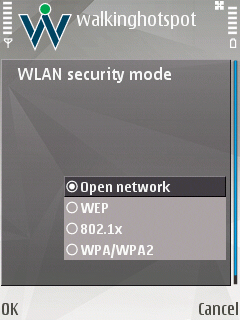
The basic version (the trial download) allows you to use the software with one connected client device. This is great if you are just looking to use the software with a single laptop. The software lets you name the hotspot as you like and set security settings (WEP).

In use, the software should provide 2 or 3 hours of usage, understandable it is a power intensive application. In my tests WalkingHotSpot was stable and trouble free -  it is impressive to see the first release of the software so mature. TapRoot, the developers, have been around the Symbian world for a long time and they are intimately familiar with Symbian networking internals.

Screenshot Screenshot

WalkingHotSpot turns your phone into a WiFi hotspot. It uses a cellular data connection (GPRS, EDGE or 3G)
to provide Internet connectivity to WiFi client device.
Screenshot

The settings include the ability to use a secure network, change the
hotspot name and use different power levels (conserving battery life).

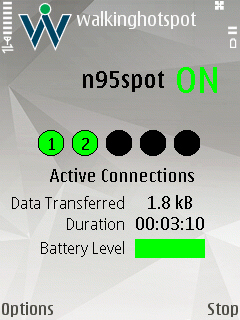
The full version (which will be available via operator partners) has a number of extra features, including support for multiple connected devices (e.g. imagine sharing one phone connection with 5 laptops when in a business meeting). There are also more advanced settings, including the ability to display extra information about the connection, and more advanced power (automatic turn off at low battery levels) and connection (auto connect) management features.

Here are a few screenshots from the advanced version showing the software running with multiple connected clients:
screenshot wlkainghotspot screenshot screenshot walkinghotspot

During testing I didn't have 5 laptops to hand, but here's a picture showing a laptop, an E51, N95, E90 and iPod Touch, all using the connection provided by WalkingHotSpot, running on the N95 8GB (left hand side):

WHS

The set up proved to be very stable, though will use more power (mainly because more devices will use more bandwidth).

You can download the trial software from the WalkingHotSpot web site.

Here is an extract from the press release:

We are very excited to see the level of interest and positive response from people around the world to our WalkingHotSpot announcements. This demonstrates the need for a true carrier-grade product developed and supported by a group of seasoned professionals. This level of interest also shows a significant demand for consolidated anywhere, anytime, any-device connectivity. Our belief is that WalkingHotSpot provides the solution to leverage existing 3G infrastructure and smartphones already in the marketplace said Bob Bicksler, TapRoots CEO.

While we are releasing a free trial version of the WalkingHotSpot solution, it is important to understand that the feature set we are releasing will not compete with products offered by our carrier partners Mr. Bicksler added.

The carrier version of the WalkingHotSpot solution supports multiple devices simultaneously through secure connections. The application is specifically designed to be power-efficient, robust and end-user friendly. The solution is commercially available for immediate implementation in carriers networks.


Share This (Digg, del.icio.us, Facebook, etc.)

Categories: Software
Platforms: S60 3rd Edition

News Discussion

Unregistered
While the WalkinghotSpot software does all that this article points out and very well, It DOES NOT support Infrastructure mode. It will only work in AD_HOC network mode. This is due to a chipset limitation in that most cell phone wireless chipsets do not support infrastructure mode.
Unregistered
No link for me. I filled in everything correctly.
Rafe
Quote:
Originally Posted by Unregistered View Post
While the WalkinghotSpot software does all that this article points out and very well, It DOES NOT support Infrastructure mode. It will only work in AD_HOC network mode. This is due to a chipset limitation in that most cell phone wireless chipsets do not support infrastructure mode.
That's absolutely correct - sorry about the mistake (that'll teach me not to check things properly). I have corrected the article. (Note that if you do change the WLAN Network mode to infrastructure it will not work). See the user guide for more details.
Unregistered
I take it that the WPA option comes with the full version, as I only get Open or WEP as my security modes?
Ratkat
I can get my laptop connected no problem via my N82, but my iPod touch and E51 connect to the access point, but then give 'no gateway' errors when trying to access the net.

I realise I can only connect one device at a time, but are there any other setting I need to add for the ipod touch and E51 to use the N82's 3G connection via wlan?
Unregistered
Quote:
During testing I didn't have 5 laptops to hand, but here's a picture showing a laptop, an E51, N95, E90 and iPod Touch
maybe not 5 laptops but just the toshiba r500 comes in handy at a price tag of 2500+ euros. All gadgets together are worth about 5000 euros. so in love with shiny new toys, its unnatural.

but anyway, what i miss in your review is the comparison between the "walkinghotspot" and "jokuspot"
Peter321
Works fine on my N95 and iPod Touch (firmware 1.1.4)

No special settings needed. Nice that it supports all protocols unlike the current version of JoikuSpot.

This means I can finally use my iPod Touch much like an iPhone, with all web features working at 3G speeds (Mail, Google Maps, YouTube, etc.).

However I'm wondering if the only limitation to the trial version is the features or if it will be disabled in the future?
Unregistered
This is absolutely awesome!! What an amazing application.. I love it!
jah
Has any one managed to get this to work with the EEE PC with an E90 or E51?
riverboat
Whilst my other devices, "see" this connection, my psp doesn't. Can anyone offer any help to get PSP slim (3.90 m33-2) to find and use this connection.
Don't need much, just like to update PRess psp rss reader whilst on the go
Menneisyys

Full thread: 11 Comments / Post New Comment

Close
  • Social Web
  • About

You can use this widget to send bookmarks or notes for this page to your favourite sharing / bookmarking service. You will need an account at mnay of these services and may need to log in to use them.

Copyright Notes || Contact Us || Privacy Policy