
The N95's camera quality? It just got better...
Published by Steve Litchfield at 8:28 GMT, December 3rd 2007
Some commentators have reported that the camera photo quality on a Nokia N95 that's been updated to v20 firmware is worse than on one that still runs v12 firmware - I disagree, and here's why: the N95's camera is now capturing an image that's closer to real life and not presenting an artificially sharpened view of the world. Read on...
Taking an image with a digital camera is a tricky business. Of course, it was always tricky with traditional film as well, but the difficulties are mainly different. We'll leave aside the focussing and light gathering side of things here, as we're looking at comparing performance from two identical bits of hardware, but suffice it to say that the Carl Zeiss lensed camera in the Nokia N95 set a very high standard in the smartphone world and one that is only just now starting to be beaten by other flagship models.
So the CMOS sensor and electronics in the N95's camera has done their job and presented a raw image to the phone's processor and Camera application. What happens next is that the image is resampled, if necessary (according to the resolution chosen), colour corrected, if necessary (according to the white balance chosen) and so on, before being finally encoded as a JPG file on your memory card. In other words, there's a whole heap of computer processing between image capture and file creation.
Speaking to an industry insider, I've been told that there are distinct differences across the world in how users like their photos to appear. So, for example, those in the Far East prefer (almost unnaturally) vivid colours whereas in Europe we prefer something sharper but 'cooler'. Manufacturers know this and tweak their algorithms accordingly.
When the N95 first came out there was such a high degree of unnatural image sharpening (taking edges and detail and enhancing the differences between neighbouring shades) that the photos were almost unusable. This was soon fixed in firmware, although a bug meant that extreme image sharpening still got applied if you got ambitious and changed the Scene mode. v12 firmware fixed this and on the whole most people have been quite happy, image wise, with photos appearing gorgeously clear and sharp.
But the trouble is that these photos, although appearing 'real world crisp' to the naked eye, were all actually fakes. Which sounds a bit dramatic, but the sharpening and edge-enhancement algorithms produce detail that often isn't there in real life. For example, a red/blue on white lettered sign will have dark 'edges' added around each letter (see below, an example from the Sony Ericsson P990's camera, normally considered the best 2 megapixel camera phone) - the edges make the photo look clearer and 'better', but it's an illusion - as the N93-shot fragment underneath gives a perfect representation of how the sign looks in real life.
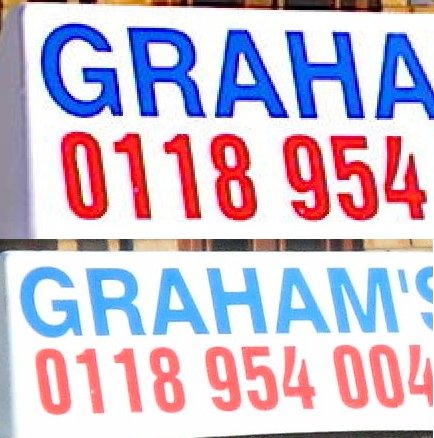
This is a dramatic example, but the same edge enhancement is at the heart of the sharpening that the N95 v12's camera software was prone to apply. At first glance the photos look superb but then you look closely, you compare them to real life and, if you're being very, very picky, you think "Hang on a minute....".
For the camera software in the N95 8GB, Nokia made quite a few changes under the hood. In addition to tweaks to the interface and much faster presentation of the final image, the amount of artificial sharpening was reduced (I'm speculating that part of the speed increase was that there was less processing to do?), resulting in more natural images that didn't appear as crisp to the naked eye.
The same software was then introduced to the Nokia N95 'classic' in its v20 firmware upgrade, to a negative reaction in some quarters. But, as I've got v12 and v20 N95s here at the moment, let's take a moment to demonstrate the change graphically. I should emphasise that the differences are VERY small, most folks wouldn't notice any difference whatsoever. But differences are there.
Take this indoor flash photo of a mantelpiece ornament:
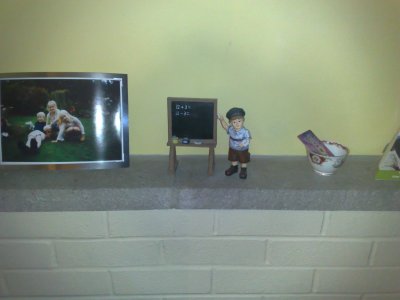
Zoom right in, and I mean right in and you can see a difference in how the edge of the blackboard is handled:
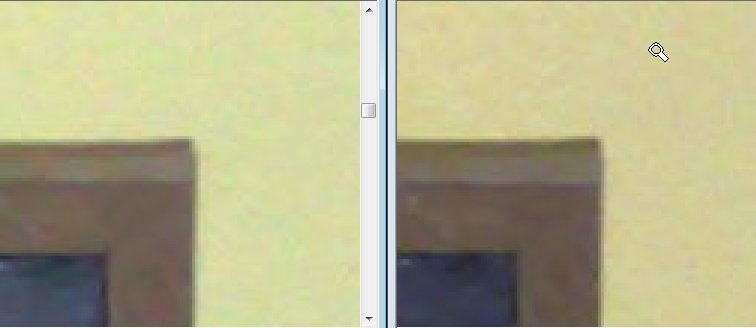
The detail on the right is from the N95 with v12 firmware, note the slightly darker edge and note the less mottled areas of solid colour in the left hand photo with v20 firmware.
Take another example, an extremely zoomed in detail from a garden scene. The rails of a child's slide in the medium distance, pure silver, should show up with very little 'edge':
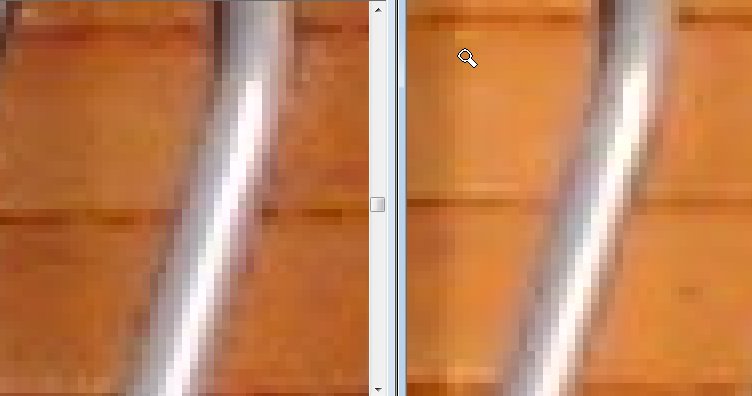
This time, the v12 N95 camera is on the left, and shows distinctly more edge enhancement than on the right hand image fragment, taken with the new v20 firmware. In addition, there's less mottling in the areas of solid colour.
By request (see comments below), here's a zoomed in sample from a sunny grass lawn:
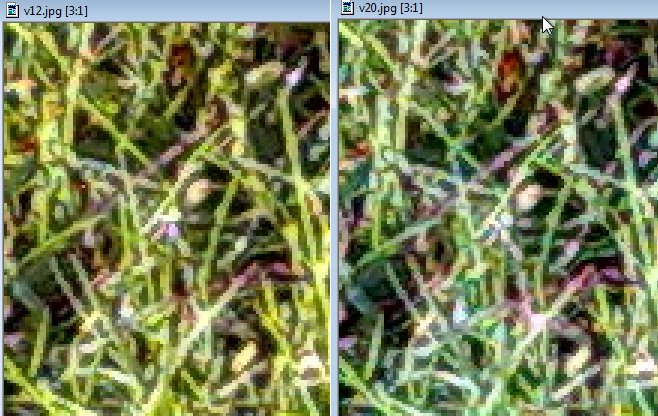
There's certainly less sharpening and less digital jagging with the new v20 firmware.
Give photos, at 6" by 4" size, or on a PC screen, from each firmware generation to a casual passer by and they'd probably pick out the ones taken by the N95 v12 as 'better'. Give the photos to someone prepared to put time into analysing the minutest details and they'd conclude that the v20 photos were better, especially if they had access to the original subject and scene.
Steve Litchfield, AllAboutSymbian, 2 Dec 2007
PS. Interestingly, the N95 8GB camera is different again by virtue of the main protective lens glass being exposed all the time (rather than being hidden behind a shutter) and subsequently picking up dust and finger grease. Even if you fastidiously wipe the glass on your sleeve or a handkerchief (well, not that fastidious then...) before taking a photo, the glass is simply not going to be as optically clean as on the N95 'classic'. If I had to grade the cameras in all three units, I'd say the N95 classic with v20 firmware produced best results, followed by the N95 8GB, and then the N95 with v12 firmware - but I cannot emphasise enough that we're talking tiny, tiny percentages and differences. If you're sitting there wondering that all the fuss is about then congratulations, you're not as obsessive as I am and you probably lead a more balanced life!
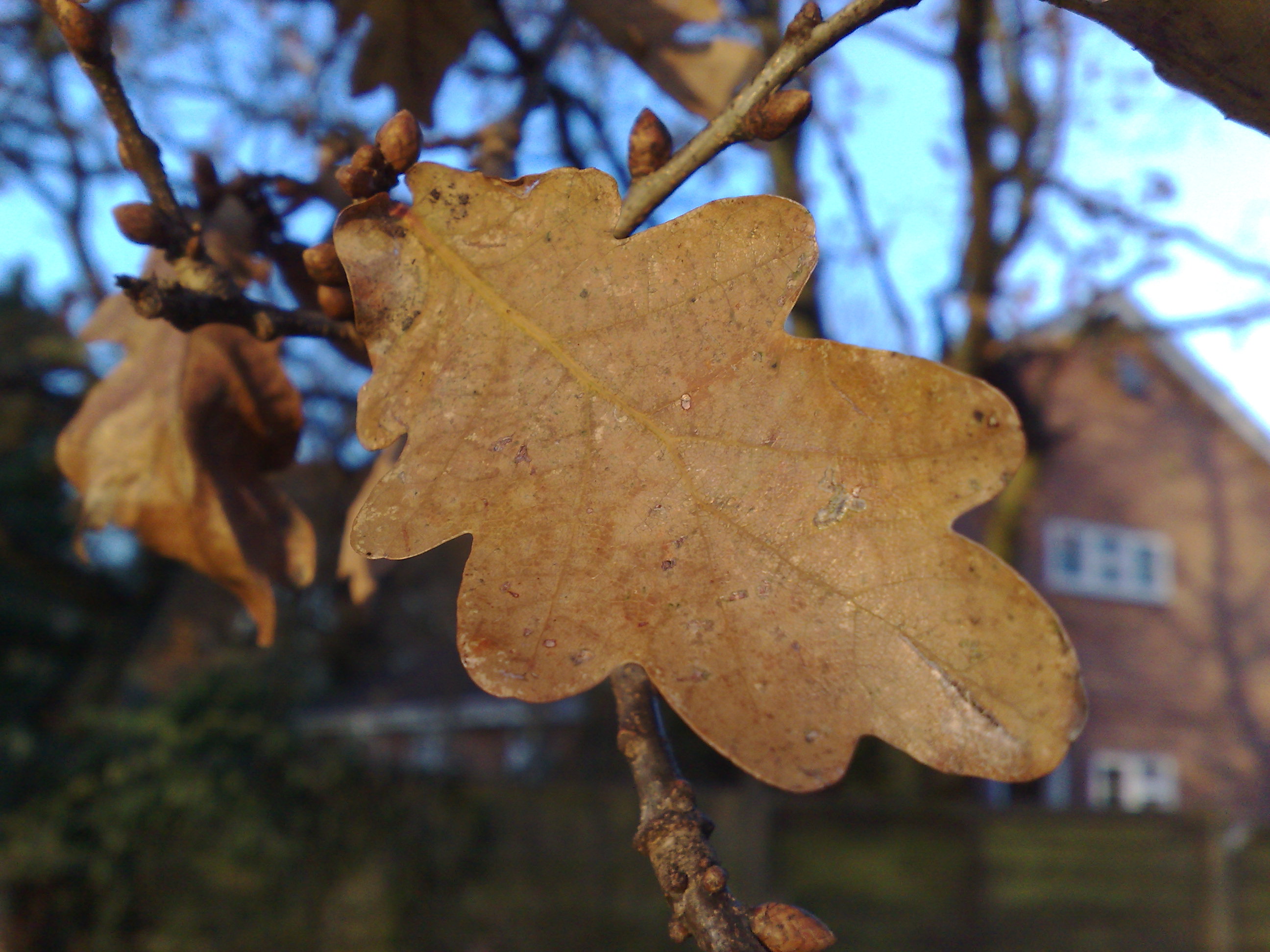
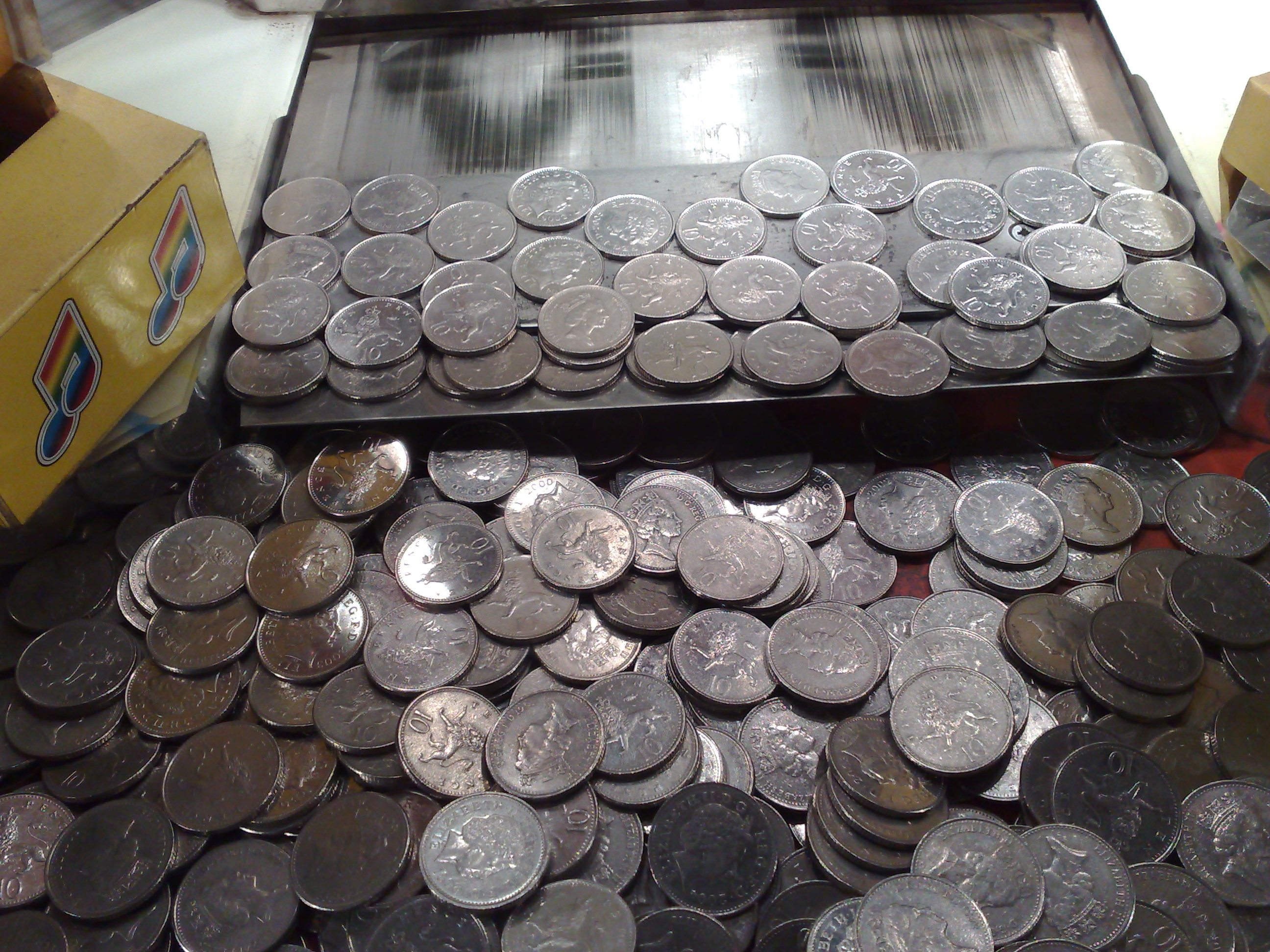
PPS. Just for completeness, a couple of images taken on the Nokia N95 with new v20 firmware. Click on each top open it full size, as usual:
Categories: Hardware, Editorial Thoughts
Platforms: S60 3rd Edition
News Discussion
snoyt.vox.com
Hi Steve,
Could you compare of V12 and V20 on a picture with lots of details, like a grassfield, or a leaved or pine(d) tree? I was wondering if they did improve the horrible compression factor? If you take a picture of a grassy field due to the compression lots of details disappear. Sometimes this is right out disturbing especially when printing on paper A4, A5 and even sometimes on A6 format. in I really wished I'd get a raw picture storage mode or at least let me tweak the compression setting.
Tested the DVSF on videorecording for the N95 classic. It adds another 15 minutes (21%) to my video recording time . Not to shabby ;-)
Unregistered
Good stuff Steve. The one thing to add is that the less DSP manipuation the camera does, the more scope is available to the photographer once the pic is downloaded onto photo software.
I mean, all the sharpening can be done by the photographer on Photoshop (for example) to suit the situation rather than pre-set by the camera at origination..
Guess Who
" If you take a picture of a grassy field due to the compression lots of details disappear."
It's not compression it's the p.o.s. mobile optics resolution limit.
slitchfield
Done, one grass comparison added above 8-) Comments?
krisse
Call me stupid if you like, but I really can't see any difference in any of those comparison pictures... :-(
slitchfield
Well, we know you're not stupid, Krisse! 99.9% of users won't notice a difference - or indeed care - but this feature is for obsessives like me 8-)
xerxes
I've noticed since upgrading to fw20 that the exposure on indoor shots seems to be a little slower.
Most of the pics I take are indoors and of fast moving objects (my kids!) and they always seem a little more blurred now. Then again, at least I can now usually take the shot before the subject has run out of the room!
Blurriness aside, fw20 is fantastic and has given my N95 a new lease of life.
N95-1
nice article! i was hoping that some good soul takes the time to compare V12 and V20 picture wise :-)
i do however disagree with the notion that a phone camera should stick to the most balanced and natural processing prossible. when using a phone-cam, i do expect to create pictures, that do not, and will not need to be post-processed and optimized afterwards, and that appeal and stand out "at the first look" for most "normal" people. if i want a technically most natural and unaltered pic, i take a SLR wirh me, and photoshop the hell out of it afterwards if needed...
so, i DO actually expect some appealing enhancements in a camera-phone, exactly because it's not a "professional" camera, but rather a gadget that's there to bring maximum fun to the average user.
Unregistered
Hi Steve.
That grass shot, can we get it in full size too instead of the zoomed?
Unregistered
As shown by the popularity of Fuji Velvia film in the pre-digital days, western eyes also like unnaturally saturated colours.
slitchfield
Email me if you want the full grass shots.... I think we're veering into geek territory!
Unregistered
If theres one word I describe the n95s image processing, then it would excess.
Excess image noise reduction. Nothing wrong with a little grain.
Excess edge sharpening but theres always been a sharpness setting in the camera so it wasn't a problem if manually changed.
Excess colors that are too vivid. Taking a picture of a building with the sun shining on it is no go.
Too much compression? Can't say as no conclusive proof either way.
Unregistered
Hi Steve,
Thanks for the grass image. But you actually took a great picture not having the issues I was talking about. Jpeg compression is designed to throw away image information that is mostly invisible to the human vision. One of the things jpeg does is reduce the color resolution compared to the intensity resolution as the human eye works. I took the picture below with the v11 software. You can see some interesting effects in it caused by overzealous jpeg compression:
http://a0.vox.com/6a00d41431a1786a4700d41431abf06a47-pi
- Just above the fence. Near the 'no admittance' shield. The yellow grass has lost all details. Part of the trees are blurry too. Some are detailed some are not.
- The shadow of the fence has lost its details. More that actually is lost in some other dark parts where there are more contrasts present. The codec is stupidly assuming we cannot see the darker differences.
These are typical also in the older converted youtube video's. Darkening dark areas to reduce video bandwidth. The blurriness is definitely not homogenous over the image. In fact looking at this image of a liquor factory ;-)
http://a4.vox.com/6a00d41431a1786a4700d4142d8d2c685e-pi
You can definitely see that the brick wall has patches of unsharp bricks.
Clearly the jpeg algorithm is aggressively trying to achieve a low jpeg file size where it should opt to maintain a certain image quality and go for a larger file size. This means whenever some object of interest is darker that a bright and detailed background object you in deep compost. Sometimes a grassy hill is left looking partly like a pool table. Allowing one to see the DCT blocks. Terrible a good compression algorithm should do this much smoother.
A high quality jpeg setting or a raw-mode would make life a lot sweeter. A good picture may take 5 seconds to store. If it's perfect. And let's be honest. Who does not own a 2GB memory card or bigger in his N95? So image files can be easily monstrous huge.
Do you think you can research this difference between the two firmware versions?
P.S. Great work in general. Send me teh gras pictures if possible to snoyt (a) hot mail dot com.
Unregistered
Hi there Unregistered post #14.
You're forgetting focus. Plus you should see what each of the 3 sharpness camera settings does to objects that are out of focus.
Dr Tran
There ought to be a RAW option. We have huge memory cards to store large image files. I dont see why its not an option.
Zeitgeist
"So, for example, those in the Far East prefer (almost unnaturally) vivid colours whereas in Europe we prefer something sharper but 'cooler'. Manufacturers know this and tweak their algorithms accordingly."
So, from this statement, should we understand that if you take your N95 (for instance) and change the product code to any Asia-Pacific one before performing a firmware upgrade, probably that firmware will be tweaked to different settings concerning, in this case, color temperature, bright, etc. ? Anyone around here has ever had the opportunity to confirm it?? Interesting however.......
I already suspected that people in Asia prefer brighter and more saturated color tones, looking at photos taken by themselves, but I had never thought that even the own manufacturer could consider a direct tweaking of the camera settings to better fit a specific region........
Unregistered
What one of you other unregistered people said about "excess" applies to pretty much every single digital camera that fits in your pocket. DSLR is the only way to go to avoid all the excess "blah blah". That's just how it is.
slitchfield
Can I make a general plea for people to bother to sign in before commenting? It would make a world of difference to have clear usernames or nicknames to refer to rather than having to keep talking about 'what Unregistered said' etc.
8-)
Unregistered
Steve, thanks for the pictures. I can report that it seems there is little difference in the jpeg compression between the firmwares. It does tend to do a too heavy compression in the shady parts. It is tricky to get the codec to ignore sensor noise and keep image details preserved. Still the ability to tweak the compression settings to a decent quality should be present in any decent camera.
Concerning the spam question. 1+1 is actually 10. Signing in really anoys me. I am dying in logins... I like Darla's solution best.
Al-Dallal
Dear Steve
With all the respect to you, this was the most terrible post you ever posted, you are talking about the n95 camera performance as if it was a professional 10mp digi cam, the n95 camera with its "Carl Zeiss" lens is no where near an average "low class" 5mp standalone digital camera specially in low light conditions, it is certainly the best camera phone exist, how ever i upgraded from my N95 to N95 8GB i still keep both of them waiting to sell the old one, i did alot of comparisons between them, i ended up with the conclusion that the N95 8gb really sucks and stopped using it taking random pictures because most of the pictures im interested in snapping are on low light condition, i really hope nokia will consider it and give us back a good camera performance with all the crap of "sharpness and unnatural" photo performance cause at least it makes the picture quality somehow acceptable for a mobile camera in all conditions, even though it becomes slower in snap shots.
Unregistered
It's a lot easier to sharp an unprocessed image than 'unsharp' a processed one. I'm rather glad they have ditched the mandatory processing. Would be nice if they made it optional tho, to keep those who like the artificial edges happy.
ltomovski
Why didn't you mention the focus phase
With v12 It took weeks to focus and a 60% chance the picture to be out of focus... With v20 the aoutofocus works great fast and focueses almost 100%
Regards
slitchfield
Hmm.... auto-focus seems about the same on my two units. I hadn't noticed a change. Probably some other explanation for your slow focussing speed previously? Ditto for focus. Although it's possible that they tweaked the focal length algorithms in terms of where the camera starts to 'hunt' for each scene mode.
Are you sure you didn't just have some dirt on the lens before? 8-)
deekdeekster
I took delivery of my N95 v1 with great expectations on Friday, but it's going back Monday. Camera is seriously sub-standard - plus the WiFi is clunky and the keyboard is tiny and difficult to use, but that's for another thread.
I come from an audio-visual background so I'm sensitive to these things, and I commend your article for it's depth, but image-wise, you didn't mention the video, which is equally bad.
At 5MP I've been judging the N95 up against my old 3.2MP Sony E and it's way beneath - the colours are washed out and the blacks grey-ish, you can particularly see that on natural shades, wood, leaves etc; and that is not just edges, it's colour fidelity. Sony Ericsson is Euro/Japan technology - I think this shows, because I certainly get good results in nature photos from the SE.
The firmware upgrade might well improve the photography but I sense that is not all we are dealing with. My Sony 3.2 plants 800-900k files on my 1GB card - the Nokia saves only 600-700k files, even at highest resolution, so the N95 compression is over-cooked. Like the previous guy said, with all that disk space, give us the option for raw. The focus is also temperamental. Sad, really, because I was totally ready to jump ship and return to Symbian - a missed opportunity, there, Mr Nokia.
Check out Flickr for comparison photos:
http://www.flickr.com/photos/deekster/mmoonsamy
Full thread: 28 Comments / Post New Comment