All About Symbian - News from the Symbian Ecosystem...

The N95 classic hits v20 firmware

Published by Steve Litchfield at 10:45 GMT, November 26th 2007

It's Out! Version 20.0.015 firmware for the Nokia N95 classic is now available via Nokia Software Update. This includes demand paging (!), so 30MB plus free RAM after booting, faster operation, N-Gage game store previews and portal stub, new camera software, integrated Search, new Welcome apps and more. Comments below!


v20!!! 


A Note on Firmware Updating 

Please remember that a firmware update will delete all data from your C drive (internal memory). You should back up your data. You may also wish to perform a sync with your PC to ensure any data you entered on your phone is on your PC. We also recommend writing down key settings (e.g. your email account information). 

You may wish to take the firmware upgrade as an opportunity to reinstall your applications (via SIS file) and data (via Outlook or SyncML sync) manually. This is generally a 'cleaner' method than restoring a backup (e.g. you may have manually installed Nokia Search version 4 [as it would be included in a backup], but is integral to the new firmware). We recommend you make a backup regardless of which method you choose.  

Changes in the new firmware

  • New Welcome application

  • New camera software and tweaks from the 8GB model - FAR faster shot to shot time, with 'Processing image message' during any delays. I suspect the image processing algorithms have changed too, to remove some of the remaining artificial edge enhancement in the v12 firmware.

  • Long press on camera button launches camera if shutter is open

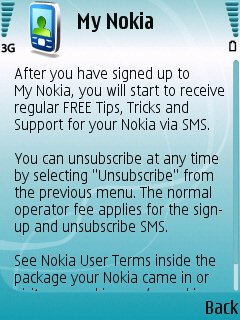
  • New My Nokia SMS tips and mobile web portal system

  • Demand paging (for ROM applications) with 30 plus MB free RAM after booting.

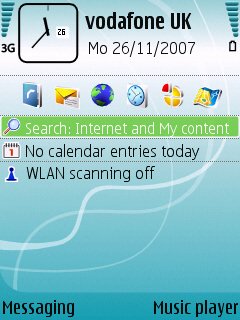
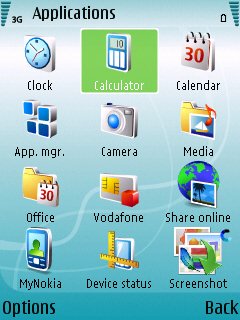
  • Search 4.0 integration on standby screen.

  • Old multimedia menu still there, i.e. it's not the new style

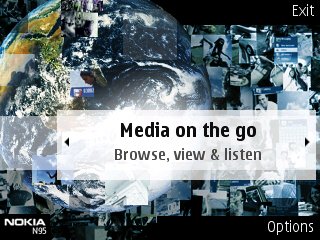
  • N-Gage game previews (FIFA, Asphalt) and portal/shortcut to upcoming N-Gage client, as in N81 and N95 8GB

  • Nokia Music Store client, although the store server hasn't been updated to handle the N95 yet - maybe this'll happen later today

  • Keypress bug gone(!), I think

  • Music player has a new visualisation and also remembers where you got to in a podcast, so you can pick it up again later on

  • No auto-screen rotation, looks like I was wrong predicting this, so we need Samir's RotateMe after all - someone please help him get this signed ASAP!
     
  • Assorted other minor tweaks, along the same lines as the N95 8GB, with video ringtones and theme animations


Screenshot Screenshot 
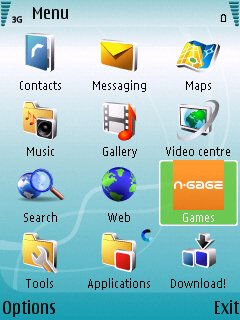
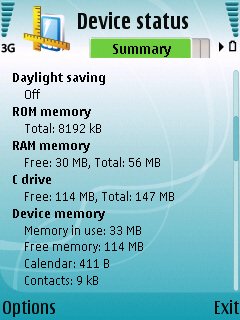
30MB plus free RAM, proving demand paging of ROM applications. Plus new default icon layout, including N-Gage shortcut
Screenshot Screenshot
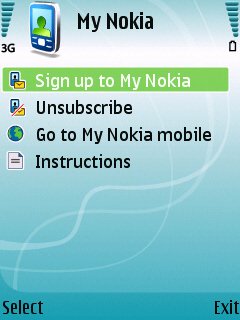
Search 4.0 now integrated into standby, plus new Applications menu, including MyNokia 
Screenshot Screenshot 
More on My Nokia...

Welcome app
Is this Welcome app totally new? If not, then they've certainly made it more prominent on first startup and given it a facelift!

Steve Litchfield

Share This (Digg, del.icio.us, Facebook, etc.)

Categories: Hardware, Editorial Thoughts
Platforms: General, S60 3rd Edition

News Discussion

freexzcadely
OMG!!! Thanks for the info.will update soon.
mmarks
My work will just have to wait for today - This is far more important!!!!!
hiteish
any news to which all product codes it is available??
Unregistered
any chance for demand paging on e61?

Nokia seems to forget us, users of this great phone
Unregistered
At least four months before I get to see it on my T-Mobile N95.
Taomyn
Yay it's available for mine - just wish it was a bit quicker to download it *yawn*
Unregistered
Available for Polish product code (EURO 3)
Jimbob1989
Can the N95 play youtube videos in the web browser after this update as rumoured!?
sjhong
Mine was bought at the flagship store in Chicago. Not available yet...
jinx405
hey guys... anyone try this with the APAC (058433 i think) product code yet??? does it work??

thanks!
Unregistered
Have fun losing the START TRACKING feature in the maps section you suckers!
Steve_R
Confirmed on EURO1 code here. 30.7 MB RAM free on startup.
ocifant
Ok, I'm in the ranks of the jealous. UK T-Mobile here, though hopefully it won't be 4 months. On past performance closer to two...
Unregistered
Not available for my Nokia 95 (RM-159) product code 0548986 - still at 12.0.013 - got my hopes up....what gives?
Steve_R
OMG, the camera app is soooo much faster now! Well done Nokia for this one.

Surely it cant all be good news though.... there must be a sting in the tail somewhere......:rolleyes:
neilhoskins
This has obviously been on the way for a while, but the size of the task is just becoming apparent. I've just been writing a list of things that will need to be re-installed, so I need to check that I've still got download urls, regcodes, etc, plus I've got to make a note of some items. So far I've got:

WiFi settings
Handy Calendar
Calcium
'Conversation'
Truphone
email settings, including gmail
y-browser
podcast app + details of feeds
Handy Taskman
Sports Tracker
Wwigo
Sloved French/English
LCG Jukebox, including radio streams I've added
Flickr Zonetag
Google Maps
3D Tracking

I may or may not re-install:
moving ball/lightsabre
wireless keyboard app (it's the wife's, but I use it sometimes)
Shazam ID
Quake
Speccy
Freeflight
Trivial Pursuit

This is at least half a day's work. As we're getting more and more into the realms of "multimedia computers", it's becoming obvious that this is a bit of a design fault. Imagine having to do a complete re-install every time Microsoft released a Service Pack.

Oh, and a quick note for "unregistered" with the bee in his bonnet about Maps: try pressing '0' in Maps, or install Google Maps.
neilhoskins
Plus Gallery/RealPlayer Streams.
And Bookmarks and webfeeds.
neilhoskins
And Flickr upload account settings.
neilhoskins
And re-tune the FM radio.
Unregistered
Quote:
Originally Posted by neilhoskins View Post
Oh, and a quick note for "unregistered" with the bee in his bonnet about Maps: try pressing '0' in Maps, or install Google Maps.
Wow, thanks for that totally useless information! 0 only takes you to the current GPS locked position. It's not "START TRACKING" that Nokia screwed it's users over by removing.

As far as installing Google Maps, the problem with that is you have to add a data plan for that to be useful at all on the go. And if you're paying for that, why not pay for the Nokia Maps at that point.

*edit*
Also, Steve, or whoever runs this site. My spam question was: What is 3 x 3? which is 9. But it didn't take that answer.


iPodTouchFan
FIRMWARE V20 CHANGELOG:

* Mobile YouTube videos play smoother than before, however, video quality isn't that great though, when compared to the experience I get from viewing on my iPod Touch.

* Images & Videos load lightning fast in gallery and I'm able to scroll through them like hot knife through butter, literally!

* Camera app is definitely way faster

* Key-press bug is gone

* Integrated Search function is extremely useful!

* All applications load faster. In fact, I find everything works way faster; OS is way snappier (the way it should be!)
* [I thought it'd be interesting to point out that the App. manager loads a lot quicker]

* Also, I like how the menu has been cleaned and tidied up; less 'free' icons cluttering up screen and most of them organised into folders --> Overall more user-friendly

* The biggest thing to note! is that when you slide your N95 to landscape mode from portrait 'standby' screen, the multimedia menu NO longer automatically opens now! So that's something really cool indeed! :)


(To be honest, I was really upset after upgrading to firmware v12... when major flaws started to appear, e.g. keypress bugs, slow app launch but now, am pretty happy with what Nokia has done with the latest firmware. Props to you, Nokia!)

One thing I find annoying, however, is that every time you require access to the network via wi-fi, you have to manually key-in password... It refuses to remember what you've keyed in before!
Enfors
N95 owners, enjoy these firmware updates while they last. Soon you probably won't be getting anymore. Look at us N93 owners - we bought what was then Nokia's flagship phone, which stopped receiving firmware updates about 6 months after launch. We still don't have A2DP (bluetooth stereo sound), for example. And we still have a buggy firmware.
Liquid_Li0n
I hope all those updates will be seen shortly in a firmware upgrade for the E90 also because it will be nice if we could finally see youtube video's and etc...
Taomyn
Just to add to the information being gathered here, after my upgrade and restore from the Backup utility, so far I have noticed:

* Podcasts: lost all my subscriptions :mad:
* Y-Browser refused to auto-reinstall
* Moving Ball refused to auto-reinstall
* Theme not restored, had to manually change it
* PIN security setting not enabled i.e. after being locked was not asked for it and was reset back to factory 12345
* I thought there was a separate "Themes" icon in the menus, couldn't find it again.
* Mini-GPS, CorePlayer and Google Maps, although auto-reinstalled, will not run so need to re-install and see what happens.
* Most data seems to have been restored, including my WiFi/ISP access point data *phew*
* Much zippier :icon14:
* 29.5 mb free :icon14:
* Camera is *so* much quicker

I am very happy with the upgrade and the problems listed above make no difference to me and are reported here so as to forewarn future upgraders.
DKlaus
I've been staying at v11, mostly because I want to keep 'Start Tracking', but also because of the bugs that have been reported for v12.

With all the goodies in v20 I feel tempted to upgrade. So, is it possible to go straight from v11 to v20, or must I go stepwise via v12?

229 Comments / Post New Comment

Close
  • Social Web
  • About

You can use this widget to send bookmarks or notes for this page to your favourite sharing / bookmarking service. You will need an account at mnay of these services and may need to log in to use them.

Copyright Notes || Contact Us || Privacy Policy