
Nokia N95 in camera bug shocker...
Published by Steve Litchfield at 22:25 BST, May 27th 2007
Surely, I thought, gazing at the Nokia N95 on my desk. Surely, its camera can't really be as bad as I and other 'power users' have been making it? Indeed it's not, and it's all due to a bug in the N95 firmware.... read on below!
First of all, have a look at a close-up of my PC keyboard, shot on the keyboard with the N95's flash:
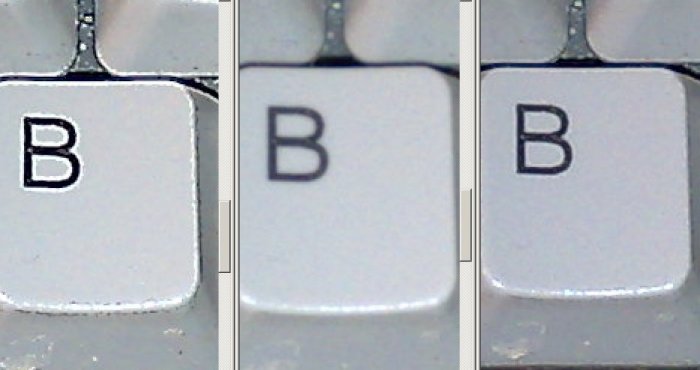
Notice the first close-up. Looks horrible, doesn't it? This is the typical massively edge-ehanced photo quality that 'experts' like myself have been decrying for the last month.
Now look at the close-up fragment on the right. This looks superb, just about right considering the subject and lighting, crisp without being artificial. Guess what? It was shot on the default N95 camera setting before any advanced 'scene' modes had been set.
It transpires that there's a bug in the N95's firmware (and I'm bang up to date with v11 etc.) whereby setting any scene mode (e.g. 'Close-up', 'Landscape') sets the 'Sharpness' to 'Hard', with similar results to the image on the left. And even setting the mode back to 'Auto' doesn't restore 'Sharpness' away from 'Hard'!!
The middle image was with the 'Sharpness' on 'Soft', by the way.
Now, the average High Street user picks up the N95 and shoots away and will have few problems with image quality because they don't know enough to fiddle with 'Scene mode' changes. So the problem isn't picked up by them and the N95's don't get returned in droves. Thankfully.
But the expert reviewer (hopefully including me) will experiment with the modes and immediately get hit by this bug, with the 'Sharpness' being quietly set to 'Hard' every single time and without notifying the user.
Grr..... Someone at Nokia/S60, please email in and confirm that this whopper is being or has been addressed in the next firmware - and get it out soon. Please.
At least now I know why a lot of my test N95 photos have been so relatively poor. With fixed firmware, the N95's camera can again be counted on as top of the heap.
Steve Litchfield, AllAboutSymbian, 27 May 2007
Share This (Digg, del.icio.us, Facebook, etc.)
Categories: Hardware, Editorial Thoughts
Platforms: S60 3rd Edition
News Discussion
slitchfield
Even more interesting, the same bug is present in the Nokia E90's camera - looks like it's embedded in the generic FP1 camera interface code....
NOKIA - over to you!!!!
Steve
Ratkat
You can just reset it to normal yourself using the Sharpness option in the toolbar, granted it would be better if the default was normal though.

Slartibartfast
It's a phone!
A "whopper" would be dropping calls for no reason (one pace forward the P990 there I fancy).
There are days when I expect this site to start giving us tips on nude B&W still life shoots before being merged with "SLR Monthly".
regards,
Slart.
p.s. Feel free to complain about the PIM apps - even though it's not a filofax either! ;-)
Ratkat
It's not a 'Phone'........it's what 'Computers have Become':)
2bb1
I get a new N95 in some days, so to avoid this problem, i should stay away from the sharpness-settings? That's all?
slitchfield
No, stay away from ANY of the scene settings. And I defend my reporting of this, the 5 megapixel camera is THE main bullet point feature of the N95 and this bug arguably ruins it.
Steve
PS. I can confirm, thankfully, that you won't be seeing Rafe, Ewan and I in the nude, in black and white or colour....
krisse
"It's a phone! A "whopper" would be dropping calls for no reason"
I'd agree if this was a reasonably priced phone, but the N95 costs 700 euros and the E90 costs 900 euros so I think people who put down that sort of money are entitled to expect bug-free camera software.
Ratkat
Steve, I can't see how you can say it 'ruins it'
90% of users will probably never touch the scene settings anyway as most use it for quick snaps
There are however two easy solutions.
1: Reset the 'Sharpness Setting' manually after you have a selected a scene setting.
2: Exit the Camera app, next time you enter it will be back to 'Normal Sharpness'
Krisse, I think in the N95's case, I am far more worried about its 'lack of operating ram' only 20mb at start up, which to be honest makes several of the key features including Web Browsing, PDF Reading, Image Editing etc etc, especially while trying to multi-task near impossible.
You'd have thought Nokia would have learnt its lession with the N80, E70 etc etc but it didn't.
No-one really expects a 'Camera-Phone' to replace a dedicated Camera, if thats what you want go and spend a couple of hundred quid (or less) on a 5mp digi camera it will take far better pics than a N95 or E90.
krisse
"'lack of operating ram' only 20mb at start up... You'd have thought Nokia would have learnt its lession with the N80, E70 etc etc but it didn't."
Actually, from talking to a developer at great length about this subject, I don't think it's about "learning lessons". There is no easy answer to the RAM problem, you cannot just add more of it and expect that to solve everything.
Apparently, the more RAM you add (as in RAM, not internal memory) the more power it draws from the phone even when there are no programs occupying it. The N95's battery life is already very precarious, so adding more RAM might make it ridiculously short even for people who don't use lots of apps at once (which I'm guessing is actually most people).
As I understand it, if you have phones with less features than the N95, for example the N76, they can afford to have more RAM because they have more power to spare, but they only have power to spare because they've given up certain features.
It's the same fundamental problem for RAM as for all other features: there's nothing technically impossible about making the processors much faster, the screen much bigger and brighter etc but all these things draw power and battery technology just isn't keeping up with the demands being placed on it. A direct example of this is Sony's PlayStation Portable, where Sony imposed artificial caps on the speed of the processor because if games used it fully then the battery life would turn to mush.
As someone on the Nokia blogs put it, mobile technology is developing exponentially but battery technology is only developing linearly.
That's why UMPCs have absolutely dreadful battery lives, they go all out for specs but completely ignore their purpose as a portable device to be used away from fixed power sources. In one interview with the Register recently, a UMPC maker flatly refused to even discuss their product's battery life.
Until a viable replacement for Lithium batteries arrives, we're stuck with these kinds of compromise solutions because a drained device has less functionality than a compromised device.
Pythonian
How does it look with nude B&W still life shoots at various sharpness settings? Could you perform some tests on the skin tone of Kate Moss? Regarding the comment about insufficient RAM, the Nokia Maemo devices have the option of using a flash card as an extension of built-in operating RAM (swap). Here are some Linux applications for Nokias: tuxmobil dot org/phones_linux_nokia_other.html
Ratkat
Comment: ......a drained device has less functionality than a compromised device
You can always charge a drained device or carry a spare battery, unfortuantly we can't add more RAM to a N95.
The point is where do you make the compromise, adding for example an extra 20mb of RAM would make small diference to battery life but would increase functionality, I'm not just talking Multi-Tasking here either.
Take for example the Web-Browser, at present if you are browsing a web page and you click on a link that opens in a new window, nine times out of ten the original window will automatically close. That is not a compromise, on the N95 that is a basic function rendered useless by a lack of RAM.
jukkaeklund
Steve, you might be on to something. I'll make sure this gets checked.
Note that Sharpness is always reset when camera app is started again.
khoolhandz
I'm having problem with my N95 too! I just got it last week.
Look at the pic and there is pixilated in purple and I don't know how to get rid of it.
ttp://i96.photobucket.com/albums/l162/khoolhandz/06072007002.jpg
gustavosoares
hi! interesting post...
iīve recently made my firmware upgrade to v 12.0.013 and fortunatly I havenīt face this problem...
One thing that I hadnīt figure it out is to change the default behaviour of the camera when I open the lens... I hate those automatic scene mode and everytime I use the camera I have to switch to the user pre-defined scene... thatīs sucks! Do you know if it is possible to change this behavious?
cheers,
Gustavo
Unregistered
what is currently better? N95 or Ericsson k850i?
as I was just told to stay away from the N95 and have this instead? it came today but Im curious for a opinion before registering it? best wishes. Jamie
Full thread: 15 Comments / Post New Comment