
All About Symbian - News from the Symbian Ecosystem...

Nokia release Podcast listening application

Published by Rafe Blandford at 17:31 BST, June 15th 2006

Nokia have released a beta version of their new Podcasting application for the Nokia N91 (it also works on other S60 3rd Edition handsets). It allows you to search for, browse directories of, subscribe to and download podcasts (i.e. it's a podcatcher). Podcasting is the provision of episodic multimedia content via RSS feeds (usually audio or video). Read on for screenshots and further details.


podcast  podcast

You can browse popular podcast directories (see above) or search for podcasts (see below). Search is provided by DigitalPodcast.com. In the settings of the application you can change the search service URL (the search appears to use an RSS format). You can also manually enter a podcast URL. 
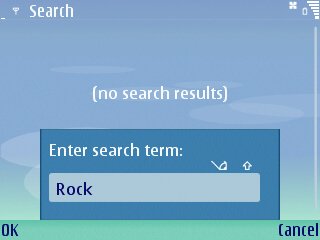
podcast search  podcast search

Podcasts can downloaded be downloaded in the background by the application. The default behaviour of the application is for manual downloads (user must select an entry within a podcast listing to download), but the application can also be set to download podcasts automatically at predefined intervals.

Within settings you can also specify the maximum amount of space you want podcast to use on your memory card.

Subscribed podcast are listed in the Podcast section of the application. Clicking on a listed podcast brings up a list of the episodes / shows available for that podcast. From here additional information about the podcast or individual episode can be viewed, downloaded podcasts can be deleted and downloads of individual episodes started. 

Audio podcasts are played back using the default Music Player application. The Music Player application includes control to fast forward and rewind through audio files (click and hold on the previous and next buttons). Video podcasts are played using Real Player. Content should be in a format the phone can read in order to be sucessfully played, although any enclosure will be downloaded. Supported formats (for out of the box phones) include MP3, WMA (on Nseries), AAC, AAC+, MP4 (limited codecs), M4A, 3GP, RA, and RV. 
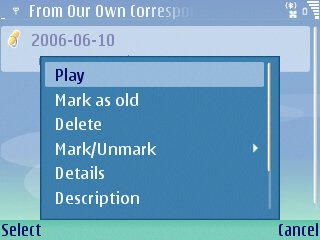
   playback


The usual warnings apply about large data download over cellular networks because of the potential for high costs (if you are not on an unlimited data plan). However the N91 and other S60 3rd Edition phones (N80, E60, E61, E70) include WiFi which is probably the best option to use when downloading large data files such as podcasts. 

Nokia have stated that future plans for the Podcasting application include the ability to not only listen to podcasts, but also to create podcasts .

Categories: Software
Platforms: Series 60, S60 3rd Edition

News Discussion

Enfors
I don't have a Symbian device yet (but I plan to get the Nokia N93 as soon as it becomes available), so this might be a silly question. Bear with me.

You mentioned that you could set the application to automatically download any new episodes from podcasts that you subscribe to. Would it be possible to set it to do this once per day, but *only* if a WiFi connection is available (3G would be too expensive)?
mudenza
Rafe, there was no mentioning of video podcasting...so does this only support audio podcasts?

Thanks

Steve
Rafe
It supports any format that the phone can handle. So yes it will support video podcasts provided the video is in a format the video can play. I imagine it will download anything thats put in as an enclosure.

I just tried a video podcast and it worked fine. Played in Real Player full screen.

Enfors - yes, in fact to use automatic download you probably have to set an access point (the default option is to ask each time). Might as well set this as your home wifi network - that way it will only use this for downloads.
bcm
> it also works on other S60 3rd Edition handsets

Refuses to install on Nokia E61.
Enfors
Quote:
Originally Posted by Rafe
Enfors - yes, in fact to use automatic download you probably have to set an access point (the default option is to ask each time). Might as well set this as your home wifi network - that way it will only use this for downloads.
Ok, that sounds good. But what would happen when I'm not at home at the time for the scheduled automatic download? Will it just silently and gracefully fail, or will it leave some kind of annoying message on the screen? I mean, if you're away from home for a few weeks, it'd be annoying to have to click "OK" on that message at the same time each day...

Sorry about the silly questions, but since I haven't got any Symbian experience so far (using a Clie UX-50 (PalmOS device) right now), I don't know how these things work on Symbian.
Rafe
bcm - works fine on an E61 here (as you can tell from the screenshots). You might try downloading / installing again? I installed via PC Suite (not that it should matter).

Enfors - I can't be sure without trying it out, but it will probably just fail gracefully. When you go back in the application there might be an error message (but it will probably just not do anything). I haven't checked to see whether the application auto starts / starts background process after a swicth off (and thus download in background).

Given the limited memory / usage scenario I imagine most people will open up the program choose a few podcasts episodes to download (manually) and leave it to it rather than do it automatically. You can download more than one at a time, and once you mark it for download you can swicth to another application and the download goes in in the background.
slitchfield
bcm - you need to go into Tools | Settings and open up 'Software installation'. First thing every S60 owner should do on their phone, IMHO.

Steve
jukkaeklund
Steve, Podcasting is not "self-signed" if that's what you mean. See my post for hints:
http://blogs.s60.com/s60multimedia/2...for_s60_3.html
steffi
Why doesn't the client work with say democracynow.org's podcast xml?

All I get is a red exclamation mark when I try to download an episode. It seems to parse the rss feed fine just cannot download the enclosures.

Also, this client needs to have the ability to import an opml file so that's it's easier to migrate feeds from one client to another.

? Does it parse itunes compatible podcast rss feeds?
Rafe
Steffi

I guess there are still some issues they need to check out. I seem to have done alright with some iTunes feeds (at least I tink they were iTunes feeds).
bjarke
This thing sucks up battery life like there's no tomorrow!

I charged my N80 this night. Woke up, battery recharged. Then i add some feeds, download some video podcasts(okay, i have been using a lot of it's WiFi) and the battery is low after 5 hours. (of constant wifi use, and video playback.)
jukkaeklund
bcm, you tried to download it with phone's browser? There is a problem in Nokia's site, it won't install that way you have to download .sis to PC and transfer to phone.

steffi, there is an option to import OPML file, look under Directories -> Menu.
N/A
Can't put my finger on the reason of the behaviour yet, but if you use the new S60 browser ("Web"), some apps do not install.

However, if the old browser ("Services") is used, instead, the same apps from the same URLs do install.
jukkaeklund
My guess, something to do with MIME type the server sends to old/new browser.
psharma
Hi All,
I have a Nokia N80
I have just downloaded podcasting software and installed using PC Suite.
All works fine other than under directories Digital podcast themes & digital podcast top 50 dont work they come up with red exclimation mark. the podshow works fine , i used it for Adam Curry Daily Source Code, works great.
I have checked digital podcast website no solutions .
Zlaja
Hi All,

I have question about podcast aggregator.
What is the type of the internet connection for Nokia podcast aplication?
Is it support connection to internet only via Wi-Fi or support GPRS or some else ?

Thanks in advance,
N/A
Cellular packet data (GPRS/EDGE/WCDMA) works as well as Wi-Fi/WLAN (if your phone has it).
Unregistered
I can no longer go into settings....the Podcasting->Podcasts->Options->Settings->Connection(or Download) results in the application crashing with the message 'App.closed: Podcasting E32USER-CBase 71'. Device is Nokia E61. I've tried uninstalling and then reinstalling the application but the problem reoccurs. (Question:) I'm wondering if a configuration or registry file is corrupt and remains after uninstallation.... is there something that I need to manually delete to do a full uninstall ??????????????????????? thanks mr_uu
afofddy
-.enjoyed reading this ,thanks
-------------------------------
Software
artdownload.net
continhadelixo
Hi, using my E61, I can get many mp3 podcast files, but a lot of them simply doesn't play. I've noted that about files with bitrate lower thas 128kbps.
Does anybody have any clue?
Thanks,
continhadelixo at gmail.com
steffi
Are you talking about the warning you get before you download the podcast or after?

If before, ignore that warning as those podcasts will play even though the warning suggests they won't.

Full thread: 21 Comments / Post New Comment

Copyright Notes || Contact Us || Privacy Policy