Ovi Maps 3.04 gets a minor update
Published by Steve Litchfield at 12:28 UTC, August 31st 2010
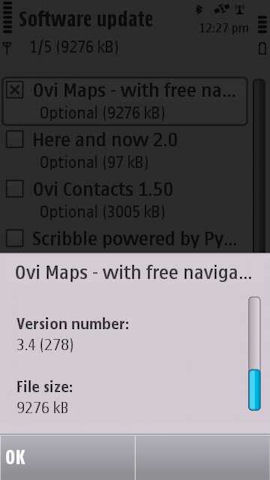
You may want to check 'Sw update' on your Nokia S60 3rd Edition or 5th Edition phone, as it seems that there's a pre-Nokia World 2010 update available for all phones, fixing minor bugs (including correcting and enhancing Nokia's Wi-Fi location system) and possibly preparing the way for additional services. It's a full 8 to 10MB update (depending on device) and installs over the air. There's no change in the basic version number (3.4) but the build number is (obviously) higher, now at '278'. More below.
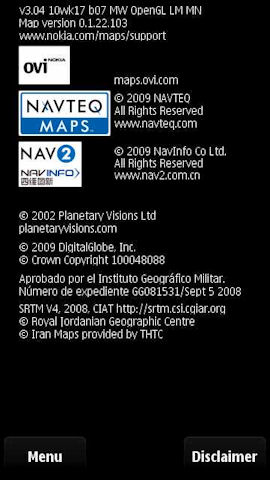
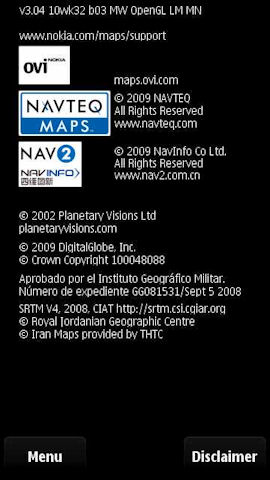
Here's an illustration of the update from Rafe's N97 mini, moving from '3.04 10wk17 b07' to '3.04 10wk32 b03' (don't get too hung up on these Nokia version numbers!):


With regard to the comment on 'Wi-fi/Network-based' (as Nokia refers to it) location, above, on the previous version of Ovi Maps, Wi-fi positioning was showing me as a mile away from my actual position. This time the combination of new software and better online Wi-Fi id database got my position to within 20 metres within a couple of seconds.

Steve, AAS
News Discussion
Unregistered
How is it updated from wk32 (which was recently) to wk17 (almost three months before...)
slitchfield
I did wonder myself. Have switched around - Rafe might like to double check/confirm?
malerocks
Steve, I think you were probably running an old version somehow. I already have the version showed in your right screensnap and its been ages since I have upgraded to 3.04.
Rafe
wk 32 is the latest version - built just over three months after wk 17. Apologes if I did not make that clear.
Look at the last number too - b07 to b03, presumably a minor build number or something.
Unregistered
My N86 always keeps the GPS on whenever i close the maps application after using it.
Any solution??
buster
Has anyone had any problems updating Ovi Maps on an E90 recently?
I keep getting a "Cannot get enough information about the phone" error, even though it successfully identifies that an E90 is connected...
Rafe
I think I'm right in saying the E90 does not support the new version of Ovi Maps - that might be the issue?
_bjorn
Quote:
Originally Posted by Unregistered
My N86 always keeps the GPS on whenever i close the maps application after using it.
Any solution??
|
I had the same issue on my wife's N86, product code: 0586595 ('Country Variant Germany DE Indigo Black' which is unbranded) FW21.006.209.01.
This update is fixing this problem for me, the GPS antenna icon disappears immediately after closing Ovi Maps.
However, after installing this newest version, my '+More' functionality disappeared from my available options within the app. In the Netherlands it didn't add much though, but it was available untill I ran this update.
Any more experiences on this?
seki
Be careful doing an update .. you may end up with a constantly rebooting phone.
The N8 can't get here soon enough!
Unregistered
nudger
Does this update use up 9MB of disk space or will it overwrite things that are already there?
Eichholz
hey folks!
if you use an n97 please dont start ovi maps before you deactivated the wlan option! if you dont do you will everytime reboot your device ;-)
Stuntman
I keep getting a not enough memory error when I try to install the update. Unable to install it.
Stuntman
I tried using the Nokia Ovi Suite and I get a network connection error.
Unregistered
Quote:
Originally Posted by Unregistered
|
Good that it can show what the N8 can do but ideally zoom on a nav device should be a one handed action.
Stuntman
Quote:
Originally Posted by Unregistered
Good that it can show what the N8 can do but ideally zoom on a nav device should be a one handed action.
|
It is a one-handed action. Last time I checked, there are multiple fingers plus a thumb on most hands with which you can pinch zoom.
Unregistered
hope Nokia update map for indonesian..
seki
Quote:
Originally Posted by Unregistered
Good that it can show what the N8 can do but ideally zoom on a nav device should be a one handed action.
|
last time I checked I could pinch with one hand..
1. choose a finger
2. move to oppose thumb
optional 3. repeat
Unregistered
Quote:
Originally Posted by Stuntman
It is a one-handed action. Last time I checked, there are multiple fingers plus a thumb on most hands with which you can pinch zoom.
|
OK but for those of us with opposable thumbs, where is the phone whilst you are using multiple fingers on one of your hands?
Unregistered
Quote:
Originally Posted by seki
last time I checked I could pinch with one hand..
1. choose a finger
2. move to oppose thumb
optional 3. repeat
|
Right then. So you hold the phone in one hand, and complete the above procedure with the other.
Carefully count the number of hands involved.
Be careful not to miscount, I can see from your post that you can count at least to 3, so if you try really hard you can keep up.
Now, imagine you are out on foot in a large crowded city using your phone to navigate, in one hand you have a heavy item, or are holding the hand of a small child. On the other you are trying to zoom the map. What would be easier, pinch zoom or just placing the tip of your thumb briefly on a + or - icon?
malerocks
Guys, I think what our unregistered friend means is that with pinch and zoom you have to hold the phone in one hand and use the finger and thumb of the other to pinch. He wants it in a way where he holds the phone in one hand and uses the thumb of the same hand to zoom in or out. That ways the other hand is free for whatever he wants to use it for. LOL... :D
malerocks
Quote:
Originally Posted by Eichholz
hey folks!
if you use an n97 please dont start ovi maps before you deactivated the wlan option! if you dont do you will everytime reboot your device ;-)
|
The error still exists?? I though this update might have fixed it. Sad...
Micky!
Quote:
Originally Posted by Unregistered
My N86 always keeps the GPS on whenever i close the maps application after using it.
Any solution??
|
This latest minor update fixes this issue on my N86.
Unregistered
where is the update for: Nokia 6110 Navigator
Unregistered
Updated my E72 via 3G Vodafone Romania. All Ok with the "new" maps app.
Full thread: 38 Comments / Post New Comment