Symbian^3 PDK 3.0.0 available for download - includes emulator

Published by Rafe Blandford at 14:16 UTC, July 8th 2010

Symbian's Product Development Kit (PDK) 3.0.0, which is based on Symbian^3, is now available for download. This is the first PDK released since Symbian^3 attained its functionally complete status. The PDK contains a build of Symbian^3 platform, the complete source code, related utilities and an emulator. It is aimed, primarily, at platform developers and device creators, but the curious may also be interested in taking a look, as it enables you to gain a better understanding of the new version of the platform.

PDK 3.0.0

The 3.0.0 PDK is an important milestone for the Symbian Foundation. It represents PDK availability of the first fully open source version of the platform to reach the functionally complete stage. This is the point in time at which the Symbian Foundation believes the platform is ready for community use. 'Using' it could involve developing devices, creating apps, or evaluating the capabilities and performance of the release. 

It is also the first release to support a full UI ROM executing on ARMv5 platforms (read more in the Symbian Foundation's blog here). This means it is now possible to run Symbian^3, with a fully working UI, on the Zoom II reference device.

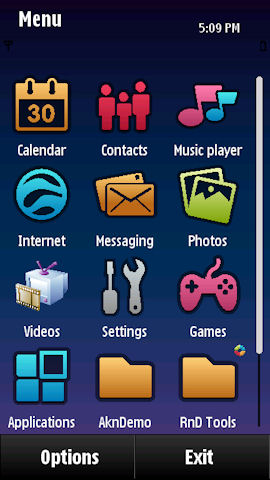
Also new in this release is the inclusion of the default Symbian^3 theme, which has been specially commissioned to give the platform a standard 'fresh' look. However, it should be noted that any commercial Symbian^3 projects are likely to look substantially different as manufacturers will add their own theme, styling and applications. A good example of this can be seen in the differences between the Symbian^3 emulator and the version of the software running on the Nokia N8.
    

Emulator 1     Emulator 2

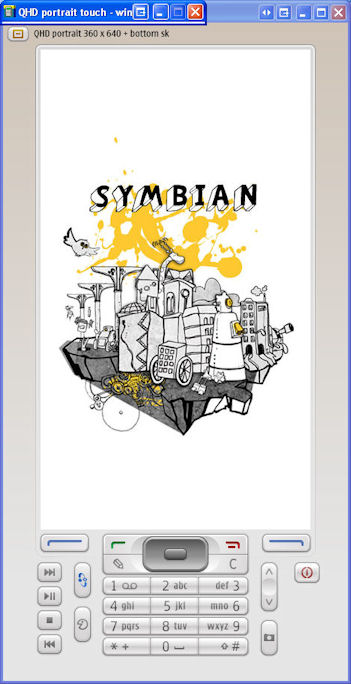
Symbian^3 emulator: booting up and homescreen

Futher details on the PDK 3.0.0 release, including download instructions, are available on the Symbian Developer wiki.
  

Community activity

The significant amount of time and effort required to reach this point is a good example of the challenges the Symbian Foundation has faced moving from a closed source environment to an open source environment and open governance model. The lack of a fully usable release has hampered community activity around the Symbian platform (e.g. it is one of the reasons why we've not seen Symbian ported onto other hardware), but the situation has the potential to improve with this release.

However, I do feel that the Symbian Foundation will need to provide leadership in the community activity arena, perhaps through an expanded array of activities similar to the Wild Ducks project, in order to put some momentum behind the platform. Given some of the prevailing attitudes around Symbian in the wider technology community, a series clear demonstrations of its capabilities and open source credentials would be very valuable.
   

Symbian^3 Emulator

The Symbian^3 emulator offers the easiest way to obtain a closer look at Symbian^3. The emulator includes all the basic applications and platform functionality. It is a little sluggish and some patience is required when using it. The emulator does however give a good way of understanding some of the changes that have been introduced in Symbian^3.

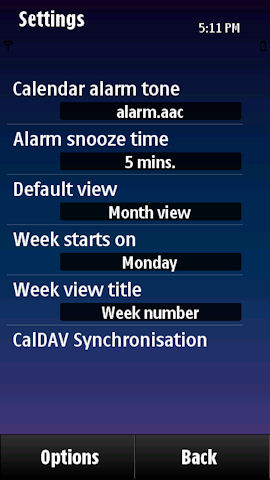
For example, the screenshot below shows the settings for the new CalDav functionality (allows you to 'sync' and 'subscribe' to web calendars, such as Google Calendar). You'll also find the single tap paradigm implemented, which significantly improves the usability of the platform.
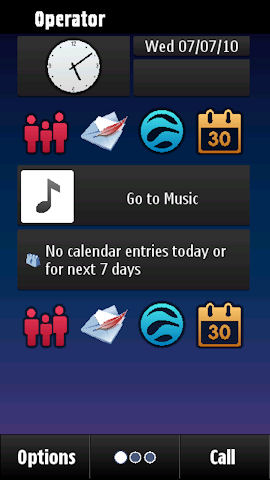
   

emulator homescreen   emulator 1   emulator 3

Screenshots from the emulator

I found the PDK 3.0.0 version of the emulator a little unstable, but some of the issues were caused by the resource requirements (a decent PC specification is essential). Moreover, it is based on an early version of the platform.  The Symbian Foundation are working to improve the situation for both Symbian^3 and future versions of the platform.

If there's enough interest we'll publish a practical guide on how to get up and running, but the tech saavy can follow the instructions on the Symbian website.


Filed: Home > News > Symbian^3 PDK 3.0.0 available for download - includes emulator

Platforms: General, Symbian^3

Categories: Software, Links of Interest, Developer, Industry

News Discussion

Unregistered
Hey Rafe, do you have any clue about the presence of native functionality for selecting multiple items in any list (contacts, gallery, messages, et al) in S^3?
irfanil
@Unregistered: yes it is there. tap and hold will bring a pop up menu and you can mark multiple items. also there is option to 'mark all' or 'unmark all' items.
Unregistered
i really hope some day we will see symbian 3 ported to my nokia 5800
Unregistered
Please write the article/guide on how to get the PDK up and running. Would be GREATLY appreciated by the symbian/nokia community and I'd be sure to get it as exposed as possible on the blog I post on.
brendand
@Unregistered

You can click through the link at the bottom of the article to get to the instructions on the Symbian developer website. If the instructions there aren't clear it would be better if they were improved there rather than having a separate article.
Unregistered
Wasn't quite clear on the download instructions for a newb.
brendand
@Unregistered.

It would help if you were specific. Which part was unclear?
Unregistered
I would suggest that if you feel you need help to get this working then you probably don't need it.
Dynite
People may also want to consider the Qt SDK (and WRT Sdk) before jumping in to bed with this as Qt is the future of app development.
Unregistered
I can definitely recommend the Qt SDK for people who wants to do apps for Symbian and Meego. I have been playing around with it and it is really easy and very straightforward to work with. Qt is a wonderful app framework to work with, a far cry from the old Symbian C++ system and the UI framework is also lightyears better than the "evil" Avkon of old.
arg0
One thing I'm curious about is how the on-screen keyboards will look like in Symbian^3, especially the portrait full qwerty.

I think the mini-qwerty that is now on S60v5 has keys too tiny for a capacitive screen and I hate the other keyboards (T9, landscape qwerty) completely hiding the screen while typing.
Moreover, entering text in s60v5 is both awkward and tiring, e.g. for a search on has to: click on the search box, wait for keyboard window to appear, type text in keyboard window, confirm to dismiss the window, wait for application screen to re-appear with the typed text in the search box, then click search.

I hope Symbian^3 will pack overlay keyboards that work like in the Opera browser, which is much more convenient. E.g., search requires less steps and no screen changes: click on search box, overlay keyboard appears, type directly into the search box, click search (without need to dismiss the keyboard).

Will there be something like that in Symbian^3? are there soft keyboards in the emulator to try?
N/A
Quote:
Originally Posted by Unregistered View Post
i really hope some day we will see symbian 3 ported to my nokia 5800
Dream on.

Full thread: 12 Comments / Post New Comment

Search

Navigation

Social

Advert

Translate

Also All About