
All About Symbian - Symbian, Nokia and S60 unwrapped.
Nokia's N8 overview video (part 2) examined in detail
Published by Rafe Blandford at 13:49 UTC, June 9th 2010
As part of its promotional activities for the N8, Nokia is releasing a series of overview videos presented by Chris Bennetts, a Senior Product Manager at the company. The second video covers the Photos, Photo Editor and Videos Editor applications as well as USB On-The-Go functionality; rather than just linking to it or embedding it, we've broken this video down in detail to offer you some insight into the N8's photo and video software. Read on for further details.
Video Nokia N8 overview - part 2 of 3 - Photos, Photo editor, Video editor and USB OTG
In the video, Chris Bennetts, Senior Product Manager, gives a detailed tour of the Photos application, the photo and video editing applications and the N8's innovative USB OTG functionality.
Here is our earlier breakdown on the first video, which gives an overview of the Nokia N8, covering the homescreen, messaging, Internet and Maps. There's one more N8 overview video to come.
Breaking down the video
This first image (below) shows the revamped Photos application, which is used for browsing photos and videos. Photos can be viewed in one big group, by month, by album (user assigned), or by tags (user assigned). Photos are shown in a grid layout, which can scrolled kinetically. Accessing any photo requires a single tap (in line with Symbian^3's direct user interaction model). The toolbar (with its new narrower style), on the right-hand-side of the screen, gives access to the key functions (slide show, select, send).
Thanks to its improved processors (most notably the new graphics co-processor) and the re-architected graphics engine in Symbian^3, performance is much improved from earlier Symbian devices.
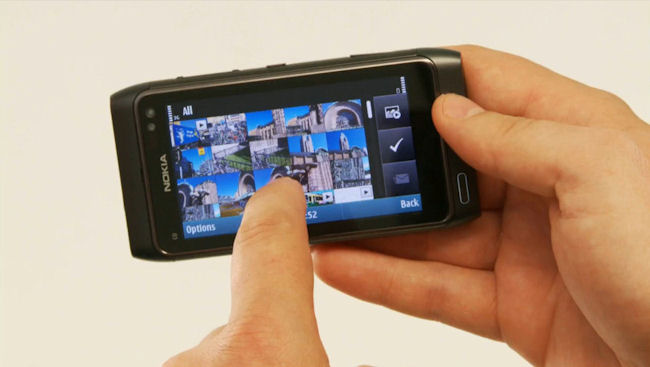
Additional commands can be accessed by a long press (touch) on the screen, which brings up a context sensitive menu: 'Send', 'Delete', 'Slide show', 'Edit', 'Add to album' and 'Add tag'. The idea behind this approach, with its flatter hierarchy, is to give quicker access to additional functionality (contrast this with the multi-menu/multi-screen approach on earlier devices).
When viewing photos in full screen mode, you can flick left or right to switch between the different photos in the current view. For videos, a thumbnail is shown, with an associated Play button in the middle of the screen.
Thanks to both the N8's capacitive screen and underlying enablers in Symbian^3, multi-touch gestures are supported by the device. In the Photos application, this is used to provide 'pinch to zoom' functionality. This is notably smoother than the step-wise zoom found in earlier version of the Photos application. Performance is again impressive, especially when you consider that the photos used in the demo are the same large 12 megapixel (multi-megabyte) example images that Nokia published shortly after the N8's release.
Multi-touch gestures are used in relatively few instances on Symbian^3. However, the platform has a gesture framework built in, which means developers can use multi-touch in their own applications and can define any number of gestures that they desire.
The Photo editor application shipped with the N8 provides a good range of basic image editing tools: rotate, resize, crop, clip art, fun (smilies), draw (pencil), word bubble, frame, red-eye, stamp, effect (seipia, back and white etc.), tuning (colour levels) and animation. There's an emphasis on adding extra elements (clip-art, stamps etc.) rather than full scale image editing, reflecting the fact that the primary use case is adorning images that will be sent to friends via MMS, email or Bluetooth.
The Photo editor application has also been updated in line with the new UI guidelines in Symbian^3 (direct UI interaction, finger-touch friendly, thinner tool bars, flatter command hierarchy).
Shown below is an example of the crop tool in operation. Both this, and the resize tool, are going to be essential, in some circumstances, given the large file sizes produced by the N8's 12 megapixel camera. What's most notable here is the focus on simple operations, driven by direct touch interaction.
Here's another example, this time showing the same image (cropped) with a frame applied. A piece of vector clip-art has been applied - note how there are 'handles' for changing the size of the clip-art and a 'grab-area' area to rotate it.
There's also a context sensitive tool-bar along the bottom of the screen, which gives further tools for fine tuning the image editing process.
Along with the image editor, the N8 will also ship with a powerful video editing application. Combined with the N8's HD (720p) video recording abilities and the ability to upload via the cellular network or via WiFi, this will make for an extremely powerful mobile video solution.
When opening up the video editor application, you're given a choice between a full video editing experience and creating a video slide show from still images. The still image-based editor allows you to combine a series of images together, add music and apply Ken Burns effects. The full video editing experience is showcased in the images below.
The video editor uses the standard 'storyboard' style editing process. Videos and still images can be added to the storyboard by selecting them from pick lists (grid view thumbnails). Each element that is added to the storyboard is given its own slot so that it can be individually edited.
In the storyboard view there are a collection of icons along the bottom to access the key editing functions: add media, add music, add title (text), add transitions.
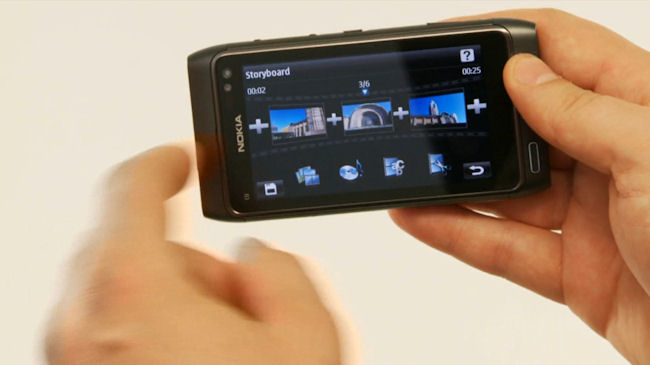
Here's an example of a text title being added between two clips. It is possible to customise the colour, size and the display angle of the text. Similarly, transitions, such as swipe and fade in, can be applied between the videos and images making up the final video.
As in other areas, all of this is achieved using the direction interaction paradigm - no multi-tap in Symbian^3.
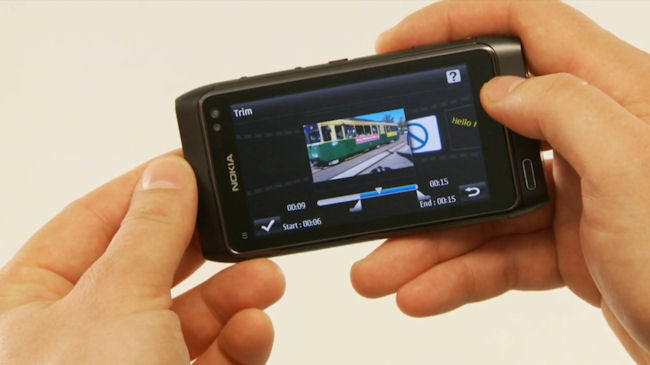
Editing functions can also be carried out on individual items on the storyboard. In the example below, the video item is being clipped so that only a portion of it is played back in the final video.
Although we can't make a final judgement on the video editor until we've tried it out for ourselves in real world situations (some live video from Nokia World in September perhaps) it does, in this preview, look very promising.
Nokia provided a powerful video editor on the Nokia N95, licensed from a third party, but video editing took a back seat (or was removed entirely) on later devices, so it's making a welcome return on the N8.
The N8's video editor, along with the high quality optics and smart video zoom in its camera and the ability to output HDMI video (with Dolby Surround sound) will make the N8 one of the most sophisticated and complete mobile video solutions ever seen in a mobile phone.
The final portion of video gives a brief mention to the N8's USB OTG (On The Go) functionality. This allows you to plug in any USB mass storage device to the N8 and see it as extra drive in the file manager (G: as shown below). The file manager can then be used to copy files to and from the device (C: drive, the 16GB of internal memory, or the microSD card slot).
The most obvious use case is USB memory sticks, but it can also be used with hard drives (external power will be required in most instances) and mobile phones with a USB Mass Storage profile (any of Nokia's recent Symbian devices), and many other devices.
That concludes the second of Nokia's N8 overview videos. We'll have more N8-focussed content next week.
Nice to see on-phone editing returning .. remember it was included in the original N95 firmware .. but disappeared from subsequent updates.
It took a while but nice to see it making a return.
yade
The Nokia N8 is an amazing phone and I am sure it will deliver but seriously, could they have found a less charismatic bloke to present these clips. He is sooooo boring!
Unregistered
and with all these lovely divx and xvid files I have on mass storage are useless when plugged into the n8 :D What a crying shame.
tenoce
According to Blog-N8.fr, a French Nokia representative confirmed that the N8 would be able to natively play DivX encoded videos, along with the H.264, MPEG4 and other formats mentioned at the handset’s official launch.
Unregistered
Regarding DivX...relax, I am sure that Coreplayer or something similar will soon appear for the likes of the N8.
Unregistered
This marketing dorkiness is Nokia inertia, rather than a thoughtful decision by Nokia to avoid fighting by Apple's new rules. Pity. So what does Steve Jobs vs 'a Nokia product manager' tell us?
Thinking broadly, I suppose in one corner you've got Apple's reality distortion field - powered by (1) its genuinely excellent product designs, user i/f etc (2) beneficial US culture/loyal fan culture hybrid, (3) Steve Jobs charisma (odd really cos he isn't all that charismatic) and (4) massive app developer industry (but its software isn't perfect - itunes software needs work).
In the other corner is Nokia (1) a genuine corp - not a one man show but a damaged brand (2) producing phones that almost always seem to miss at least one trick, (3) user experiences that are kind of clunky with journeyman touchscreen experiences (3) with about 5 applications (it looks like it may be worse for symbian^3 and Nokia's own software cock-ups litter the battlefield - it needs some really tough management there)..
But (4) Nokia does however have really good upcoming product hardware in the N8.
So I'd say contrasting the Apple videos with N8 videos just about sums things up. Nice phone, shame about everything else.
Unregistered
> According to Blog-N8.fr, a French Nokia representative confirmed that the N8 would be able to natively play DivX encoded videos, along with the H.264, MPEG4 and other formats mentioned at the handset’s official launch.
Nope, that was updated - Nokia France officially said N8 won't play DivX. HOWEVER, a couple of people around the web have said that the early N8's they used were able to play DivX so it's somewhat up in the air.
NOKIA - PLEASE include DivX/Xvid playback capability. There are a LOT of people that want this very badly (proof can be found in comments on N8 blog posts all over the web). And it needs to cope with .avi containers. Will be a real shame if such a capable device as the N8 cannot be used as a media player to playback the most used non-streaming video format in use today.
Having to convert DivX videos to another format is NOT acceptable, it's a big hassle, and requires time and a PC, and means media can't be just played (or copied then played) off a USB stick etc.
> Regarding DivX...relax, I am sure that Coreplayer or something similar will soon appear for the likes of the N8.
The coreplayer team seem to have given up - they have failed for some time to support S60 5th ed. Shame as coreplayer is really capable on earlier S60 devices.
AAS - are you able to get official confirmation of DivX capability? (playback, but recording too would be a major bonus!)
mkr10001
AVI isn't the way forward though. It's all about h264 mp4 and mkv now.
jfanning
Who on earth uses Divx any more? Everything I get is MKV container with h.264 and AC3 audio and that is a piece of cake to transcode to a native mpeg container.
So, drop Divx and move to something more standard, everyone else has. Even my LG TV can play MKV now.
malerocks
I really like the editing capabilities. Although I would be really interested to know as well if the N8 will support the UPnP capability that was introduced in the 1st S60v3 phones. This feature was dropped in later Symbian phones and though not used by many, was still a useful feature when combined with a compatible router.
Unregistered
Quote:
Originally Posted by Unregistered
This marketing dorkiness is Nokia inertia, rather than a thoughtful decision by Nokia to avoid fighting by Apple's new rules. Pity. So what does Steve Jobs vs 'a Nokia product manager' tell us?
.
With nokia it's about the phone, with Apple it's all about Steve Jobs and his ego.
It was a video about the N8, not the guy presenting. I didn't even notice the presenter, and that's the way it should be as far as I'm concerned. If I see a video with Steve Jobs in it I just don't even bother watching. I do own an iPhone but I don't subscribe to being a sucker fan of a corporation, especially now that Apple have supplanted Microsoft and taken over as evil corp that represents everything bad about business.
bheetebrij
@aas I like your analysis of these videos. Keep it coming!
An idea: After Apple presenting iMovie for the iPhone, I'd love to see a head to head between the N8's capabilities in this field and iMovie for iPhone.
In terms of the N8, I think no one doubts its capabilities in terms of pictures and videos. I think the videos also show that the OS is quite responsive even when trying the edit together a video with up to 6 media items.
However, I think the thing that continues to worry me with Nokia's phones is the third party apps. For instance, the world cup now comes up and the iPhone has plenty of decent apps to follow the event. The best Symbian has is the AP app and it is so slow that it is basically unusable. I don't know whether it is a poorly programmed app or whether WRT is not up to the job yet. In any case, if Nokia wants me to seriously consider the N8, they'll have to show that the N8 will do better with these things.
As a side not, to what extend are you buying into a "dead-end" with Symbian 3? Supposedly, Symbian 4 is just around the corner and represents a platform break. I bought an N900 last December, but have already sold it as I feel Nokia has not given it the support it deserves (given its capabilities and price). Will the same happen with Nokia N8?
Unless I get good answers to these questions, I am afraid my next phone won't be a Nokia :-(
Nörde
Quote:
Originally Posted by bheetebrij
Unless I get good answers to these questions, I am afraid my next phone won't be a Nokia :-(
You should ask Nokia, this site is not and shouldn't be any official source for technical information. Additionally at least I couldn't care less what your next phone is or isn't.
Unofficially and what can be seen from videos etc. N8 is going to improve a lot in every area of previous Symbian phones.
Gabeuk
I know N8 is pitched as mid-to-high-end, but isn't it likely to be the new 5800 ?
Get the price down a bit and why not? The hardware looks designed for that market.
buster
Quote:
Originally Posted by yade
The Nokia N8 is an amazing phone and I am sure it will deliver but seriously, could they have found a less charismatic bloke to present these clips. He is sooooo boring!
Perhaps that's to make the N8 seem even moooore interesting :rolleyes:
Rafe
Quote:
Originally Posted by bheetebrij
However, I think the thing that continues to worry me with Nokia's phones is the third party apps. For instance, the world cup now comes up and the iPhone has plenty of decent apps to follow the event. The best Symbian has is the AP app and it is so slow that it is basically unusable. I don't know whether it is a poorly programmed app or whether WRT is not up to the job yet. In any case, if Nokia wants me to seriously consider the N8, they'll have to show that the N8 will do better with these things.
As a side not, to what extend are you buying into a "dead-end" with Symbian 3? Supposedly, Symbian 4 is just around the corner and represents a platform break. I bought an N900 last December, but have already sold it as I feel Nokia has not given it the support it deserves (given its capabilities and price). Will the same happen with Nokia N8?
The app-gap is going to be continue to be a concern, but this is improving and will continue to do so (especially next year). Things like the Nokia Qt SDK and the maturing Ovi Store will help. As with anything else you have to balance this against other factors. I think most people will find there's relatively few third party apps they use lots and lots - whereas a decent camera is a must have (depends on person clearly).
I think you can overplay the buying into the dead end with Symbian^3 - there's going to be plenty of Symbian^3 devices and while Symbian^4 will arrive in relatively short order this does not mean Symbian^3 will go away. I also would expect Qt will mean more 'back ported apps' than usual.
Quote:
Originally Posted by Unregistered
AAS - are you able to get official confirmation of DivX capability? (playback, but recording too would be a major bonus!)
It does not have it. However I will seek some clarification on this early next week.
Quote:
Originally Posted by Gabeuk
I know N8 is pitched as mid-to-high-end, but isn't it likely to be the new 5800 ?
Get the price down a bit and why not? The hardware looks designed for that market.
Not really. I think there's a good bet that there will be a cheaper device that will be the new 5800. I'd say this is more like a touch version of the N86 - but that only a simple way of looking at it.
Quote:
The Nokia N8 is an amazing phone and I am sure it will deliver but seriously, could they have found a less charismatic bloke to present these clips. He is sooooo boring!
This is the N8's product manager - i.e. effectively the person in charge of creating the device. I would father rather hear from him than a mindless (PR) drone. It's way more genuine and honest. I think its great to see Nokia embrace this approach - different messaging and channels for different people - much better than a rendered 'fake' demo video.
And believe me doing those demos is a lot harder than it looks.
morpheus2702
That was really cool, not sure how much I would even use such a function but have go admit that is a pretty impressive movie-making tool they have there in the works. Be interested to know what format the final cut together movies output in but it was nifty. And if you could mix in music...
Unregistered
Quote:
Originally Posted by yade
The Nokia N8 is an amazing phone and I am sure it will deliver but seriously, could they have found a less charismatic bloke to present these clips. He is sooooo boring!
I'll take this guy over any of the self-absorbed pricks on the iphone videos, proclaiming how their product is 'going to change the way we communicate, forever'..
Klopot
Jeeez, AFAIK OTG was a technology on devices equiped with USB host functionality which allows to copy all the content from slave device to mater with one touch of a button.
The N8 has rather USB host then OTG (but i suppose OTG can be emulated in software)......
Unregistered
USB OTG refers to the ability of the host to operate in either host or slave mode depending upon what you connect it to. Anything beyond that is something layered on top.
Unregistered
First, I would like to object re: divX being not the preferred video format for PC playback. Most of the movie downloads are still encoded in this format.
Secondly, even if mp4 and h.264 becomes the predominant format, these are formats that Nokia smartphones have supported since a decade ago (in addition to .3gp).
The robustness of a device's multimedia capabilities hinge largely on 1) the interface and 2) the number of standards its support (3.5 mm jack, bluetooth 2.2 audio profile, the number of multiple formats it can play natively)...