
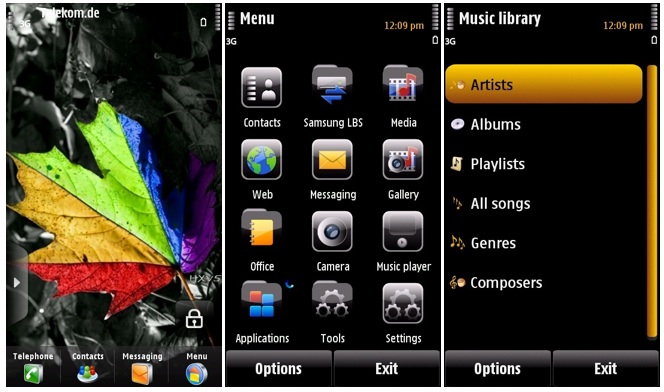
The i8910 HD gets HX-V5
Published by Steve Litchfield at 13:24 UTC, May 21st 2010
The HX series of firmwares for the Samsung i8910 HD continue to roll out, with v5 the best yet, with a number of important fixes and detailed improvements, including, critically, fixing the Java certificate problem and improving battery life. As ever, these firmwares are 100% unofficial, but they're easy to apply* and can dramatically transform this old but still powerful smartphone. Comments welcome if you get a chance to try it on your i8910. Changelog extracts and link below.

Here are the main changes for V5 (selected items quoted from the official changelog)
- java-certification failed- fixed
- mediabrowser showing every file/icon -fixed
- slower kinetic-scroll values
- camera videos/images are saved with DATE instead of text by default (yyyy.mm.dd)
- wlan-power at down 40 mw by dafault – saves battery
- packet data connection set on “when needed” by default
- exposure meter set on “normal” instead on center-weighted
- Browser cache set back to d:\ many users reported that it´s much faster then.
- now musicplayer looks also on e:\sounds and f:\sounds (will find recorded sound-clips)
- landscape standart-apps added
- loudspeaker on when you are in call and SHAKE the phone
- bluetooth, received files will be now on e:\download
- OVI-acount login on OVI maps not possible – fixed
- Threaded-SMS-lite on autoinstall and linked INTO messaging-app
- CPU-CLOCK – Turbomode patch will come later (maybe)
You can find the HX firmwares on HyperX's page.
* NB. Disclaimers apply. You will need a PC running Windows XP, a little tech confidence and the sure knowledge that whatever's on both disk C: and the mass memory of your i8910 HD will be blasted out of existence. Do your backups and be prepared for half an hour of reinstalling apps afterwards.
The changes above are in addition to the usual HX firmware attributes, e.g. max disk space on C:, better image quality, etc.
News Discussion
Jimmy1
This is great, but I just 'sigh' that the i8910 doesn't have user preservation data mode, like most other handsets.
I'm getting a bit tired of re-setting up and re-downloading everything.
slitchfield
True. But hopefully this will be the last firmware you'll need for a while. V4 would have been, but for the missing Java certificate, which was a showstopper for me. Anyway, setting up devices is fun! Isn't it? 8-)
Zaqfalcon
"old" - ?
stuartg
I'd love to read a similar in-depth review about unofficial firmware updates for the Sony Ericsson Satio.
hargs48
Quote:
Originally Posted by stuartg
I'd love to read a similar in-depth review about unofficial firmware updates for the Sony Ericsson Satio.
|
+1 & for the Vivaz as well
faenil
you're right steve, sorry...my fault...
I repeat the message here, so that you can thrash the other one ;) (and delete this intro ^^ )
Are you looking for different firmwares?
I am faenil, i8910 firmware cooker, lots of people already know me, but if you never tried my firmwares or you have never heard about them,
just give this a look :)
www.i8910tuning.com
I can assure you that none will be disappointed!!
slitchfield
Quote:
Originally Posted by hargs48
+1 & for the Vivaz as well
|
I didn't know there was a modding scene for these devices? Mind you, the main reason we're dropping our usual guard and reporting on these i8910 HD firmwares are because Samsung itself doesn't seem very keen about pressing on with the device - and the hardware's too good to waste.
It's also trivial to bootload an i8910 HD, whereas I imagine it's a LOT harder for Nokia and Sony Ericsson devices.
slitchfield
The pace of updates to these firmwares is pretty extreme. 3 days after my post, a brand new build of v5 is available, with a turbo mode to run at the full 600MHz, comments welcome if anyone here tries it!
Unregistered
Argh just got all my apps and settings right after flashing V5 =/
FaizDaDon
@ Steve
After seeing the video on the latest HX, I decided to try it. I'll report back tomorrow.
John C
And now there is turbo version released on the 23rd!
Fast and smooth Andy has managed to ramp up the speed of the processor :-)
FaizDaDon
OK this firmware is perfect (faster, smoother) except for one annoying bug. It doesnt save my wifi connections, so everytime I connect to wifi, I have to re-enter my WEP key. It seems not everyone has this problem, so I am going to try and re-install the firmware and se if that helps.
Unregistered
You need settings > connectivity > destinations > Access Point. There you can add a new access point, and the wifi password will be remembered.
Welshy
Amazing firmware. Brilliant work. Thanks for making a Perfect phone even better. I cannot wait to see what amazing things you may do for the i8920 Omnia HD2 if that is your next phone!
Full thread: 14 Comments / Post New Comment