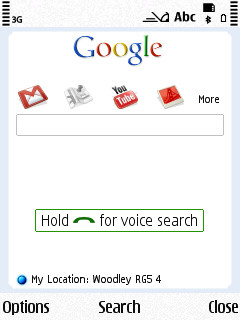
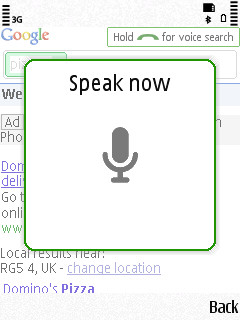
Google's S60 'portal' search utility, 'Google Mobile App' just got itself an update to v2.03(8), bringing voice searching - and it works rather impressively. Bring up the S60 3rd Edition utility in the usual way (e.g. by pressing 'C' on the homescreen) and then press and hold the green call key to speak your search string. Some screenshots, videos and links below.
You can get Google Mobile App for yourself by going to m.google.com in Web on your phone - the version for S60 5th Edition (with no 'C' key, among other aspects) comes up as 'Not compatible' but you can persevere as long as you're happy to get to the utility another way.
Once a search match is found, you're shown any results, optionally sorted by distance from your current location, in the usual way.
Google India has done a demonstration video, embedded here. Of note is the complexity of phrases which can be used and also the multi-language abilities - apparently Mandarin (Chinese) is now supported. Comments welcome if you've got the time to try this out fully!
From Google's announcement, on the subject of Mandarin support:
Up until now voice search has only been available in English, but the new version of Google Mobile App for Nokia S60 devices works for Mandarin speakers, too. We're really proud of the work we've done with Mandarin speech recognition, both because it's the most spoken language in the world, and because of the engineering challenge. To get Mandarin speech recognition to work, we had to learn a lot about this fascinating language — the differences between traditional and simplified Chinese, its tonal characteristics, automatic segmentation of text into words, pinyin representations of Chinese characters, sandhi rules, the different accents and languages in China, unicode representations of Chinese character sets...the list goes on and on.
Mandarin speakers can now search by voice for complex queries like 清华大学附近的水煮鱼 (which translates to "water-boiled fish near Tsinghua University"). Although this only works on the Nokia S60 at the moment, we're working on adding support for Mandarin speech recognition to our products on other mobile platforms, such as Android and iPhone. And bear in mind that this is a first version of our system in Mandarin, and it might not be as polished as our English version. For example, if you have a strong southern Chinese accent, it might not work as well as for people with a Beijing accent. However, our system will improve over time, so please give it a try!
(hat tip to Clinton Jeff for the YouTube link for the second video clip)
I have this on the N97 and discovered that the backspace key (<-) works as the 'C' key. So to quick start, slide open the keyboard and hit the backspace key.
Unregistered
Did you make it work in a n97?
When installing i have a message that the program was not compatible, also it doesnt launch.
Unregistered
Not able to launch on my N82 & E63 :(
thecrevis
Amazing app. Works really well on my 5800. This app will revolutionize all apps.
Unregistered
Can't launch the application with the "back delete" key as indicated by the on screen pop up message, any ideas...?
Shreekanth
I have tried it on my nokia 5800. Voice search function is good, but not good enough to recognize all the phraces. Only 50% of the phraces are recognized while i tested it.
More disappointingly, it does not support virtual keypad, making it more or less useless for 5800. Thus we can't type any search keywords and can only be used with voice search. But it will not be problem with N97 as it has keypad also. Eagerly awaiting s60 v5 support...
Shreekanth
Unregistered
Of several phrases I tried, it only recognized pizza on my E71x, let alone being able to search one of the calculations like the guy in the video did. 2 thumbs down!
Berdl
Installed this latest update on my E71 and it won't start. "Clicking" the icon simply does nothing. Uninstalled, reinstalled, restarted the phone, nothing.
tenoce
It does not launch on my N95 when pressing the Pencil button :(
Unregistered
Installed ok on my N93i but as with the others, nothing happens when I click the Google icon. On the home screen I do occasionally see the "Press pencil to search" box, but nothing happens when I press the pencil key.
lookatbowen
Very impressive. I've been waiting for this application for a long time. It works super well on my Nokia 5800. Some words like "Bowen" it struggles to understand and shows up the completely wrong word, which is mega disappointing because how are people going to find my lookatbowen.com website through Google Voice?
It might just be my South African accent that is confusing it (lol), but my others websites like Wilkinson's World or Crunch Victims are working perfectly.
Gosh, I wonder what @ClintonJeff of http://zomgitscj.com is going to think about this application, especially when he has a problem with people talking out aloud on headsets or headphones (Ha Ha, Jokes if you are reading this Clinton). I am sure you can see the advantages of this hands free application. ;)
Unregistered
not working on n82...
darrenalex
I was starting using this application and It is really quite impressive for S60 mobile phones. It s is bringing the voice searching. Once a search is finished. It is howing the results sorted by distance from your current location, in the usual way. It is easy to operate this google mobile application. I heard that They are planning to sell the mobile phones.
malerocks
I tried it on my old n93 and it works wonderfully. It did take a while to launch though the 1st couple of times. Wonderful app.
Unregistered
I previously gave it 2 thumbs down. That's because I'm an idiot and wasn't using it correctly. I wasn't holding the call button down while speaking. It does the voice reco after you let go and then searches. It actually works great.
Unregistered
steve, does it work on your N86? it doesn't work on mine~!
Unregistered
Anyone know what the deal is with this app... why it works on some phones and not others? Why would an N93 work for instance and not an N93i? Could it be based on the location of the user?
Rafe
Quote:
Originally Posted by lookatbowen
Very impressive. I've been waiting for this application for a long time. It works super well on my Nokia 5800. Some words like "Bowen" it struggles to understand and shows up the completely wrong word, which is mega disappointing because how are people going to find my lookatbowen.com website through Google Voice?
It might just be my South African accent that is confusing it (lol), but my others websites like Wilkinson's World or Crunch Victims are working perfectly.
Well it your post made me visit your site - thanks for the links to AAS BTW.
One thing that might be worth checking - in Settings you can specify the accent / region - might be worth experimenting with?
Unregistered
For anyone who may be interested?
FINALLY decided to actually install Google search, after suggestion by others. I was a bit reluctant, as no-one could confirm it would work with n97 (s/w v12, still waiting for v20).
Anyhow. Downloaded it, and started to install but received the warning "Application is incompatible with you phone". "Install anyway?" It was at this point before, that I decided to abort the install. Nonetheless, I hit the install button (and kept my fingers crossed) :-)
Application installed. Launched application, and ..... PERFECT :-) All works fine.
Tip:- On the main screen, an indicator appears "Press C to search". This appears for a couple of seconds, as a reminder. As the N97 does not have a "C" WITHOUT going into the keyboard, the application can be launched by finding the shortcut and pressing that (the same as you may do when wishing to look at your photo images). The "prompt" may be disabled from the application, as I have done.
Observation:- Once the app is launched, and you have performed your voice (or text input) search, and the results are shown, there is no way to"zoom in" on the screen (for clarity, if your eyes aren't so good). Normally, when "surfing the net" from your handset, a double tap "zooms in". This doesn't happen with the Google search app.