
Analysis, tutorials and tips for your Nokia and Samsung Phones

Nokia Maps 2.0 - a woman and pedestrian's perspective

Published by Steve Litchfield at 12:33 UTC, March 14th 2008

Hearing that my long-suffering wife, Fiona, was off for a day jaunt to 'somewhere she'd never been before', I wondered if she'd like to get help from some smartphone technology and try out one of the new features of Nokia Maps 2.0 - namely the explicit pedestrian navigation mode. She agreed and handed over her Nokia E51 for me to preload it with the latest beta and the UK maps. I also stuck a pocket GPS in her jacket and guessed it would see enough of the satellites from there. Here's her report.

 Twickenham!

"Deposited in Twickenham by train, never been there before, I am at a loss as to which direction to go as the signposts helpfully suggest which route the motorist may take to get deeper into London or away from it.

Help is at hand as my thoughtful husband has loaded a mapping system onto my Nokia E51. He hates to travel, you see, and being the better (male) map reader has provided a substitute for his own company. We had a quick training session before I set off, so I take the GPS out and flick it on. So far so good. I tuck the unit into the pocket of my fleece so I don’t have to juggle two bits of kit at the same time, then it's on to the tricky bit. You’d think being married to a certain journo who knows a bit about these things, some of his knowledge would have rubbed off, but no. A bit of fiddling around gets me the mapping programme but I’m stuck with the screen for my home address so I have to make a call home. I’m letting the female of the species down, I know, but at least I’m trying! '0' – that’s all I had to do to get my current position.
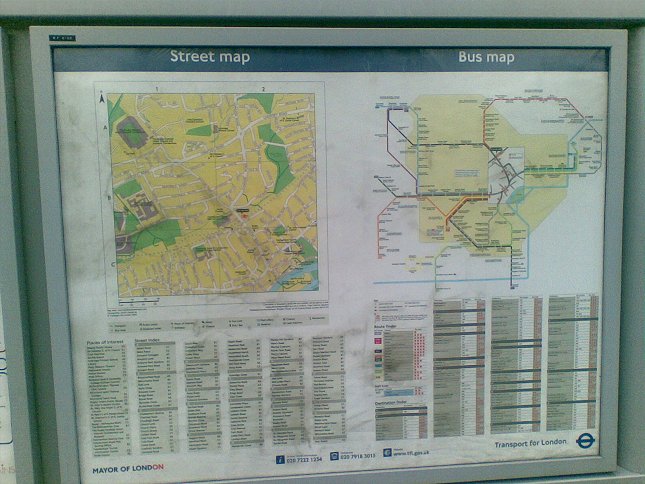
Map
The old fashioned way of getting around. Pah! I've got Nokia Maps 2.0 and a GPS!

Apparently I’m outside a train station (hah!), so the icon tells me, A310 London Road. There is no search feature for (normal-sized) shops, so instinct tells me which direction to head in. GPS is safe in my deep pocket but I’m going against instinct by having the phone out on view as I try to track my slow progress. Single woman. Distracted. Expensive smartphone on full view. Etc. I’m also (apparently) a big red blob that spills across both lanes of the A road. My self esteem helps me rise above this insult and I turn on my heels and head left.

I do need cash though and risk getting the Nokia out to search for the nearest cashpoint. Maps tells me there's one just round the corner and guides me successfully to... a queue of people standing behind a frustrated lady who's lost her card in the machine. Ten out of ten for Maps in terms of location though. Luckily I spot another cash machine just up the road and I'm soon sorted.

I do keep losing the GPS signal as I dip in and out of the shops but it doesn’t seem to affect the mapping, only the bank balance.

I get to a junction where two A roads collide and encounter a problem as the program is not sure which side of the road I’m on and throws a wobbly. Once it’s established which road I’m on, the map is back on track. I tuck it discreetly into my jacket as I’m feeling very self-conscious about having it in my hand and giving it all my attention. The town isn’t too busy but I don’t want to be bumping into pedestrians or having a would-be-thief think I’m so absorbed they can help themselves to my bag.

Once the shops begin to thin out, I ask the program to show me a list of museums. Apparently I can choose from several museums and galleries, so I opt for the Twickenham Museum and ask it to plot the pedestrian route. I’m less than 1km away, so turn about and set off for a cultural experience.
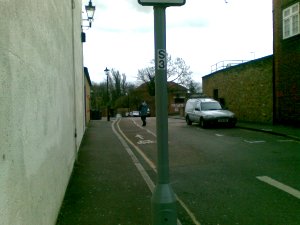
Dingy alleyHere’s the rub, as Shakespeare would say. We come back to that old problem of I’m a woman and I’m reading a map. Guess what … the arrow points one way but I still end up turning the Nokia around in my hand so I can read which way to go. I did note that a compass reference for North is helpfully included in the bottom left corner. It’s small. I’m now wondering if I’m at the age where bi-focals are inevitable. Steve tells me later that Maps would have rotated the map for me if I'd just been patient for 30 seconds after each turn so that it could work out whether I'd made the turn or not. Ah. I just thought it was trying to be annoying by rotating the map on my nicely rotated phone... anyway.

'Turn right', the map seems to purr at me, but I’m not inclined to take the most direct route which will take me to the riverside. It looks distinctly dodgy. Nobody local seems to be using it, so I think I’ll give it a miss as well. I keep walking and take the next right. It’s very pretty and leads directly to the river. I’m then taken down a road that has no pavement. It’s crucial I have the phone out at this point as I’m close to my target, but I’m spoiled for choice as to whether I look at the screen or look up for passing traffic that's about to run me over.

I opt for the nodding dog effect and dash between the two. I have 45m to go and am tempted to put the phone away, so I do. Many metres later I’m thinking I’ve overshot the Museum so get out the phone and track backwards and forwards checking my location. It’s not here. Well Nokia Maps says it is, but the evidence of my eyes cannot find it. An Internet search later at home reveals it does it exist, but it's quite small and has a front entrance just around the corner. Presumably this sort of problem doesn't happen when looking for places that are larger than my own house! It does look and sound interesting - a photograph of the building in Google is not one I recognize, but it seems it has restricted opening hours anyway and wouldn't have been open, perhaps something I could have checked on the Internet function of my phone? [first things first - that'll do for next time - Ed]
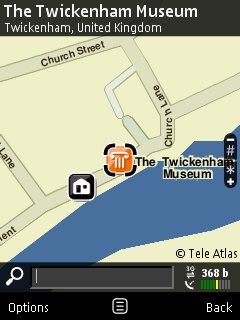
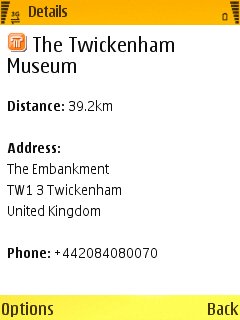
Screenshot Screenshot
Nokia Maps says it's there, Google Maps says it there (later), but I couldn't find it. Having no house number in the details screen didn't help. Neither did the lack of a mention that the musuem is closed for the majority of the time.

What’s a girl to do but put on a brave face and go back to the shops? I pass a fabulous fountain in some gardens as I do (cue the phone's really rather good camera):

Fountain

Out of curiosity, putting myself into the male mind-set, I opt to map a route to the famous Twickenham Rugby ground and think maybe I should just have gone there as it’s quite close.

I set the red blob to go back to the station.

Steve tells me that my rail ticket is tax-deductible. I decide I'd better not mention how much I spent in the shops....

Still... until next time..."

Fiona Litchfield, AllAboutSymbian.com, 17 March 2008

Categories: Comment, Software, Previews
Platforms: S60 3rd Edition

Feature Discussion

slitchfield
Things to note from all this:

1) Next time I send her out, I'll install Screenshot as well, so that she can do more screen grabs of points she wants to make 8-)

2) Relying on points of interest databases has always been a bit of a mugs game. POI databases are gradually getting better, but they've still got a long way to go.

3) The speed of map rotation needs improving in Nokia Maps 2.0. A 10 second delay is ok for a geek who knows what to expect, but it's confusing for the average user.

That said, Fiona was generally impressed by the interface and had no problems navigating (sic) around inside Maps 2.0. The issue of personal security is a serious one for anybody though, and a lady especially. Maybe a voice-guidance system through the music headset or Bluetooth earpiece would be more discrete after all, as an option in pedestrian mode?

Steve Litchfield
davidmaxwaterma
Enjoyable read. Love the sense of humour :)

Perhaps it could be a regular thing; though I guess it would become less and less useful as she became more and more proficient.
Ratkat
I agree with your wife that the camera can take great pictures, I just wish Nokia would release a firmware update to get rid of the 'Green Tint' it spoils an otherwise great device.
You should add the location Tagger, works great on the E51 with external bluetooth GPS.
malerocks
Great Article...

Its always good to read things from a layman's perspective too, instead of just geeks like us. :)
Unregistered
Annoyingly I've just discovered that the Florida (Clermont) house that I am using for the next month is not on the latest Nokia Florida map, none of the same development is on there despite it all being built 2 years ago.

Interestingly it's not on TomTom either, though it IS on google maps.
Unregistered
I fully sympathise with Fiona's feelings regarding safety as she stood on an unfamiliar street with an expensive smartphone in her hand. It's even worse with an N95 which you have to keep open, with the keyboard fully extended, for the GPS receiver to work. You look a right idiot with that. Surely pedestrian GPS is one of the main uses for a smartphone Maps app? Why not place the receiver on the top of the phone? Has this improved in the N82 or the N96?
Unregistered
'It's even worse with an N95 which you have to keep open, with the keyboard fully extended, for the GPS receiver to work. '

For this reason and for performance I have continued to use an external bluetooth receiver.
Mapperz
Great review, :icon14:
The N82 has the GPS at the top of the Phone (much better than the N95 and it's wonky slider).
Nokia Maps 2.0 the positioning refresh is a little on the slow side.
And the crows keep eating the breadcrumbs.... leave them on for backtracking if required.
Would be good to see the Nokia Maps Team combine the features of the Sports Tracker and the Nokia Maps 2.0 it's getting there.
Currently new N82 users get 3 months Navigation free when they purchase a new phone.
It is is far cheaper to have the maps pre-loaded on the phone, though you lose the hybrid and satellite mode. You can still used 3D mode.
Did a 10 minute test using Satellite mode and it used 18mb worth of download, expensive on any mobile network (lucky done it via Wifi).
Nokia please remove the 'Search bar' that is always blocking the map, put it in options>search (please).
More suggestions coming soon

Mapperz
http://mapperz.blogspot.com/
Unregistered
Funny reading though i am a woman geek so wouldnt have as much trouble as your wife and i know that road with no pavement and can you believe there is also a children's playground there so definetely not clever thinking by the powers that be. I have n95 and i think i would fallover and hit my head if i had to use pedestrian mode. It needs to be able to work via headset but not had chance to use it yet, so i dont know if there is an option for that.

dani2xll
Unregistered
Hi, I have two modes of pedestrian navigation.

1) Plotting a route. Looking at the map, READING it, phone back in pocket. Walking until I need to see the map again, getting phone out... reading map... until I am where I want.

2) Wearing the bluetooth headset voice and not watch the little screen. Simply walk and go. When in doubt which side street to take or simply want to check I am on track. I take out the phone and check the map.

Both modes are very inconspicous an make you look as though you know where to go and have a purpose. Which is one of the things that prevents a woman being bothered by thieves or vague street figures.

snoyt
Unregistered
Great article mate. You should do it more often ;). Amazing how much insight a non techie can give you ;)
Tommi Vilkamo
Good stuff!! And from Nokia point of view, I believe this kind of true "very human" stories encourage Nokia developers into action much more effectively than a random blogger arrogantly proclaiming how things should be done and how he knows better (the latter kind of feedback makes you defensive and find the flaws in the semi-valid argument).

Again, good stuff.

- tommi

Ps. about story-telling, I started to understand the power of stories when hearing Stephen Denning's (= ex-senior executive at World Bank + nowadays recognized author) presentation years ago. Also, reading books like Made to Stick and Presentation Zen recently, and having years of real-life experience about how stories spark action (and how academic analysis doesn't), have made me a full believer in the power of stories...
krisse
I think GPS for pedestrians will only take off when it's in the cheapest phones, which isn't a million miles away as the upcoming 6220 Classic has GPS and costs about half the price of the N95.

In 5 or 10 years time it will probably be difficult to buy a phone without GPS, and that's when the pedestrian features will start getting interesting.

For what it's worth, the pedestrian mode on the 6110 Navigator was pretty bad because the route-planning software didn't have much information on footpaths. Some of the routes it suggested were ludicrous. The 6110 uses Route 66 though, not Nokia Maps.
bartmanekul
Im very interested to see how good pedestrian mode is outside of London. Im thinking that out here in the sticks it wont be much better than just telling me to use roads.

If nokia would sort out the search bug in Maps, I could have a go.
Unregistered
1. Why not just print out a map and use that?

2. Why are you so convinced that there are thieves around every corner?

3. You do realise that single women are very unlikely to be mugged, right?

15 Comments / Post New Comment

Copyright Notes || Contact Us || Privacy Policy (Ellie)