
All About Symbian - News from the Symbian Ecosystem...

S60 and Mac - from first principles - part 3

Published by Rafe Blandford at 9:22 UTC, August 20th 2008

Continuing Steve's series of 'S60 Mac virgin' walkthroughs, he tackles the thorny subject of video, both transferring it to the phone and doing useful editing on footage from the phone.  Do any of the Mac video solutions play better with Nseries MP4 video files than the current crop of PC editors? In previous parts, he connected up and synced via Bluetooth, and he transferred media and bookmarks using the USB cable.

So far in this mini-series, I've connected my test S60 phone (an N95 8GB) to my trial MacBook using Bluetooth, I've synced PIM data using iSync, and I've transferred photos, videos, music and bookmarks using the USB cable.

Time to get heavy on the bytes though, i.e. what about video? As reported in the last article part, Nokia Multimedia Transfer managed to copy across my N95-shot MP4 videos and Quicktime Player did an excellent job of playing them without any issues.
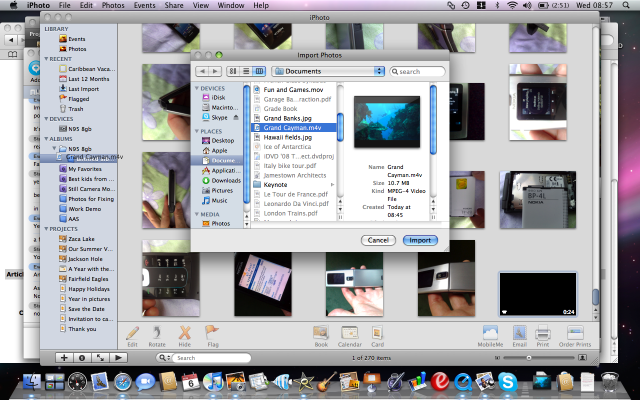
Read on in the full feature.

Transferring video

Share This (Digg, del.icio.us, Facebook, etc.)

Categories: Software, Miscellaneous, Editorial Thoughts
Platforms: General, S60 3rd Edition

News Discussion

nedrichards
Alternatively, you could use iTunes to manage the video, in much the same way as you use iPhoto in this article. Not sure if mixing video and music is much better than mixing video and photo though.
Gideon
Hi Steve,

Did you get the 6220 and Nokia Multimedia Transfer to work together or did you just bluetooth/USB file across as drag and drop?

I've tried them together and I just get message saying 6220 isn't supported.

Also, no iCal conduit, but that's another moan
snoyt
Rafe: Sufficiently fired up by your list I skipped the other comments:

1.1) Nokia is nicely exploring possible improvements. There is betalab's conversations and the N82 has its caroussel with Quick contacts. Most recent callers/sms'ers are top in you call log or inbox anyway. Admittedly, sorting your dialled log by frequency instead of time might be a nice option to have in conversations and your call/sms log.

1.2) If I download a ringtone (openatyourownrisk), it asks, do you wish to make it your new ringtone?

1.3) Not to loose your specific mutations on a specific theme (background, font, etc...)

2.1) Yes, I'd really be interested in 'firmware OS upgrades'. Part of it might come with S60 becoming open source. Surely they will split it into modules with propriety hardware driven modules and open-source modules. Allowing to buy a phone for its hardware and then select softwaremodules to fit your needs as buisinessman, consumer or media producer...

2.2) Have you forgotten Nokia's implementation of demand paging for memory starved N95's? And I prefer sufficient RAM instead of memory paging any day! The N800 has way to cramped memory for its screen size and applications. So did the N95?

2.3) USB-host support is not default available on the N800/N810. It needs additional 3rd party software and some special cables/connector to be acquired. USB drives and memory sticks feed from your mobile's battery life. Bluetooth is for wireless devices and NFC and carries its own powersupply.. In general USB is useful for AC or larger battery capacity devices like laptops.

Lunch is over, back to work.
Ratkat
Steve, you should read through the comments in your previous articles.

The best way to get your video in your required format is to use VisualHub.

http://www.techspansion.com/visualhub/

Quite simply the best video conversion software I have ever used, very fast with a simple interface covering just about every format you will ever need.

A friend of mine uses it to format news clips for many of the leading news sites in the UK.

Just create your video clip in iMovie etc, save it, then convert in VisualHub, it doesn't get any simpler
predicaments
I think most of the problem here is being a mac virgin rather than the software being 'poor'. Final Cut Express is a GENIUS editor. You don't have to render your clips inside FCE at all - the reason the red bar is there is because your project doesn't have the same video size / resolution as the clips. The beauty of FCE IS the fact that it can use unlimited RT which allows for live preview of transitions and so on.

Also if you google around you'll find a fantastic way to get video onto S60 devices. The best way is to use Quicktime PRO (About £20) and export as 3GP making the bit rate 700 and keeping the aspect ratio via CROP. This will provide awesome video playback of the highest quality but keeping the file size down. Typicallly I can get an entire feature film onto my N95 8GB at around 700mb.

Once you have this setting in Quicktime you're laughing and video will look amazing on your S60 device. Oh i forgot - make sure it's 320x240 as your export size.

I think a future article on mac / S60 integration would be best written by someone who uses macs everyday and is familiar with the pros and cons of the whole package.

My only main criticism of the whole Nokia / Apple thing is that transfer is slow between the two devices. Also why on earth didn't apple just partner with Nokia? They're so similiar in so many ways!
stuclark
You get exactly the same video export dialog boxes, producing exactly the same results, if you use the Windows version of Quicktime.

I have to agree with predicaments - shell out for QT Pro and suddenly you have the full ability of this excellent program to export in whatever format you want and make it work... easily!

I use QT all the time on my XP and Vista machines; and never trust any of the builtin MS products which either refuse to work with MP4 (it essentially being an Apple format), or will only output in some nasty WMV format which I can't then playback on anything other than Windows.
sapporobaby
@Gideon,

What do you need an iCal conduit for. iSync is all you need unless you want to use MissingSync or something like that. I have been using iSync and Nokia's for about 5 years and it just works. No loading software (unless the phone is so new it is not in the iSync database and Nokia supplies the sycning data) like in Windows.

You can also use Handbreak, and FFMPEG. Both are free.
Gideon
@sapporobaby,

Sorry, that's what I ment.

I just can't find the 6220 iSync conduit on the Nokia Mac page and Apple no longer add support for new handsets, it is down to Nokia (or 3rd parties) to provide for their phones.

As for Missing Sync, I don't see that it provides any extra features compared to Nokia Multimedia Transfer and iSync conduit. Or am I missing something.....
mattrad
I have to agree that whatever the video export options, VisualHub is a great conversion tool. Failing that, Quicktime Pro, which seems to take considerably longer (IMHO).

Steve, if you want to try either out, you're welcome to try them on my MacBook.

Cheers
Mark Guim
Hi Steve, like many have commented before: with iMovie 08, just go to share - then itunes.

Then open up VisualHub to convert it to ur preferred video formats even those playable on the devices itself.
Sergey Zak
Hi Steve, nice to see you try "new tricks"! :) huh, no offense OK? :)
I use macs since they were macintoshes (1994) and I used Apple][ way back in 1988.
For the messaging part of your reviews, take a look at BluePhoneElite of which I am an active user and beta tester; I mentioned this product here some time ago. Works a treat, especially for typing SMS on N-series which lack qwerty. Has features that Nokia PC Suite only ponders about (incoming call/message notification/processing on mac screen).
Also of a note is Salling Clicker remote control (which I think you've already mentioned somewhere).
slitchfield
The whole point of the articles was to look at the practicalities of a hardened pc owner switching to a mac and exploring the initial learning curve. i.e. How would this affect smartphone integration? Are there any drawbacks or showstoppers?

And I specifically wanted to avoid trickery or third party non-obvious apps.

We'd welcome proper articles from mac geeks showing how to do far more. Email us if you want to contribute.

Steve (via mobile)
sapporobaby
@Steve,

I was a Windows user until I got the hourglass of death. I switched to Mac about 4 or 5 years ago and would not consider going back. I only run Windows on my Mac just to do the updates for my N82. NOKIA WHERE IS A MAC VERSION???

Sorry about that. Anyway, I was an SE man at the time as well but they said they had no plans to support Mac. Funny how times and a greater marker share can change your mind. Being Mac'd and Nokia'd, if there is any particular thing you would like demo'd tried, etc..... let me know and I will run it through for you. Considering I use my Nokia and Mac together daily I no longer even notice them. I wrote a script that does a nightly update of my N82 via my Mac without me even having to initiate it. I just add the script (Automator) to the calendar and the Mac does the rest.
sapporobaby
Quote:
Originally Posted by Sergey Zak View Post
Hi Steve, nice to see you try "new tricks"! :) huh, no offense OK? :)
I use macs since they were macintoshes (1994) and I used Apple][ way back in 1988.
For the messaging part of your reviews, take a look at BluePhoneElite of which I am an active user and beta tester; I mentioned this product here some time ago. Works a treat, especially for typing SMS on N-series which lack qwerty. Has features that Nokia PC Suite only ponders about (incoming call/message notification/processing on mac screen).
Also of a note is Salling Clicker remote control (which I think you've already mentioned somewhere).
Good call Sergey,

I beta BFE as well. Been a user since the early days.

One good thing about installing apps on the Nokia via a Mac is that you simply send the app and click on it. No need for the PC suite. The installer in the phone takes care of the rest. I can install 10 apps via Bluetooth in the time it takes to install one via the PC Suite.
davidmaxwaterma
Quote:
Originally Posted by Rafe View Post
Continuing Steve's series of 'S60 Mac virgin' walkthroughs, he tackles the thorny subject of video, both transferring it to the phone and doing useful editing on footage from the phone. Do any of the Mac video solutions play better with Nseries MP4 video files than the current crop of PC editors? In previous parts, he connected up and synced via Bluetooth, and he transferred media and bookmarks using the USB cable.

Read on in the full article.
Steve,

What's that complaint about FCE displaying a dialog *every time* you start it. Didn't you *read* the dialog? You even put a snapshot of it. It clearly tells you what to do, *and* it has a checkbox saying "Don't warn me again"....what more could you ask for? Did that option not work, or did I miss something? Perhaps you're just commenting from a usability point of view or something...

Max.
Unregistered
If you want to put a picture in the middle of a video with iMovieHD. I would follow the following steps.
- extract audio from video
- cut out a section of video equal to the length of time you want to show photos with "Ken Burns Effect"
- select photo in media tab and select Ken Burns Effect in dialog that appears
- drag icon of photo from media panel to location where video was cut out
mikeschmidt
I would like to add ffmpegx as a great tool for converting movies. I my opinion, it is not practical to use FCE or iMovie for making scaled down versions of your videos. I would use FCE and iMovie to edit video and then save it in full quality for viewing on the Mac, TV, ... then use these other tools for converting the videos to smaller sizes. That way when future products come with higher resolution screens you can return to the original and make another conversion.

The presets in the add-on tools make this process process painless. On Windows you are using 3rd party apps for the basic editing why not use one for the conversion on the Mac.

Finally, I agree that encoding video can be a black art if you want to select all the properties. I use H.264 at around 300kb/s for 320x??? movies. They look good and rarely exceed 300MB.

- mike (posted earlier as unregistered)

Full thread: 16 Comments / Post New Comment

Close
  • Social Web
  • About

You can use this widget to send bookmarks or notes for this page to your favourite sharing / bookmarking service. You will need an account at mnay of these services and may need to log in to use them.

Copyright Notes || Contact Us || Privacy Policy