
Introduction
Many moons ago, I remember sitting in a darkened room at Edinburgh University, watching the slow progress as a 12MB data file speeded down the internet (sssh, it was the nineties). This was the shareware demo of Quake – the latest first person shooter and the first in ‘true’ 3D. It needed the University’s internet pipe, in the dead of night, to get it down in a sensible amount of time. The high end developer computers were needed to push out even half the graphics. And once it was there, we probably stayed up 24 hours straight in competitive death-matches.
So there’s part of me that looks at Quake running on my phone and that simply goes “wow” with the advances in technology that lets this happen. Of course it’s not a single install file to get Quake or Quake 2 running on a device (yet), but in honour of the command line hacking of my younger years, let’s get this beast up and running on an N95 8GB.
You can install Quake on a number of S60 phones, specifically any that are using Feature Pack 1 and have an ARMv6 processor – so any of the later Nseries phones (such as the N95-1 onwards) should have the oomph and spec to run Quake.
Map and Level Data
The first thing to get hold of is going to be a copy of a Quake data file. This holds all the map and graphical detail, while leaving the controls, interface and game engine as a second file. This second file is the Symbian OS specific bit which we’ll come onto in a moment. But first up, we need that data file, commonly called the PAK file.
Because of the size of Quake, your best bet is to install it to the memory card.
If you’ve got a full version of Quake or Quake 2 lying around, then this should be super easy. Otherwise you need to get a hold of the shareware version of either title (try starting at ID Software, the original publishers of Quake…)
Quake2
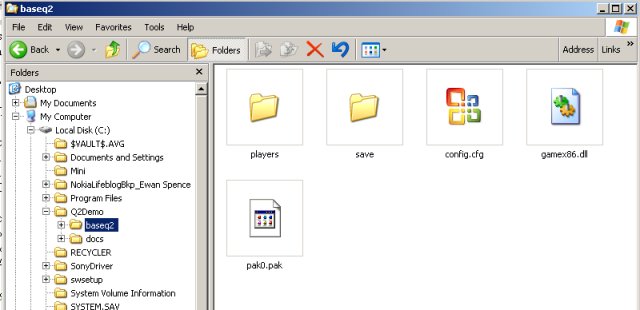
I’ll be using Quake 2 in this demo, so I grabbed the shareware demo and installed it on my PC. It was a little quicker this time around than the original(!) Installing in the root of my PC, the PAK file was found at C:/Q2Demo/baseq2/pak0.pak; and was then ready to be copied over to my N95's memory card, which was connected via PC Suite in the normal way.
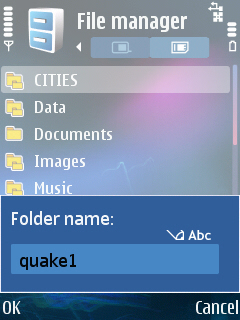
At the top level of the directory tree on card, create a directory called ‘quake2’ without the quotes. In here, another folder should be created, called ‘baseq2’. We’re going to put the single PAK data file in here.
Quake
If you want to play the original, then Just copy over the directory called ID1 from the PC installation into the ‘quake1’ directory and you’re sorted for this bit.
Just to be clear, for Quake, copy the data PAK file to
Memory Card:/quake1/ID1/
…for Quake 2 copy the data PAK file to
Memory Card:/quake2/baseq2/
Optional Music
Fancy listening to some rock while you’re playing? Or Dr Hook? Or anything you’ve got to hand? Quake on Symbian lets you play your own .mp3 files (in the same way the original would let you play a CD on your PC). There’s no integration (yet?) with the music player on the N95, but if you have some MP3’s you just have to listen to while playing, create a new directory called ‘cdaudio’ in the ‘quake1’ folder on your smartphone and drop the MP3’s in there.
You must put in only ten mp3 files, and they must be named 1.mp3, 2.mp3, etc. all the way to 10.mp3
Symbian PIPS Required
Right then, time to get the actual code into your handset. This is pretty straightforward, you just have to choose the right SISx file. The only hoop to jump through is that you need to install something called ‘Symbian PIPS’ first. This isn’t some scary apple thing, but a library of routines and commands for C (which Symbian Quake is programmed in). You can download it from the same page as all the Quake variants.
Here’s the direct link on Olli’s page… http://koti.mbnet.fi/hinkka/pips_s60_1_2_SS.sis
Installing The Quake Engine

You’ve got a few choices to make to download the ‘engine’ that reads the data files, but the majority of people are going to want the basic Quake or Quake 2 version, the direct links to these SISx files are
Quake... http://koti.mbnet.fi/hinkka/quake_v104_armv6_fpu.sisx
Quake 2... http://koti.mbnet.fi/hinkka/quake2_v101_armv6_fpu.sisx
There is a build of Quake for S60 phones missing the FPU (but you will notice much slower gameplay using this) as well as versions of Quake World, Quake with hardware acceleration (recommended for the N95, N95 8GB and E90), and the source code to all the versions. Have a browse to find the right version for you.
http://koti.mbnet.fi/hinkka/Download.html
In any case, once you’ve got the SIS, install it on your handset (I prefer to put this on the internal memory of my N95 8GB, actually, purely because the access speed in some cases can be slightly faster) and you’ll be ready to launch Quake,
Assuming you’ve got everything in the right place, you should get a black screen for a short while, and then you’ll have Quake running on your smarphone. Sweet!
Keyboard Controls
The default keyboard controls are as follows (from Olli Hinkka’s site…)
Left soft key = return / jump
- Right soft key = esc
- Joystick = forward, back, left, right, fire
- * = Hold down and use joystick to look around (without moving)
- # = Hold down to use left and right on the joystick to sidestep
- c = change weapon
- green answer key = center view
- volume up/down = look around/sidestep
As to what to do, beyond shoot everything that moves, well, you’re going to need to look further afield than this article! Wikipedia is probably a good place to start!
But How Does It Play?
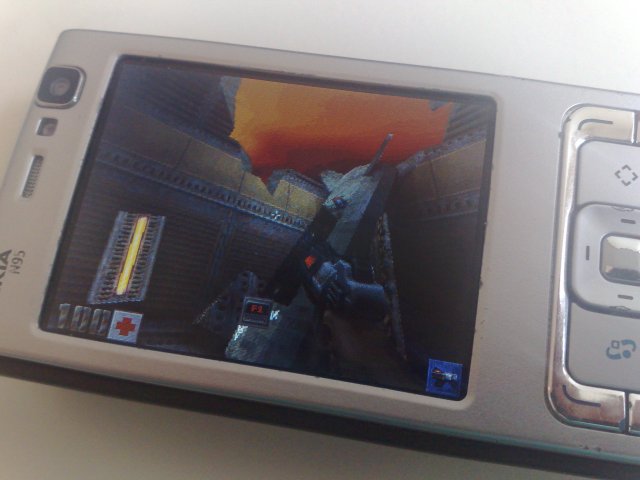
Yes the big question, just because something works technically doesn't mean that it's any good in the real world. Well the good news is that it plays as well as it looks. And it looks good.
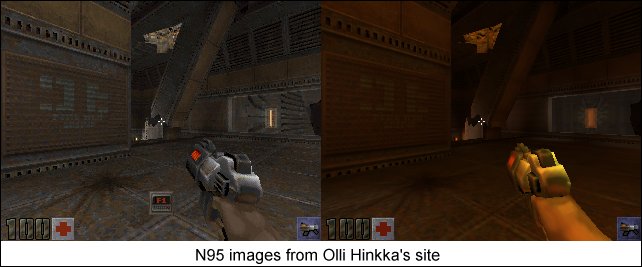
But it's not perfect. Quake on the PC really needs a mouse, and the conversions to games consoles such as the PS2 meant that there were dual analogue joysticks - the simple digital cursor on the smartphone does struggle sometimes with the accuracy required to play Quake, and that means the later levels are a bit of a challenge.
With a little work, I suspect that the Quake engine could be optimised for a mobile platform; additions such as auto-aiming and less reliance on looking around to find things and to navigate would make a lot of difference. As it is, Quake S60 is a very faithful reproduction, but one that takes no account of the special environment a smartphone needs. That's not a criticism, just a fact. There's a certain amount of 'Because it can be done' behind a project like this, and watching everything on the screen while moving and playing is a testament to just how powerful our pocket computers are nowadays.
And if anyone asks what a smartphone can do, now you have the answer. This.
Links and Further Reading
-- Ewan Spence, April 2008