
Review: Data Monitor
Score:
50%
Do you have a monthly, weekly or even daily data limit on your mobile account? I know I do, which is why we leapt at the appearance of Data Monitor as a utility to help keep track of usage. However, with barely more data-gathering functionality than the built-in Log utility and with an intrusive and hard-to-configure, always-on 'ticker', it seems that Data Monitor isn't ready for the prime time just yet, as you can read in David Gilson's review.
Version Reviewed: 1.0
Buy Link | Download / Information Link
The term "unlimited data" is an infamous fallacy in the mobile industry. However generous, there are always limits, and so each individual has to keep track of how much data they have consumed. This is just what DataMonitor by One View Systems is meant to help you do.

DataMonitor gives you a display of how much data has been sent and received over your 3G/GPRS connection, and likewise for your WiFi connection. However, the application itself isn't keeping count. Rather, it is pulling together data already stored in the phone. This is evident when the application is run for the first time, as the counters are already populated. In this sense, DataMonitor isn't doing anything you can't do already, as your mobile data usage is already shown in the S60 Log application. Having said that, it isn't quite so easy to find your WiFi usage in S60, but then again, I'm not sure why you'd want to.
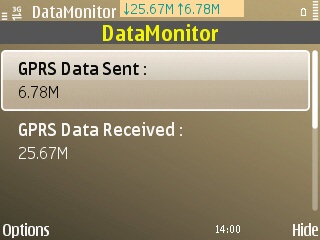
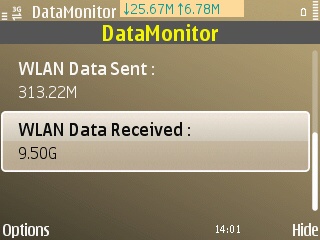
The helpful part of DataMonitor is how it makes use of this information and its most simple function. The user can set a usage threshold, which when passed, will trigger DataMonitor to post a notification. Presumably users would set this threshold to something close to, but less than their actual monthly data limit.
However, the S60 data counter appears to keep track of the last 30 days of usage, which is different to monthly usage. Therefore, it seems that the onus is still on the user to reset their counter every month - which I think would take a level of attention that most users would not be willing to give. It would have been nice if DataMonitor had included an option to automatically reset the counter at the beginning of each calendar month, and to keep a record of each month's usage. These are the basic functions of any data counter, and makes DataMonitor appear as if the authors were not making a serious attempt.
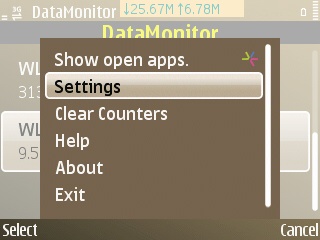
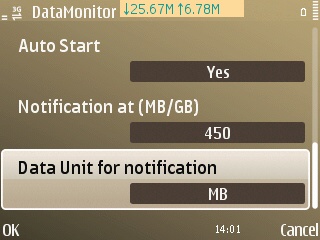
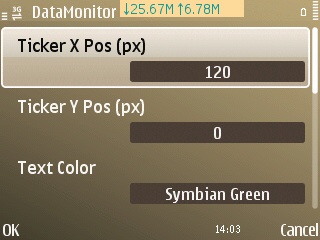
The other function that DataMonitor provides is an always-on 'data ticker' (that's their name, I call it a counter!). This gives you a constant view of your mobile data usage, without having to dive into DataMonitor to check. On the face of it, this isn't a bad idea. However, a cursory glance at the S60 3rd Edition screen shot on the Ovi Store may leave one assuming that it's a home screen notification widget - it isn't. This is a simple coloured block with text; both the background and text colour are configurable. Also configurable in DataMonitor's settings are the ticker's screen coordinates. Again, this really points to an alpha-stage user interface, hardly a 1.0 release. What's more, it's a no win situation for the user, as there just isn't a sweet spot on the screen that other applications never use. The developers could have at least replaced the type a coordinate type interface for sliders to determine horizontal and vertical positioning, as I doubt many regular users even now how many pixels high and wide their phone's screen is!
At least on S60 5th Edition screens, the ticker is sufficiently small to not get in the way (see first screen shot). However, with the QVGA S60 3rd Edition screens, it actually takes up a third of the screen's width! It would have been much better being restricted to the home screen, as it just gets in the way with every other application.
The final straw with the ticker is that there isn't even an option to turn it off. Instead, the only way to hide it from view is to set its coordinates beyond the limits of the screen. Again, this just shows how half-hearted the thought behind DataMonitor must have been.
Overall, I can't recommend DataMonitor; it actually gets in the way, more than it helps. I just hope its developers revisit the project and implement features that would make it a serious utility to help people keep track of their data usage. Instead, all it does is clumsily replay functions already built into S60.
David Gilson for All About Symbian, 5th September 2010.
Reviewed by David Gilson at