Quickoffice 6.0 news, Q&A with Phil Spencer

Published by Steve Litchfield at 13:14 UTC, July 30th 2009

Summary:

In the light of last month's announcement of the Nokia E72, which includes the full Quickoffice 6.x editing suite, and of yesterday's news for S60 5th Edition phones, we took time out with Phil Spencer, Director, Busness Development at Quickoffice, to get to the bottom of what exactly has been announced so far for current S60 and Quickoffice users and what's coming up.

Steve Litchfield: Following the recent announcements, what is happening to your S60 products?

Phil Spencer: Quickoffice have been longstanding business partners with Nokia, delivering our office products directly to the S60 platform and to users of S60 smartphones since they first began shipping. More recently, Quickoffice and Nokia have worked closely together to agree a way to provide existing and future Nokia S60 users with easy updates to the latest Quickoffice functionality.


Is Office editing still relevant as our phones get smaller and smaller?

Yes, we believe Office functionality is becoming increasingly important to S60 users on the move. The ability to reliably view and edit office documents with complete confidence, including the latest Office 2007 file formats, is a common use case. Nokia and Quickoffice want to ensure S60 offers a 'best-in-class' mobile office experience to its current and future users in order to further cement its position as a leading smartphone platform.


You're changing things at Quickoffice, I hear. How are these changes being rolled out?

We are ensuring that users of currently shipping Nokia S60 phones have an easy upgrade path to the latest Quickoffice release.

For the following devices: Nokia E51, E52, E55, E63, E66, E71, E72, E75 and E90, we've worked with Nokia to be able to provide users with the latest Quickoffice 6 viewing and editing release, free of charge. From the middle of June 2009, to coincide with the Nokia E72 launch, users of these devices have been able to get the latest Quickoffice 6 releases (including today's latest update) as free upgrades via Quickoffice’s on-device delivery channel called Quickmanager™, part of the Quickoffice application.

For Nokia devices that ship with Quickoffice viewers only, the latest Quickoffice 6 viewers are now also available as a free upgrade via Quickmanager. Users of such devices can update their Quickoffice viewers for free with Office 2007 file support or, as before, optionally purchase the latest editing version as an upgrade.


How do users get these updates?

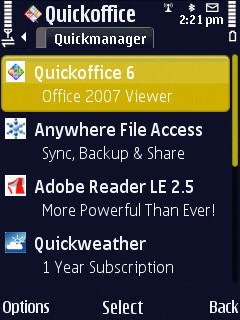
Users can get their free update immediately in Quickmanager. Quickmanager is Quickoffice’s secure software delivery catalog, built into every Quickoffice product. So, all users have it on their phones already. They just need to launch Quickoffice and select ‘Quickmanager’ or ‘Updates and upgrades’ from the menu. Users will be responsible for any network/data fees (if applicable – e.g., if they do not use WiFi) they may incur in the download process, but there will be no additional charges from Quickoffice to receive these updates.

Over time, the latest Quickoffice version will also begin to appear in Nokia firmware updates for various devices, but the updates will always be available in Quickmanager too.

Quickoffice  Quickoffice 6 upgrade   Quickoffice 6 upgrade

Upgrade process on the Nokia N86.

Quickoffice   Quickoffice 6   Quickoffice 6

Quickoffice 6, complete with new logo and icon.


Can you recap Quickoffice 6's main benefits, for new readers?

The latest Quickoffice 6 release adds many great features over the older versions that most users will find in their S60 handset right now (typically Quickoffice versions 4.1 or 3.8). These features include more advanced document viewing and editing (where applicable) functionality, ZIP file support, password-protected file handling, Excel 2007 chart viewing, multiple usability enhancements and much more. A particular highlight is support for Microsoft Word, Excel and PowerPoint ’97 through 2007 file formats.

The latest release available from today is a brand new update to the previous Quickoffice 6 product on offer – this version now adds the ability to view PowerPoint 2007 files for all users. Users of the Eseries devices listed above who already took advantage of their first free update from 15th June onwards might also like to visit Quickmanager again and download the very latest editing build again, also for free.

Another highlight of the newest update is support for editing on S60 5th Edition devices such as the Nokia N97.


Will the update be available in all languages?

Currently, to ensure we can reach as many users as quickly as possible, these first free updates are available in English, French, German, Italian and Spanish. A fully-localized update will follow in the near future (there is no fixed date, but users can check back in Quickmanager if they wish to receive this later).


What about future versions of Quickoffice?

The idea behind this new approach from Quickoffice and Nokia is that the latest viewing release will always be available as a free upgrade to Nokia phones which include our viewers, regardless of what version is in their phone’s initial firmware.

Certain Nokia devices will also ship with the ability for users to always receive the latest editing versions as well (as long as the device is still shipping). Other devices will ship with the latest editors available at that time, and users will be able to purchase further editing upgrades if they wish to receive the latest versions. Exactly what Quickoffice updates users are entitled to receive on each device will be made clear in the device's product literature, and will also be carried through to the Quickmanager offers tailored for each device.


What about users of non-Nokia S60 phones?

Right now, the changes here are the result of work specifically between Nokia and Quickoffice and are aimed at Nokia’s S60 phones only. We’ll continue to offer Quickoffice product upgrades and support to other S60 device users exactly as we do now. For example, the latest Quickoffice 6 release (which now supports editing on S60 5th Edition devices) is also available for Samsung Omnia HD users to purchase.


Thanks, Phil!

All About Symbian, 30th July 2009


Filed: Home > Features > Quickoffice 6.0 news, Q&A with Phil Spencer

Platforms: General, S60 3rd Edition

Categories: Interviews, Software

Discussion

Rafe
If you want the full editing version (but are not an Eseries user) I would suggest visiting Quickoffice.com or using the built in Updates and upgrades / app store feature of Quickoffice. There's a promotion running which gives you the editing version for $19.99 (normally $39.99) - look like it is only running fo a day though.

Edit: If you have already purchased an earlier version you may entitled to a cheaper upgrade. (e.g. $12 from 5 to 6.2). Check on the quickoffice.com site for more.
celios
Tried to upgrade on my N97... got "Catalogue update failed, check settinga and try again" - my WiFi internet connection is fine with everything else.

Tried to buy it using their website and after my PayPal account was charged got "Your purchase was successful, however a problem with our system has prevented proper processing of unlock code. Please contact Quickoffice Support for further help."

Now I have had to register for their support system and raise a ticket before I even have the software to install!

Fail*Fail = FAIL^2
Rafe
celios:
Annoying I know, but do contact Quickoffice support. They've always done a good job for me. I think this scenario happened to me with an earlier version.

Generally:

If you get a catalog update failure message it is worth trying again. Also (I think) you need to have a SIM card in the phone at the time (it will still use the WiFi connection).

I'd advise using the built in component for doing the upgrade / purchase.
Nemoi
I have the same problem as Celios on my N97, with SIM card inserted and I tried several times. After his experiences, I will certainly hold off buying the software from their site. A shame, really, cause I would have liked the word editing feature...
celios
Yep, I tried about 5 times with a SIM card in, then rebooted the phone and tried again... still no joy.

I have contacted Quickoffice support and hopefully they can send me a key. I would prefer to use the built in updater, to avoid any potentially disasterous dual install of Quickoffice, but I think I'll be downloading the .sis file from their website at this rate.
splus
I tried to upgrade from the version 3.8 I have on my Nokia N95 8GB, and after entering the IMEI on their upgrade web page it said sorry, but the free upgrade is only for QuickOffice versions 4.5 and above.

Does anyone know if I buy the full version if it will be locked to this device or I can somehow transfer the license (or whatever system it uses) if I buy a new phone?
Berty
Stumped up £11 to get the full program working on my N97. All well and good but the new V6 installs on my C memory so down to 16MB's even with the cache cleared on the browser.
Liquid_Li0n
Same issue here. I have an E90 and tried several times to update to version 6 using the built in update

he makes a connection to my wifi and almost directly it says the update of the catalogue failed. try again

Would it maybe be because everyone is now trying to download...

is there a way to download the QO6 via PC and install the .sis on the phone?
celios
Quote:
Originally Posted by Berty View Post
Stumped up £11 to get the full program working on my N97. All well and good but the new V6 installs on my C memory so down to 16MB's even with the cache cleared on the browser.
:frown: This makes me very sad. Why is eveyone in the Symbian world wanting to use phone memory only all of a sudden? What is the point of 32Gb of flash drive if you can only install half the apps to the phone's (extremely) precious memory.
Berty
This is where I downloaded from: URL Removed

Admin edit note: I have removed the URL from this post. See this post to see why.
Berty - obviously no problem with you doing this originally (I appreciate best of intentions etc.), but wanted to avoid issues for people who might follow the link for obvious reasons.
Berty
Quote:
Originally Posted by celios View Post
:frown: This makes me very sad. Why is eveyone in the Symbian world wanting to use phone memory only all of a sudden? What is the point of 32Gb of flash drive if you can only install half the apps to the phone's (extremely) precious memory.
I did have 22MB's before the upgrade so I'm thinking the original version is lurking on the C: drive somewhere. Anyone know where I can locate it, had a good look through using Y-Browser, nothing stands out!
Ratkat
Quote:
Originally Posted by Berty View Post
Stumped up £11 to get the full program working on my N97. All well and good but the new V6 installs on my C memory so down to 16MB's even with the cache cleared on the browser.
That's because the new version doesn't overwrite the old version, so you essentially have two versions on your phone, if for example you format your phone, you will get the old version back. I am assuming from the fact you only have 16mb left that you n-gage and Maps 3 as well.
16 mb is scary for c drive. You are going to run into problems at some point, are all your other apps installed on c or mass memory?
Berty
Quote:
Originally Posted by Ratkat View Post
That's because the new version doesn't overwrite the old version, so you essentially have two versions on your phone, if for example you format your phone, you will get the old version back. I am assuming from the fact you only have 16mb left that you n-gage and Maps 3 as well.
16 mb is scary for c drive. You are going to run into problems at some point, are all your other apps installed on c or mass memory?
Yes I install everything I can on Mass Memory, only a few Java apps I have automatically go to C: I deleted the N-Gage app as it's rubbish, and have 3.1 maps on there. Not sure what else is cluttering things up.
Ratkat
Quote:
Originally Posted by Berty View Post
I did have 22MB's before the upgrade so I'm thinking the original version is lurking on the C: drive somewhere. Anyone know where I can locate it, had a good look through using Y-Browser, nothing stands out!
You can't remove the original version. Quickoffice upgrades will never overwrite original, regardless of whether you use the built in updater or the standalone sis.

The only way to remove it is too hack your phone and remove all the files manually, it's hard work there are loads of files and you have to be very careful as it is not immediataly clear which belong to new and old.
Ratkat
Quote:
Originally Posted by Berty View Post
I did have 22MB's before the upgrade so I'm thinking the original version is lurking on the C: drive somewhere. Anyone know where I can locate it, had a good look through using Y-Browser, nothing stands out!
Quote:
Originally Posted by Berty View Post
Yes I install everything I can on Mass Memory, only a few Java apps I have automatically go to C: I deleted the N-Gage app as it's rubbish, and have 3.1 maps on there. Not sure what else is cluttering things up.
I have all apps installed to mass memory, and haven't bothered with ngage or maps 3, I have 53mb free on c at the mo. Gonna wait and see if they add maps 3 to firmware update.
Rafe
Quote:
Originally Posted by celios View Post
:frown: This makes me very sad. Why is everyone in the Symbian world wanting to use phone memory only all of a sudden? What is the point of 32Gb of flash drive if you can only install half the apps to the phone's (extremely) precious memory.
The necessity to install to the C: drive is a technical limitation when upgrading ROM applications (you'll note the same behaviour on some Nokia applications too - e.g. Nokia Maps). So this isn't Quickoffice's (or any other developer's) desire to fill up your C: drive.

Incidentally there wont be two copies on C:, so you wont be able to find anything to delete. As I allude to above the original copy is on the ROM drive (Z:). The Quickoffice install is quite big (not surprising when you think about what it is doing).. I think the sis file is 4 MB ish - the install size is generally around 50% again (varies a lot though from app to app).

Unfortunate, but hopefully this is something that Nokia / Symbian Foundation can fix for future platform releases. Also, hopefully, a firmware update will help as the most recent versions of the C: hungry applications (N-Gage, Maps, Quickoffice etc.) should end up on the ROM drive.

Rafe
dougalzene
I bought QO Premier 6 (latest 6.195) for the discounted price* and am generally happy with the product but for this one reason:
Any spreadsheet exported from google docs as XLS will not open in QO Premier. The same file opened and resaved in either MS Office or OpenOffice will be fine however not directly. To be fair it's Google's export however I thought I was buying a package that could open any XLS, DOC or PPT MS could. I have raised a support request.

*note: the "1-day" half price promo seems to have been active for ages - its countdown timer makes out it's like ooh wow must act quickly but in truth you can visit 2 weeks later and it's countdown time again! might need to clear cookies or ip.
yitwave
After installing this, my C:\ fell from 30 mb (w/ ngage, ovi maps3, messaging) to 18mb.

I uninstall it, but i can't access quick office, it doesn't leave me with my previous version.. what should i do?

Can i just downgrade back and will it delete the downloaded file?
celios
Quote:
Originally Posted by Rafe View Post
The necessity to install to the C: drive is a technical limitation when upgrading ROM applications (you'll note the same behaviour on some Nokia applications too - e.g. Nokia Maps). So this isn't Quickoffice's (or any other developer's) desire to fill up your C: drive.

Incidentally there wont be two copies on C:, so you wont be able to find anything to delete. As I allude to above the original copy is on the ROM drive (Z:). The Quickoffice install is quite big (not surprising when you think about what it is doing).. I think the sis file is 4 MB ish - the install size is generally around 50% again (varies a lot though from app to app).

Unfortunate, but hopefully this is something that Nokia / Symbian Foundation can fix for future platform releases. Also, hopefully, a firmware update will help as the most recent versions of the C: hungry applications (N-Gage, Maps, Quickoffice etc.) should end up on the ROM drive.

Rafe
Thanks for the explanation. That makes some sense (the face the original pre-installed version is in ROM). I was wondering about C: as the SEVEN email app also refuses to allow you to store messages anywhere other than C: - this may
be a result of problems with apps where data was stored on a removable memory card, which was subsequently removed and they have not updated their thinking (or their code) for the devices with built in solid state drives.

I got good support from Quickoffice and now have it installed. My free RAM (not C: space) is around 44Mb with SEVEN running and Quickoffice installed so I am fairly happy. Will give it a try over the next week.
Ratkat
Quote:
Originally Posted by yitwave View Post
After installing this, my C:\ fell from 30 mb (w/ ngage, ovi maps3, messaging) to 18mb.

I uninstall it, but i can't access quick office, it doesn't leave me with my previous version.. what should i do?

Can i just downgrade back and will it delete the downloaded file?
The only way you can go back to the old version is to format you phone using *#7370# and not restoring a backup, you will lose all your data so sync first.

Although as Rafe says the original version is on rom z drive, there are a number of files that are written in the private and sys drives on c, deleting them gains about 1 mb back, but you need to hack your phone and it is not something I would recommend.

It you have previously upgraded from version 4 to version 5 and then 6, you will actually have two copies on c, as well as the one on z, as version 6 doesn't overwrite 5 even if you installed it as an upgrade.
In this case hacking and deleting files will give you back about 5mb, but it is much safer in this case to format and upgrade direct from 4 to 6
JohnnyN
I started with 51mb on my N86, and now have 32 after this and ovi 1.1. I think I'll stick to firmware updates from now on, other wise i'm going to run out of space :o
dougalzene
I have 74mb free after installing QO 6 on my recently hard reset N82. Also on C I have most of my apps installed including Ovi maps. In fact everything but my dictionaries which are on a 8gb card along with country maps, music etc.

About a month ago I did a hard reset along with latest firmware reinstall. Everything is running very smoothly and much better than the accumulation over several firmware and app upgrades.
rvirga
Free upgrade for Samsung i8910 HD users as well (read-only version).
It's probably free for all those Symbian handsets that came with the previous version preinstalled by the manufacturer.
mcpezza
Just purchased the upgrade for £9.00 something!! Now have 8.69Mb left on my C drive!
Phil Spencer
All,

Great to see the enthusiasm around these updates, thanks for the interest. Just a few quick points:

1) Rafe already replied about the ‘install to C’ issue. Unfortunately there’s not a great deal we can do about this due to system installer complexities and limitations, sorry.

2) I see some people are reporting issues with Quickmanager catalog updates. We have seen some regional issues we hope are now fixed with some connections but in the main we think a lot of these are just down to understandably high demand. Our apologies if anyone experiences this, but please try again later or tomorrow and hopefully it will work. If you’re using WiFi then as some posters note please do ensure there’s a SIM in your phone and that your phone is on too, even if you’re not using its data connection.

3) A very important point, but PLEASE can I urge you all to use our official http://support.quickoffice.com/ site if you have problems with downloads or purchases? I see someone has posted a link to a SIS file for direct download. We’re happy for people to get direct download links via our support service but it’s CRUCIAL people get the right SIS file. As a little background for you, we now unfortunately have to maintain over 20 SIS files for this release due to different S60 versions, different license offers and different ‘types’ of SIS for different devices due to the way the Symbian Installer works. It is very important for your own sake and proper usage on your phone that we can direct you to the right one.

(An example: the SIS linked to earlier is for S60 5.0 devices which have Quickoffice in ROM only. If you try to install it on other devices/setups it will cause problems – if not immediately, when you come to try and get future updates installed. So it’s imperative we try to help you with the right link for your specific phone).

We’re very willing to support customers with questions or problems directly and if you file a request on our site we’ll be able to do so most effectively.

Thanks,

Phil

Full thread: 56 Comments / Post New Comment

Search

Navigation

Social

Advert

Translate