BBC iPlayer application officially available for the N95 and E71
Published by Steve Litchfield at 7:04 UTC, June 11th 2009
The BBC has just launched a standalone iPlayer S60 application (v1.0.0!) for the Nokia N95 and E71. iPlayer lets UK users catch up on BBC programmes that have been broadcast in the last week or so and has previously been exclusive to the Nokia N85, N96 and 5800, available as a Web Runtime widget. Although no formal announcement has been made by the BBC as I write this, it's as good as a done deal, as this BBC blog post strongly hints.

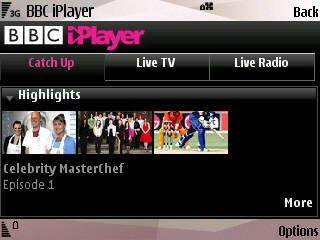
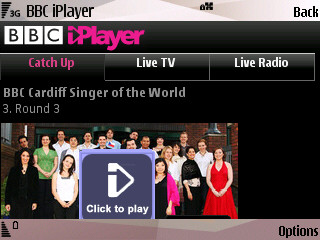
iPlayer listings as seen on the Nokia N95 (in landscape mode)
The basic application operation is very similar to the widget version. However the UI has been tweaked with re-arranged tabs and layout. The most notable change is the addition of support for Live TV. Live TV allows you to view the programmes currently running on the various BBC channels. Previously this was only available via the BBC website.
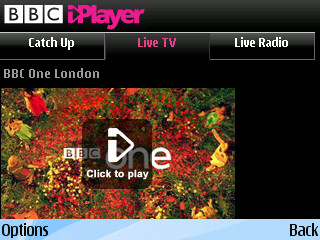

Watching BBC One live, via iPlayer on the Nokia E71
The Nokia E71 supports both streaming and download of iPlayer content. Unfortunately it appears that the N95 doesn't contain the DRM needed for the 'Download' option, but the streaming part of the system works well. Downloads and streaming will work over Wi-Fi for all and, on select UK operators, streaming and downloads should also work over the 3G network.

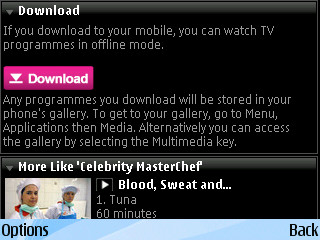
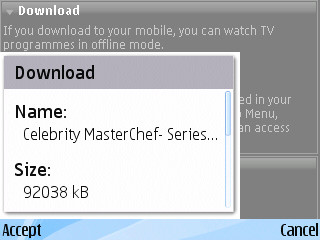
Downloading a programme from BBC iPlayer on the Nokia E71
You can get the iPlayer application, as always, by going to www.bbc.co.uk/mobile/iplayer in S60 Web. The site will serve you whichever version is appropriate.
Comments on performance, connectivity and compatibility welcomed!
Update
While the application is a native S60 application it consists of 'web browser component' with a few extras designed to solve the Real player access point bug.
The new version will only work on the Nokia N95, N95 8GB and E71. Even if you do obtain and install the SISX file on another device it will not work. The programme listings are still downloaded over the web and, when this happens, the service checks which device you are using through the browser's user-agent. Instead of seeing the listings you will see a message saying that the device is not compatible with iPlayer.
Hopefully the BBC will widen the compatibility once it has carried out further testing. You can leave your feedback on the official launch post, which is now live on the BBC Internet blog. There's also a second blog post, explaining some of the technical details, here.
You may also find this help page useful, it lists, in a compatibility grid, all the mobile devices that can be used with iPlayer.
Source: Official Nokia boards and gerrymoth.
Steve Litchfield and Rafe Blandford, AAS, 11th June 2009
P.S. Steve: Interestingly, despite setting up my RealPlayer 'Network' panel to the right access point, iPlayer's streaming doesn't seem to like my Linksys router. I had the same problem with the N96, yet iPlayer works perfectly over the same router on the 5800. If any tech wizards out there can offer a plausible explanation, I'd love to hear it!
Categories: Software, Links of Interest
Platforms: S60 3rd Edition
News Discussion
Unregistered
Works nicely on my E71, through the web browser.
entwisi
I've posted a few times that its actually really easy to 'hack' this widget to work on many S30v3 phones. Its also easy to disable the limitation of only using WIFI(just make sure you have a suitable data package).
I've been using it on my e90 for ages now with it enabled for 3G as well. It make it much easier to 'entertain' a 4 year old when you need 20 mins to do stuff if you can sit her down with cBeebies running away quite happily!.
To do the changes, download the .wgz file to a desktop PC, extract it using winzip, find the .js file, look for N96. You will see a | seperated list. Add your model number and save the file, repackage as a .zip and rename to .wgz and send to your phone over cable or bluetooth.
The 3G 'hack' is a little more involved but basically find the function that checks what connection type is in use and set it to always return Wifi as the connection type. repackage as above and Bobs your mothers brother.... The only thing you need to do is manually set the connection correctly in RealPlayer before opening the iplayer widget.
I've not worked out if its possible to remove teh region checking as yet for those of you abroad.
slitchfield
Yes, yes, but as you know, AAS does at least try to report on things which are official - we leave the hacking side of things to other web sites 8-)
lumothesinner
y bother with widgets - iplayer has run through skyfire for ages for streaming, even over 3G
FaizDaDon
@ entwisi
Dammit I wish I knew that before!
stuclark
iPlayer 1.6.0 works on the Samsung i8910 as well; and if you're using the generic firmware for that phone (as opposed to the Orange firmware), it's also enabled for downloads as well as streaming :)
MikePJ
It works on my E71 without a hitch - streams live and catch-up video over 3G. Excellent, thanks Auntie!
Dynite
This is good news.
Hopefully the iPlayer team can develop a way for downloads to work as well in due course.
entwisi
Quote:
Originally Posted by slitchfield
Yes, yes, but as you know, AAS does at least try to report on things which are official - we leave the hacking side of things to other web sites 8-)
|
heh If they choose to release something that can be modified then who are we to not help them 'improve' their product :D
After all without people taking software and driving it forward where would open source movemnt be today.
I chose the term 'Hack' quite loosely, in reality i did nothing more than add a few characters to a text file. Its not like I decompiled some java etc.
testman
I think you lot have forgotton one thing... this new N95 download is a SISX file, not a WGZ file.
slitchfield
Thanks, do you know, I automatically assumed it was also a widget!!! I've amended the story slightly.
Very impressive for the BBC to now producing native S60 apps though, I must say.
Steve
Unregistered
It's developed by Apadmi according to the About page. Works a treat on my old N95
shadamehr
It seems the compatibility is STILL hit and miss and limited.
As it works a treat (over wi-fi only of course), on my E71, which, as I already knew, having the same DRM codes as the N96, will let me PLAY a video, or DOWNLOAD a video for later too.
Cool.
NOT SO COOL, is that it WON'T work for the N82 that my partner has though...
Webpage says "Sorry this program does not work on your phone yet. We are adding more soon blah blah blah..."
Sort it out Aunty Beeb!
shadamehr
Steve, having visited the Blog you mention, and seen the poster, then can I confirm it is exactly as the poster states...
It now works for the E71, and the N95.
It does NOT appear to work for "and similar devices presumably" as your post states.
Hope this clarification helps, as it was a HUGE let down to me finding that it doesn't run on my partner's N82, after reading this story.
But at least it's flawless on my own E71 now.
slitchfield
OK, noted, I'll tweak the wording. Though what happens if you install the SISx file manually?
Steve
shadamehr
Quote:
Originally Posted by slitchfield
OK, noted, I'll tweak the wording. Though what happens if you install the SISx file manually?
Steve
|
If I could remember how you find and locate the sisx file, this is EXACTLY what I wanted to try Steve.
Remind me how to find it, and I'll do the leg work mate...
slitchfield
Reinstall, but pause at the 'Install?' prompt and switch to Y-Browser. Search for the sis file and copy elsewhere etc. Let us know how you get on!!
Rafe
I've tested the SIS file on another device. I've updated the story to note the results. Bad news - it will not work.
mkr10001
You're welcome steve. Dont worry about it
pauul
[quote=entwisi;422353]I've posted a few times that its actually really easy to 'hack' this widget to work on many S30v3 phones. Its also easy to disable the limitation of only using WIFI(just make sure you have a suitable data package).
is there any chance that you might be able to point me in the right direction to downloading a already altered .wrz for the n82 . i have tried to do it myself, but dont seem capable. i would be most greatful, im going to silverstone next week and it would save me 70quid not gettvng kangeroo tv
Unregistered
Why isn't this available for the N82 and I don't understand why the E71 supports the DRM and the N96 can't.
mkr10001
This isnt a widget. Its a sisx, its completely not the same as the wrt that has been hacked. You dont need to hack it. Its not a widget. Stop saying its already been hacked. It hasnt
neilhoskins
Sorry to be a party pooper but this isn't as exciting as it first seems. I don't see any download links so it's streaming only, which kinda defeats the object and only takes us back to where we were several versions ago before we were blocked. The live TV option would be nice if it worked but it doesn't seem to want to come through the firewall here either. I've always had problems getting realplayer streams through firewalls; if you're saying it works on the 5800, then it looks like there was always an issue with the v3fp1 version of RealPlayer. They also seem to have closed the loophole whereby you got prompted to save a realplayer stream in Gallery, for use later without having to go via a website or somebody's poxy client.
capitaine
when's Skyfire gonna be available for 5800?
sapporobaby
Tried to download it to my E75 but no joy. It says that the phone is not supported. I am currently in Finland so this might be the issue. Hey Tzer2 can you try this if you do not mind and see if it works? Thanks.
Full thread: 38 Comments / Post New Comment