All About Symbian - News from the Symbian Ecosystem...

eReader beta for S60 3rd Edition

Published by Rafe Blandford at 11:50 UTC, May 21st 2008

A beta version of eReader.com's eBook software is now available for S60 3rd Edition. eReader is a long standing eBook store which provides some of the current best sellers in eBook form, protected via its own form of DRM. They provides a version of their reader for multiple platforms. However a few years ago they seemed to lose interest in support Symbian OS handsets, but under the new ownership of Fictionwise this seems to be changing.

The S60 3rd Edition version of eReader will be most attractive for those who have already bought books using eReader. If you're looking at buying an eBook for the first time you may also want to investigate the Amazon backed Mobipocket which provides both reading software and eBook store.

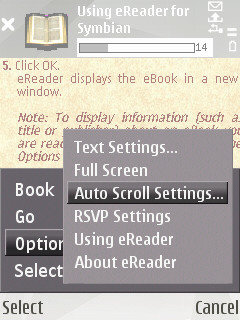
Both Mobipocket and eReader povide similar features in their software (full screen mode, the ability too look up words, bookmarks, autoscroll, font and text settings). Both can also be used to read standard .pdb file (non-DRM) which is useful for reading public domain content from sites such as Memoware.

Mobipocket is currently the more mature reader (and is also available for UIQ handsets), but hopefully the eReader software will progress during the course of its beta.

eReader is owned by Fictionwise, another eBook store, which has the notable positive feature of providing many of its books in multiple formats including both eReader and Mobipocket. Books bought from Fictionwise are therefore less susceptible to being left behind by changes in DRM.

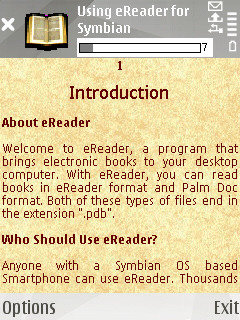
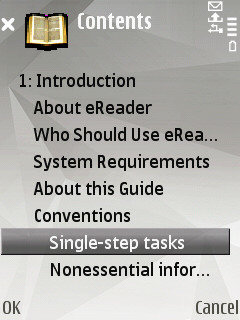
Here are a few screenshots from the beta version of eReader:
ereader

Categories: Software, Links of Interest
Platforms: S60 3rd Edition

News Discussion

icebox
as is my pc, laptop and internet tablet :cool:
snoyt
I can recommend also to look at the SF/Fantasy collection of the baen free library of Baen books, a well known SF publishing company. There are complete books as free samples, though be warned some might lure you into buying the other books in the series ;-)
Unregistered
Woohoo!!! I've been emailing them every couple of months for the last year and a half since I switched from Palm to a Nokia E61.

The software installs and runs on my E61, but unfortunately it shuts down often. I don't have any other apps running, except for Microsoft for Exchange (MfE).

I hope they fix it - I've been waiting for a while for this one!
Unregistered
That's really good news as that keeps my library with books from them readable on a current mobile device (which has S60 3rd as you might have guessed) instead of my aging PDA. And I don't have to take my PDA with me just for reading them, either.

It would have been cool if they would have mailed this info to everyone asking about it in the last few months. At least I didn't get that info till now though I asked for it only a few weeks ago.
wocius
It installed fine on my E51, but it can't find any e-books. Any word on where they should be installed? I tried the app on both the phone and the memory card and the books in \Others on both the phone and the card, but no luck.
wocius
I found it -- books should go in e:\data\others.
Unregistered
Thanks for finding that directory wocius!

Now I can download free *.pdb books from manybooks.net, copy them to e:\data\others (i had to create the directory myself), and then I'm able to view them in eReader.
Unregistered
Hi all,

I don't know if everyone is experiencing these problems but this version of eReader seems to have some serious bugs! Running on a Nokia N97 with latest firmware.

1/ Unable to select a book from the library using the touch screen, have to open the keyboard and use eReader in landscape mode.

2/ Whenever eReader is exited, the phone will restart.

On top of these two major bugs, there are several minor issues that make eReader unusable.

1/ I like to turn the page by touching the screen but on eReader, I have to touch a part of the screen with no text or it will open the 'word lookup' feature.

2/ After reading in full screen in portrait mode, the only way to return to normal view is to either open the keyboard (but eReader does not handle the change in orientation well) or to use the word lookup feature mentioned above that I would like the option to disable.

I'm sure there are further issues but the issues above are certainly enough to prevent me continuing to use eReader. I love ZXReader, the only issue being the lack of supported formats. If ZXReader could support PDB or eReader work like ZXReader then I would be returning to ereader.com and fictionwise.com.

Full thread: 8 Comments / Post New Comment

Copyright Notes || Contact Us || Privacy Policy (Ellie)