Google Maps 3.3 syncs your favourites and starred places
Published by Steve Litchfield at 20:44 UTC, December 2nd 2009
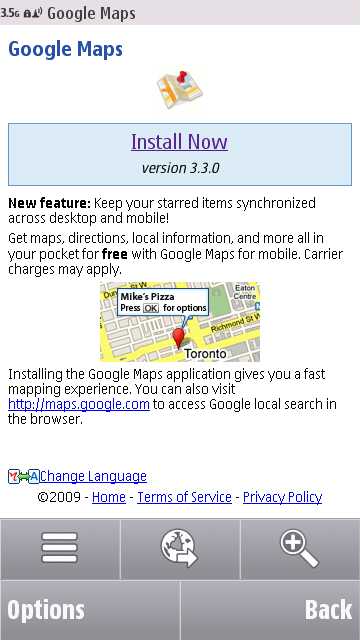
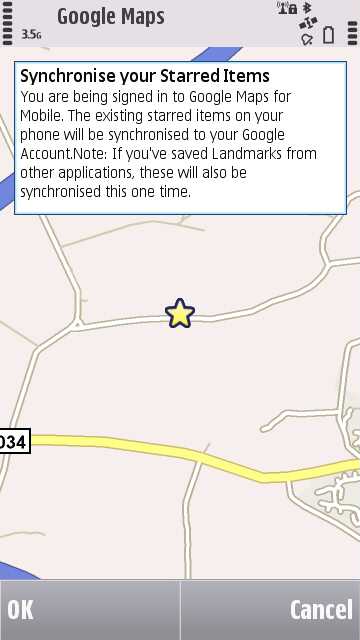
Google Maps for Symbian just got updated to v3.3, with direct syncing support for your 'starred' places (to the full Web version of Google Maps). In addition, on the first sync, your Nokia/Ovi Maps favourites also get uploaded. You can get v3.3 by going to m.google.com in Web on your phone. There are a couple of screenshots after the break.
Thanks to Ovi Applications for the heads-up
News Discussion
slitchfield
Interestingly, the 'Layers' function crashes the app on my device now. Working for anyone else? Maybe it's a conflict with Maps Booster? Hmm..... Comments welcome!
dmcconachie
Same problem for me Steve! :(
Vayada
"Layers" work OK on my Nokia 5800.
davidgilson
Layers works fine for me on my E55 (haven't updated my firmware).
I have some issues with this, I've got my landmarks sync'd up to Google as "starred items", but then you don't seem to be able to do very much with them once you log into maps.google.co.uk. You can't even edit them.
I also tried going into Ovi Maps to create a new location, after having uploaded to Google Maps. Then I reset Google Maps completely, and started again, but it failed to sync my test location.
I'm sure this is an improvement, but I'm failing to see the use if I can't change these starred items, either on the mobile or web.
Unregistered
kind of a shame there isn't an update option inside google maps... seems silly to download a new version every time they make a small change.
shadamehr
Layers Crashes/Errors:
Guys, if you check out the Official Google Mobile Blog at:
http://googlemobile.blogspot.com/200...sync-with.html
You will see LOADS of people complaining of this.
I reckon a new version will be released,. in the next few days, to fix this, given the prevalence of this issue.
For me though, all my Latitude Contact Photos have all been wiped, after installing this new version.
So I'd say this update is a MESS, for sure.
shadamehr
Quote:
Originally Posted by slitchfield
Interestingly, the 'Layers' function crashes the app on my device now. Working for anyone else? Maybe it's a conflict with Maps Booster? Hmm..... Comments welcome!
|
Indeed, further to my previous post flagging up lots of people getting this Steve, it now seems Google are ASKING for specific examples to be notified to them. From the Google Blog, from one we assume to be and Admin:
"Chris said...
Hi everyone,
If you're experiencing problems with Google Maps version 3.3, can you please report them in the Google Mobile Help Forum:
http://www.google.com/support/forum/...e+Mobile?hl=en
Post a question, tag it with Maps and Windows Mobile or Nokia/Symbian, and include the requested info like your exact phone model so we can help troubleshoot the problem.
If you've reported issues above, please post them in the forum so we can communicate back and forth with you if needed.
Thanks!
Chris"
davidgilson
Having just gone back to Google Maps website, I can now see my starred items shown on the map, and that I can star and unstar locations from the speech bubble. I'm going to test making a starred item on the web and seeing if it shows up on my phone, and in turn S60 Landmarks.
seki
Now if they'd just institute an OFF-Line mode .. :)
slitchfield
The 'Reset Google Maps' option sorted out the Layers problem for me, by the way. But messy of them to have this transition bug in the first place.
E51er
Call me stupid, but how to get it ? Only version 3.2.1 showing for me everywhere.
E51er
Never mind. Using Opera for some reason redirects to 3.2.1, the S60 browser (which I rarely use) points to 3.3.
stuclark
The layers / lattitude bug is a known ongoing problem. The best solution is to load an older version (such as 3.0.1) then reload the latest
dmcconachie
Options -> Tools -> "Reset Google Maps" fixes the Layers issue.
JayTay
I deleted Google Maps and reinstalled which also fixed the Layers issue.
Unregistered
Very Useful information , this is both good reading for, have quite a few good key points, and I learn some new stuff from it too, thanks for sharing your information.
regards,
<a href="http://www.superchinawholesale.com">handbags</a>
Full thread: 16 Comments / Post New Comment
