Swiss Manager Pro launches
Published by Steve Litchfield at 15:26 UTC, November 18th 2009
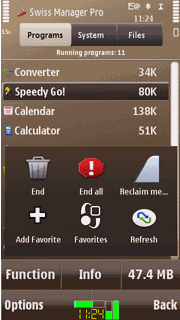
CellPhoneSoft, UIQ specialists until a year or so ago, have launched their new flagship title for S60. Swiss Manager Pro 3.0 is a 'task manager, system information tool and file manager in one' (I've pasted the feature list below, along with a screenshot). It also includes a 'memory cleanup function' which sounds interesting. Comments welcome if you've tried this and/or want to review it formally for AAS(!)
"Swiss Manager Pro is compatible with all Symbian S60 smartphones by Nokia, Samsung, LG and Sony Ericsson, working equally well on keypad-based phones and on the latest touch-screen devices, like the Nokia N97 and X6, the Samsung i8910 (Omnia HD), and the SE Satio.
Major features:
Task manager, system information, file navigator in one application.
Full control over running and installed programs.
Advanced memory cleanup functions to maximize free memory, both manually and automatically.
Useful system information (device characteristics, system uptime, status reports, and much more).
File manager providing fast and convenient operations (copy, move, delete, rename, etc.).
Status icon displaying time, free memory, CPU usage, battery level, and drive usage.
Floating menu for instant access to all major services.
Fully customizable Favorite list for convenient application launch.
Recent list providing automated access to the most frequently used programs.
Key-press shortcuts for all major functions.
Many options for full customization and convenient use."

News Discussion
JayTay
I've just installed it. Seems to have a lot of info (uptime, reserved RAM, no. of applications open, etc.)
I tried the RAM cleanup which freed up 10MB of RAM on my N97 Mini which has been on for 7 hours with quite a bit of usage.
I usually use Handy Taskman for my task manager but may consider switching as this looks very promising at first glance. My only worry is that there's almost too much info on display.
DKlaus
Can the file manager access hidden files & folders (on internal/C: drive) that aren't accessible in the built-in file manager?
JayTay
Quote:
Originally Posted by DKlaus
Can the file manager access hidden files & folders (on internal/C: drive) that aren't accessible in the built-in file manager?
|
Yes.
Unregistered
I'm trying the app right now and it's really good. I'm on trial still and want to now that long hold menu but does lunch the app in full version or not? In trial it has no function.
Hih
Quote:
Originally Posted by JayTay
Yes.
|
No.
Unregistered
Quote:
Originally Posted by Hih
No.
|
Maybe?
Zed@CPS
Hi, I'm from the lab producing this app. Here are some answers:
Quote:
|
there's almost too much info on display
|
We have plans to release a Lite version with no file manager, much less system info, but same memory management engine. Is there a demand for that?
Quote:
|
Can the file manager access hidden files & folders
|
No, unless the phone's security system is manipulated.
Quote:
|
In trial it has no function.
|
The trial is not crippled in any way, just expires, but can be registered any time.
Unregistered
There's a lot of info but it's great. I use Handy Taskman but I'm definitely considering this. Top app!
Berty
How long is the trial for? Bit expensive at £12 or so!
Support@CPS
Quote:
|
How long is the trial for?
|
Two weeks.
Quote:
|
Bit expensive at £12 or so!
|
You get three apps in one for the price!
Unregistered
so far i am really impressed with memory reclaim tool. the rest imo is mediocre at best. lots of stuff, sure, but clunky and tons of useless info (whole tab dedicated to knowing what my screensize is, what processor, speed... i know what i bought) then again it is supposed to be swiss army knife so i wont beat it any longer but when you say £12 (roughly double in dollars) for 3 in 1 then i start rating 3 sections individually and they dont add up when there is better performing and better looking free alternative.
idea. make memory app (that can allow me tu run n97 for days without reboot- no or little ui) standalone for $2.50 and were in business. keep the rest and sell it to those that need app to know their battery is full.
Support@CPS
Quote:
really impressed with memory reclaim tool
make memory app that can allow me tu run n97 for days without reboot
|
Okay, Swiss Manager Lite, the plain-vanilla memory remedy is coming. In the meantime, SM Pro is here for those who want more.
Unregistered
happy about news about lite and standalone memory tool.
what impresses me about memory reclaim is that it actually works. other apps claim to have it but in my experience it reclaims little or nothing.
i start my day with 50 megs average on n97 and in the course of day or two at the most it keeps dropping finally settling at around 38 ( use some apps drops to 45 clean memory with other tools get 46.8, use some more apps and im on 42 clean memory and im on 42.9 etc.) problem is by that time you never know what might fail to work, touch response becomes slugish or non responsive freezes for 10 seconds at the time, phone restarts unexpectedly.
with this tool i reclaimed memory almost to the point of fresh reboot anywhere between 46 and 51 by this time normally i would be already be at 38-39 range expecting weird stuff to start happening. will test some more to see if it stands to the further tests over next week but so far good job. day one: pass. if this tool will have simple ui then allow selecting individual apps that reclaiming will not shut down. it would be a great tool for troubleshooting memory leak offenders.
Support@CPS
Quote:
|
with this tool i reclaimed memory almost to the point of fresh reboot
|
Yes, that's one of the advantages of this program.
Quote:
|
allow selecting individual apps that reclaiming will not shut down
|
To preserve selected apps you need to define them, and then use the
End all command instead of
Reclaim memory. It's worth looking at the User Guide as well.
Unregistered
lol i was talking specifically about non existing yet standalone memory reclaim tool. preserving app and using end all does not help really reclaim memory just shuts the running apps down. when im doing my tests im not talking about for example running 5 apps and using memory reclaim. what im talking about is with usage some apps or os itself never gives memory back even after shutting down and with all apps and processes shut with jbak it is 38 at the end of a day or 2 on n97. now specifically with memory reclaim i want to reserve jbak taskman (dont want to have to restart it every time i run this and added benefit is being able to troubleshoot) and run reclaim. if it shows to be a source of memory leak it will be off my phone and so on with others.
Support@CPS
So what your suggestion indeed is?
Unregistered
... make a standalone memory cleanup tool with ability to reserve jbak or handy or any app i deem necessary to want preserved during memory reclaim. if this app has that, good, keep it but im not buying for reasons above. if it doesnt, make it on standalone and i will be your customer provided you dont expect to get more than $2.50-$2.99. thats all.
will not be replying anymore to this post as it seems to go sideways and i realise you are trying to promote the existing app. i appologise. thanks for the prompt replies.
Unregistered
Quote:
Originally Posted by Support@CPS
Two weeks.
You get three apps in one for the price!
|
My first visit here.To me and several of my friends, its a very steep price.
$12 is too high for a common man. But i guess, your target market is high-end
enthusiasts, hackers, bloggers.
Nick17
Wow.. What a great app..
Too bad we only get it near the end of S60-phones instead of at the start..
Unbelievable smart app.. where it automatically reclaims RAM (when set) and
only does this when needed (and thus only once over night (support informed me))..
Also gave Speedy Go a try and my N96 is faster than ever and not in need of repeated reboots to reclaim RAM..
ichwong
I've installed the program on my N97 mini but it refuses to start up.
It quits automatically every time I start the app.
Unregistered
Is there a way to set exceptions in "memory reclaim"? And can it be used as a taskman by using the key button?
Full thread: 17 Comments / Post New Comment