
DreamConnect : Now for S60 3rd Edition FP1 and FP2 as well

Published by Asri al-Baker at 4:35 UTC, October 28th 2009

For those who are waiting for DreamConnect to be available for S60 3rd Edition note that the developer has just announced the availability of DreamConnect for S60 3rd Edition FP1 and FP2. Previously, it's only been available for UIQ 2, UIQ 3 and Series 60 5th Edition. There are some screens and info after the break.

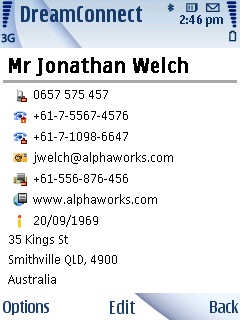
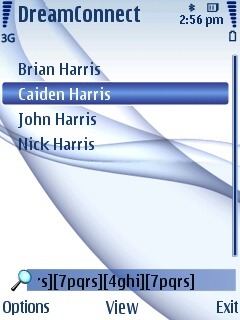
DreamConnect S60 3rd Detailed View  DreamConnect S60 3rd Detailed Keymatch


From the press release :

"The S60 version of DreamConnect inherits many of the ground-breaking technologies from its UIQ and Psion predecessors. It features a clear display of information in business card format, key match, global find and hierarchical sub-categories, designed especially for users who have a large contact database.

DreamConnect's unique business card layout allows at a glance information viewing by presenting important and most frequently used information first. Category based layout customization works together to achieve greater clarity and instant contact recognition. It cleverly manages screen space to show 3 times more information than standard Contacts while maintaining easy access to using the details.

DreamConnect provides powerful and instant search of contacts using the unique KeyMatch and flexible global find. Global find allows users to perform a specific search on all text and numbers to locate information anywhere within their DreamConnect database. KeyMatch significantly reduces key presses on numeric keypads and shortens input by matching all of the letters (and the number) represented by each keypress.

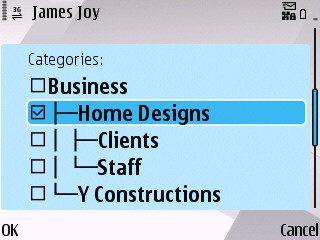
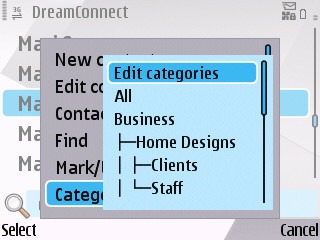
The S60 version of DreamConnect boasts hierarchical sub-categories, giving S60 users the ability to organise their contacts and capture their relationships in a meaningful and realistic way.

DreamConnect for S60 3rd Edition FP1 is Certified Symbian Signed and available in English, French, Italian, German and Spanish. The FP2 version is Symbian Signed and available in the same languages.

More details on DreamConnect for S60 can be found at http://www.dreamspring.com/products/dreamconnect-for-s60/dreamconnect-for-s60.html. A trial version is available at http://www.dreamspring.com/products/dreamconnect-for-s60/download.html for users to try before purchase."


Filed: Home > News > DreamConnect : Now for S60 3rd Edition FP1 and FP2 as well

Platforms: S60 3rd Edition

Categories: Software

News Discussion

phil9500
They MUST be kidding!!!!!!!!

A while ago i applied as a betatester. Mailed some company names as a reference but it wasn't good enough it seemed. I thought that this meant that Dreamconnect was a company that knows what it wants and has enough resources to permit itself to "choose" who can betatest and who can't. Today they finally released Dreamconnect and guess what??? It doesn't even recognize the keyboard of the e71! A so called "business" app isn't working on the so called "business" phone. WHAT A JOKE!
lithgow
The application was Certified Signed using the E71 as one of the main test machines. That basically guarantees that it works as advertised.

It also works on our own E71, as well as many other testers' E71s.

Might I humbly suggest that there is something else happening here? Perhaps the KeyMatch feature is on and it's using that? That gives unusual results on the E71, which is why it is turned off by default.
phil9500
All i did was open the application and tried typing something (i used dreamconnect years ago on my Psions, thats why i immediately tried this version). Nothing more, nothing less. Only the numeric keys are recognized but typing a word as you do in contacts on an E71 isn't working. For example when i type '2' the app shows [2abc] wich would be correct on phones with a regular keyboard. Typing 'A' doesn't do anything. I didn't mess with its settings simply because there are none. When you fold out settings in the options menu there's only an 'about'.


BUT then i checked the menu again and indeed "keymaych" was set to ON. Turned it off and now it works correctly so big thanks for your help. Still 1 question left: Keymatch definitely was set to 'on' without doing anything. I can asure that. What has caused this? (since you say it set to off by default)

anyway, im glad i can finally test this app and start looking forward to Dreamlife.
Unregistered
Cant find the FP2 device option. The little dropdown menu only has 5th Ed.
Unregistered
I'd like to try the demo but I've seen that a registration to their website is required...
Strange policy.
The app seems really well done from the screenshot but I don't like to give private information just to try an application...
Unregistered
Finally bothered to register and silly download script wont work. Meh, will have to try it another time.

Full thread: 6 Comments / Post New Comment

Search

Navigation

Social

Advert

Translate

Also All About