|
SmartAnswer - from SymbianWare
Review by
Dazler
prologue
An answering machine on your 92x0, promised by many developers but nothing
more than a rumour in the end. Finally, it was Symbianware that took on
this challenge and succeeded, or did it?
Let's put it to the test :] please leave a message after the beep
SmartAnswer is a combination of 2 little apps; the smallest of them is the
actual answering machine, where the other is the main app(messages player)
where we can setup our answering machine and listen to our recorded
messages.
When we start SmartAnswer we find ourselves in the main app.
The main view of this app contains the list of recorded messages, this app
also provides us with the setup possibilities for our answering
machine. 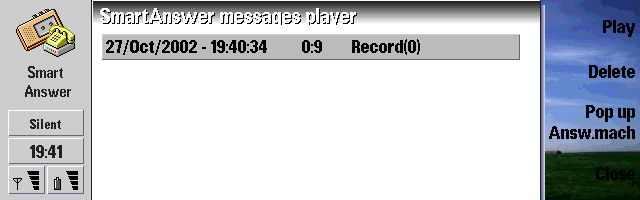
List of recorded messages When to beep?
The main view of the setup menu contains the Answering machine launcher
options.
The first is a rather simple one, the on/off switch :) It's kind of tricky
in this way that activating the answering machine doesn't really turn it
on; what this function does is plug in your answering machine, the actual
turning on and off still has to be done :)
The second option helps us with this on/off switching, it provides the
option to automatically turn the answering machine on when entering a
certain profile. I find this function very helpful; when my phone is in the
general profile it means that I'm around to answer, when I put it in silent
mode I'm probably not in the mood to answer so this function takes care of
this rather nicely :) Of course you can always switch on the answering
machine manually ;) The third option in this category is the shortcut key;
setup a shortcut key to popup the answering machine in a blink of an
eye. 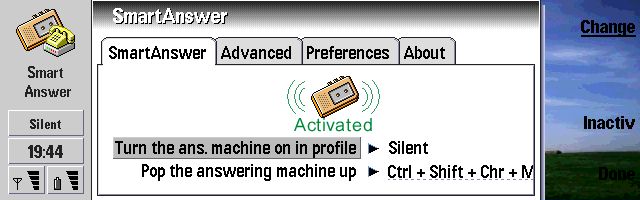
The general setup view. What to beep?
Now the section that drew my attention right away; which text to play
before our lovely beep?
Spent almost an hour scrolling through the web listening and judging which
noble sound would grace my lovely callers :] But the creative minds
shouldn't be limited to the use of pre-recorded wav files and therefore can
record there own chattering. Annoy your friends by recording their half
intoxicated rants and using it as your voicemail :] mmmz I'm starting to
see some possibilities ;) In this same section we can set the disk to save
our messages 2, I would suggest your memory card which of course is a lot
bigger then the internal c drive.
The last 2 settings determine after how much time the answering machine
should jump in and how long the caller can annoy your answering machine.
I've configged my answering machine to pick up the phone after 5 seconds
(If the answering machine is on, I don't intend to pick up ;) ) and a
maximum recording of 1 minute; this gives me a total of 35 possible
messages according to the answering machine. 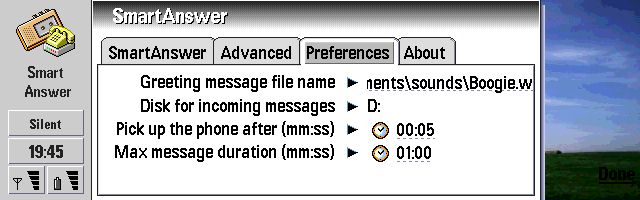
After all the 'judging' I liked this one the best :) Thx 2 Nosferatu for posting it here beep
Enough talk now, let's check the action, we can reach the answering machine
display in 3 ways. We can use the pop-up answering machine functions in the
message player app, switch to the configured profile or use the shortcut
key. The answering machine app is very small and straight forward. It
displays the status of the answering machine (on/off) and the number of
messages which can still be recorded on the remaining disk space.
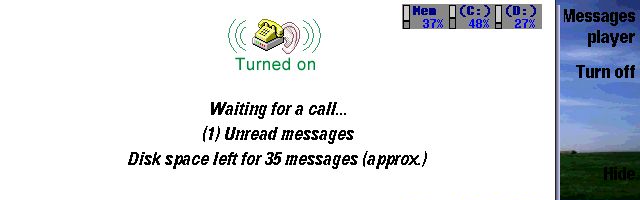
And even SmartMemory likes having SmartAnswer around ;) Does it beep?
Everything is setup, now it's just a matter of time before someone calls
and I can enjoy this new addition to my software library. So let's sit
back, relax and wait ... yeah right :p It's been a while since I last
called myself, the medication which the doctor subscribed really helped ;)
My 92x0 switched to silent and off we go. After the 5 seconds the answering
machine jumped in to save the day and perfectly played my wav file followed
with a nice beep. But to my disappointment that wasn't all I heard :s The
answering machine isn't able to turn off the 92x0 microphone which resulted
in the fact that the caller can still hear everything what is going on. A
true appkiller, but a quick mail to SymbianWare confirmed that they are
doing all they can to solve this problem as fast as possible, Nokia(at
least they promised) will be giving them a hand on this, since the problem
resides in the Nokia OS. I'm starting to see why no other developer was
able to produce an app like this. But enough about this .... when someone
calls you and answering machine is turned on you'll of course still have
the option to answer it manually (in my case you'll have to be damn quick
;) ) if you don't, the answering machine will take the message and store it
as a wav file. You can then listen to (delete/pack) them in the message
player. 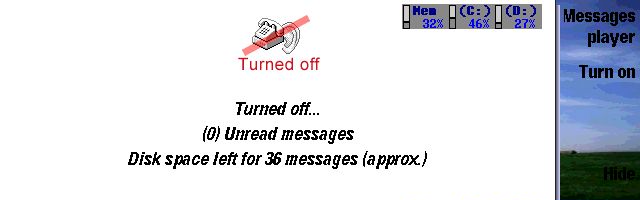
Just to illustrate the Off switch ;) Judgement
I couldn't quite get the hysteria about the whole software answering
machine idea because the my network operator's answering machine did a
good job (actually I don't even use that one ;) ). But I must admit that I
really like this app, having the conversations as a wav file directly on my
92x0 is so much easier and funnier :] I really hope the microphone bug gets
fixed, you don't want people to listen in on your bedroom 'meetings'
;)
I haven't added my usual 'Technical' section because I wasn't able to get a reading on the memory use (guess it's really a small app ;) ) and because of it being still a Beta release, sorry for this.
| Rating Type |
Rating |
Installation:
Application goal:
Application interface:
Quality:
Total: |
20/20
11/20 (this could be a very good app, but until the microphone bug is fixed I can't give it the full 19/20 which it deserves)
15/20
19/20
81.25% |
|
SmartAnswer can be bought from the Handago website.
|


 Copyright
(©) Rafe Blandford
2000-2001 Last modified: November 01 2020.
Copyright
(©) Rafe Blandford
2000-2001 Last modified: November 01 2020.