Hey Guys just wanted some advice from those that use Super converter for converting video files for the N95!
When i convert a simple 750mb AVI file to MP4 it takes ages and increases in size 3 times sumtimes the output file is huge 😮 please sum1 give us a heads up!!!
These are the settings i use
MP4
H.264/AVC
AAC
320:240
16.9
15 fps
336 kbps
44100
2 channels
Biterate 64 kbps
Thanx in Advance
KingDingaLing wrote:Hey Guys just wanted some advice from those that use Super converter for converting video files for the N95!When i convert a simple 750mb AVI file to MP4 it takes ages and increases in size 3 times sumtimes the output file is huge 😮 please sum1 give us a heads up!!!
These are the settings i use
MP4
H.264/AVC MPEG-4
AAC
320:240 NO CHANGE
16.9 UNCHECK ALL
15 fps 25
336 kbps
44100
2 channels
Biterate 64 kbps
Thanx in Advance
Try the setting in red.
I have all the above setting plus 1248 kpbs for video and the output mp4s are only half the size of the source avis. So I think yours should be smaller using the setting above.
is super the best one to use then? Doesnt nokia do one thats better? And is it posisble to get the same quality as say the spiderman 3 film that comes with the n95 8gb because thats great qaulity!!
Liam
Super is good because it allows conversion of various video formats. Not only that it is able to fully convert them with options in video and audio quality so as to optimise the file size for your mobile use.
I've only used it recently, and the conversion time is one of the fastest I've witnessed so far.
I use the following and find the quality really good...
MP4
H.264/AVC
AAC
320:240
4:3
25 fps
384 kbps
44100
2 channels
Biterate 128 kbps
I tested 640:480 movies the other day to play on the TV, but it won't play H.264/AVC encoded movies at that resolution, so had to use MPEG-4...
MP4
MPEG-4
AAC
640:480
4:3
25 fps
432 kbps
44100
2 channels
Biterate 128 kbps
It results in bigger files sizes and plays well on the TV, but generally I keep them 320:240 and just watch them on the phone.
I'd just like to say thank you for these suggestions because I wasted hours trying to find the right ones. Then, when I found settings that worked, I didn't note what they were. Duh... <😞
ive just got hold of super so would love to get the best settings, to get quality like the built in spiderman 3 movie!
I was watching South Park (I own the DVD) encoded with these settings on the way to work this morning and the quality of the sound (I was using headphones) and picture was excellent.
HoundDog wrote:MP4
H.264/AVC
AAC
320:240
4:3
25 fps
384 kbps
44100
2 channels
Biterate 128 kbps
I've always found that cartoons show up video artifacts more than videos. So if these settings work for cartoons, they should be fine for video as well.
but surely you should be using the 16:9 setting for this phone to get full screen?
16:9 will probably stretch the picture, as the aspect of the phone turned sideways is 4:3.
If it's a wider aspect movie you get the black bars, but you get the whole picture with no stretching.
someone i know said the same thing,
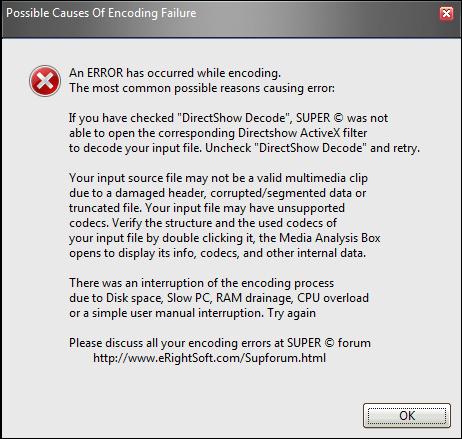
why do some files error when trying to re-encode them?
If I get an error it's usually because I've set the output file to the same folder as the input file and It's a DVD.
I used to get errors if I was missing a codec. Since I installed the Combined Community Codec Pack (CCCP) i've never had codec problems with this or anything else!
It's the ONLY true one stop shop for codecs.
i am saving it to a different partion on my HDD, i will take a screen shot if the error comes up again.
this is the error i am getting
"Image hosted by angelfire"
That's an unusual error 😉
Hya Guys i have just come accross Media Studio for Nokia it is an excellent piece of software it converts allmost all kinds of media files to play on a wide range of nokia phones it even lets you choose how big you want the file by selecting fit to 128mb,256mb,512mb,1gb so on 1 gb you can have 4 files of 256mb great quality too seems like a winner!
just thought i should share!
Regards
Nope. Sorry, none of those recommendations works. I have a 16:9 DVD. I've tried 320x240/4:3, and 480x272/16:9 and both screw up the aspect ratio. 320x240/16:9 generates an error if DirectShow is enabled, and I get the wrong aspect ratio if DirectShow is disabled.
How do I convert a 16:9 file to something that gives me the right aspect ratio with black bars at the top and bottom?
KingDingaLing wrote:Hya Guys i have just come accross Media Studio for Nokia...
Thanks. That does the aspect ratio right but the soundtrack's out of sync. Blimey, this shouldn't be this difficult, it's a fairly obvious thing to want to do.
BTW, Nokia Video Manager doesn't even start to try to work.
Is there a setting that works on Super thats bigger than x240 that the N95-1 will handle. id like to make more use of the screen as x240 looks just too thin from DVD.
Id like to stretch the video from top to bottom just a little bit 😊
Cripsy
CrispyDuck wrote:Is there a setting that works on Super thats bigger than x240 that the N95-1 will handle. id like to make more use of the screen as x240 looks just too thin from DVD.
Id like to stretch the video from top to bottom just a little bit 😊Cripsy
Well, yes. I've found that just about all the settings offered above stretch the image to some degree. I think it must just be me: I can't bear to see images at the wrong aspect ratio. I'm the guy that fiddles with your widescreen TV settings because they're driving me nuts.
neilhoskins wrote:Well, yes. I've found that just about all the settings offered above stretch the image to some degree. I think it must just be me: I can't bear to see images at the wrong aspect ratio. I'm the guy that fiddles with your widescreen TV settings because they're driving me nuts.
Hehe so have you found a setting that stretches top and bottom slightly in super? i would love to know
Crispy
I think that the "stretch it" check box is actually counter-intuitive. That is, if you want to preserve the aspect ratio, you have it checked, but if you want it all stretched to fill the screen you have it unchecked. I could be wrong.
I've actually given up for now with Super. I wasted about three days trying to get the right settings and failed. I either get the picture all distorted, or a file size that's bigger than the original avi from the DVD. I can't afford to waste any more time on it, especially when it takes around half an hour on full resources to try a single conversion.
I just want a way of de-res-ing DVD video to a reasonable file size to view on the N95 at the correct aspect ratio with the sound in sync. Shouldn't be too hard, but seems to be impossible.
Hey all, thanks for sharing these settings, they work great on my N95.
However, I am still looking for the settings that allow the video to play in fullscreen via TV-out.
The 'nokia nseries experience' video that came with my original plum N95 played in fullscreen on my TV and was very decent quality. Anyone know what settings to use?
Thanks in advance
Andy
so the best depends on if you want the best for phone or of you want to watch them on tv too?
I take it the N95 doesnt play wmv files ?
HoundDog wrote:I use the following and find the quality really good...MP4
H.264/AVC
AAC
320:240
4:3
25 fps
384 kbps
44100
2 channels
Biterate 128 kbps
I tested 640:480 movies the other day to play on the TV, but it won't play H.264/AVC encoded movies at that resolution, so had to use MPEG-4...
MP4
MPEG-4
AAC
640:480
4:3
25 fps
432 kbps
44100
2 channels
Biterate 128 kbps
It results in bigger files sizes and plays well on the TV, but generally I keep them 320:240 and just watch them on the phone.
320x240 still has a slight border on the n95 8gb screen....
I've just played a one the of the videos I converted and there seems to be a slightly larger border on the right hand side only, just a couple of pixels. I have the N95-1
neilhoskins wrote:Well, yes. I've found that just about all the settings offered above stretch the image to some degree. I think it must just be me: I can't bear to see images at the wrong aspect ratio. I'm the guy that fiddles with your widescreen TV settings because they're driving me nuts.
I'm the same, I hate squashed, stretched and croped images, give me the black bars anyday.
It's strange it stretches it for you and not for me. The 320x240 setting above worked perfectly by only choosing those options and nothing else, no matter what the aspect of the original. Do you have the latest Super - the version from 4th July 2007?
I used Virtual dub to cut out just a minute of movie and used that to test the conversion settings, much less time consuming.
I'm having a play around with Super and wanted to see what was special about it so I'm trying to encode a video with it. I've chosen SpiderMan 3 😉 but it seems to throw up an error when I try to encode the VOB file for the movie.
I ripped the film from the DVD using DVDShrink and AnyDVD and saved it on my HDD as a 5.23Gb VOB file, and don't worry... I own the original. It's sat right next to me 😊
Anyway, can't Super convert from VOB to MP4?
so what is the best settings ???
I just read about 8 replys and all of it are seems to be not good.
SUPER isnt the best converter in my opinion.
Try Xilisofts DVD Ripper Platinum, it handles almost any file you throw at it 😃
I have used it to convert TV series to mp4 for my N95 8GB and it works as a sharm and is REALY fast 2.
/HomieX